
Every command you type in a Linux terminal is read by a program called the shell, and Linux has more than one shell to choose from. The shell interprets what you type and starts programs, while the terminal window only displays the session.
You’ll see how the Linux shells differ, from sh to zsh, and how a script’s first line picks the shell that runs it.
What is a Linux shell?
A Linux shell is a command interpreter that reads and interprets commands, then launches built-ins or other programs. It also provides a language for combining commands into scripts, as the POSIX shell-language specification describes.
They have separate jobs. A terminal emulator displays the session and carries input and output, the shell interprets commands and starts programs, and the kernel manages system resources.
| Part | What it does |
|---|---|
| Terminal emulator | Displays the session and carries keyboard input and program output. |
| Shell | Interprets shell syntax and starts commands or scripts. |
| Kernel | Manages system resources and provides services that programs request. |
Typing a command in a terminal means the shell receives it through that interface. A different shell can change how the same input is parsed, even when the terminal window looks unchanged.
The cd command is a shell built-in because it changes the current shell’s own working directory. An external program runs in its own process and cannot change the parent shell’s directory.
What language does a shell script expect?
A script’s first line can name the interpreter that should run it when you launch the file directly. Linux’s execve documentation describes this #! convention, called a shebang.
#!/bin/sh
A Bash-specific script can name Bash instead.
#!/bin/bash
Those lines express different expectations. A script that names /bin/sh should use the POSIX shell language, while one that names /bin/bash can rely on Bash syntax and features. The Bash Reference Manual describes Bash as POSIX-oriented with additional features.
A .sh filename alone does not prove which syntax the script needs. Read its interpreter line and inspect the script before choosing how to run it.
Passing a script to an interpreter by name, such as bash script.sh, runs it with that interpreter instead of following the shebang for direct execution. The distinction matters when a script uses arrays, condition tests or syntax that another shell does not understand. See the Linux shell-script launch methods for the difference between running and sourcing a file.
For example, Bash-specific condition syntax belongs in a Bash script, while a portable script should stay within the standardized shell language. The examples in the site’s shell if-else guide and shell for-loop guide show how syntax choices affect scripts.
Shell loops and branching constructs also have interpreter-specific details. The site’s shell while-loop guide and shell case-statement guide give examples of those constructs.
Which shell types are common in Linux?
Shells share the job of interpreting commands, but they do not all share the same language. This table groups familiar names by the work they suit and the boundary to keep in mind.
| Shell | Where it fits | Boundary |
|---|---|---|
| sh | Scripts written for the POSIX shell language. | The command name does not identify one implementation. |
| dash | A POSIX-oriented shell used for script execution on some Linux systems. | It does not provide Bash-only syntax. |
| bash | Interactive sessions and scripts that use Bash features. | Bash extensions are not portable to every shell. |
| zsh | Interactive use with programmable completion and line editing. | Its default mode is not POSIX-compatible. |
| fish | Interactive use with built-in suggestions and syntax feedback. | Its scripting language differs from POSIX shell syntax. |
| ksh | Scripts or environments that already target KornShell. | Do not assume it is installed on a new Linux host. |
| csh / tcsh | Existing C-shell environments and their scripts. | The syntax differs from the Bourne-style family. |
Bash and Zsh share some Bourne-style syntax, but their details do not always line up, while fish uses its own scripting syntax. Check the target interpreter before running an example.
The POSIX standard specifies a command language for sh, but it does not require every system to ship the same shell executable behind that name. Debian’s Dash manual describes Dash as a POSIX-compliant implementation. On another distribution, check the actual target rather than assuming the same mapping.
Shell names also do not form a fixed list. A Linux system can have additional interpreters installed, and the useful set depends on the scripts and interactive tasks that matter to you.
Where do Bash, Zsh and Fish differ at the prompt?
Interactive shells can share familiar commands while behaving differently during completion, editing and script parsing. Those differences are more useful to compare than a claim that one shell wins every task.
- Bash combines interactive features with a large base of scripts written for its syntax. Its manual covers command history and line editing alongside its programming language.
- Zsh includes command-line editing, programmable completion and spelling correction. The Zsh manual says its default operating mode does not provide POSIX compatibility.
- Fish provides autosuggestions and syntax highlighting during interactive typing. Its interactive-use documentation explains these features, while its language guide documents a distinct scripting syntax.
Fish’s conveniences do not make Bash snippets valid fish code. If you choose fish for your prompt, keep scripts in the language their shebang names. You can explore fish’s setup separately in the site’s Fish shell setup guide.
Likewise, Zsh’s interactive features do not make its default syntax a drop-in POSIX shell. A Zsh setup such as zsh4humans changes the interactive environment, not the language expected by an unrelated script.
How can you identify the shell behind a prompt?
The SHELL environment variable can name the configured login shell, while the current process name identifies the shell handling this command. Resolving /bin/sh separately shows which executable that path reaches on the current system.
printf 'Login shell variable: %s\n' "$SHELL"; printf 'Current shell process: '; ps -p $$ -o comm=; printf '/bin/sh resolves to: '; readlink -f /bin/sh; printf 'fish on PATH: '; command -v fish || printf 'not installed\n'
The last check reports whether fish is discoverable through PATH. It does not prove that no fish binary exists elsewhere. The /bin/sh result can also differ between distributions, so treat the output as a local fact rather than a Linux-wide default.
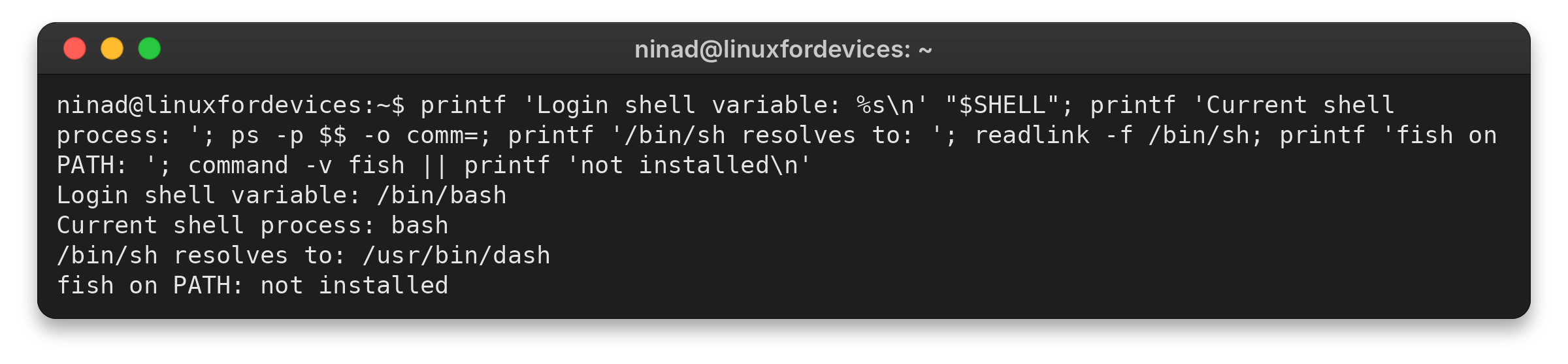
The screenshot records one diagnostic session. It shows a Bash process while /bin/sh resolves to Dash.
For a login-shell change, use the separate default-shell instructions, since this check only observes the current setup.
Let the script declare its language
Choose an interactive shell for the way you work at the prompt, but choose a script interpreter for the syntax and systems the file must support. When you are unsure what a script targets, inspect its first line before running it.
head -n 1 script.sh
The shebang and source code tell you which shell language a script expects. Check the target system before running it.
Linux shell questions
How many types of shells are there in Linux?
Linux has no fixed shell count. The installed programs vary by distribution and by the packages added to a system.
Are Bash, Zsh and Fish different languages?
Bash and Zsh share some Bourne-style syntax, but Zsh’s default mode is not POSIX-compatible. Fish uses a distinct scripting language, so Bash code does not automatically work unchanged in fish.
Is sh the same as Bash?
No. POSIX defines the sh command language, while Bash is one shell with additional features. A system’s /bin/sh path can point to a different POSIX-oriented implementation such as Dash.
Which shell should I use for portable scripts?
Target the POSIX shell language when portability across POSIX-style systems is the requirement. Use Bash syntax only when the script names Bash and its target systems provide it.