

btop puts CPU, memory, storage, network activity, and running processes in one terminal dashboard. Install it from your distribution repository when it is available, then use the process list to decide whether a workload needs investigation or a process needs attention.
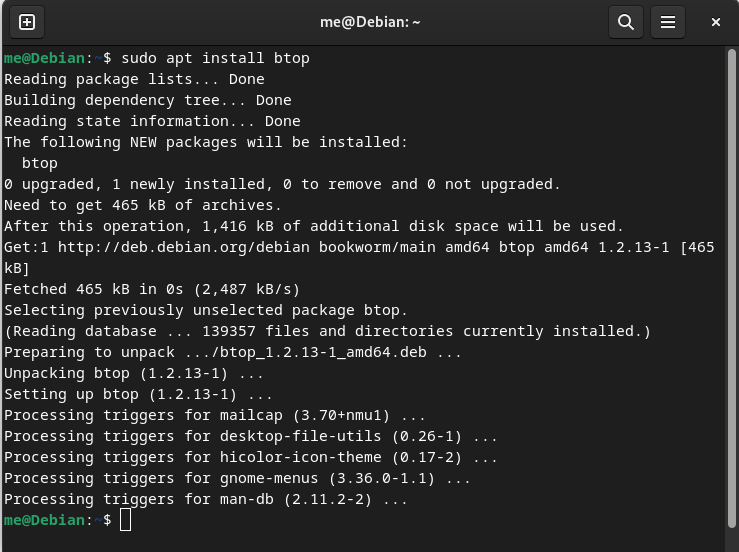
I installed the Debian package during this refresh and verified btop version 1.3.2 with the command shown below. The btop project remains the useful reference when your distribution repository does not carry a suitable package.
Install btop from your distribution repository
Repository packages update with the rest of your system and fit the package manager you already use. Open a terminal and run the command for your distribution.
Debian, Ubuntu, and Linux Mint
Use apt on Debian-based distributions. Add sudo when you are using an unprivileged account.
apt update && apt install -y btop
Fedora
Fedora ships btop through its package repositories, so install it with dnf.
sudo dnf install btop
Arch Linux
The Arch Linux package is named btop and installs with pacman.
sudo pacman -S btop
Snap package
If you use Snap, the current btop Snap package installs under the btop name. Install snapd first on distributions where it is not already available.
sudo snap install btop
Confirm the installed package
Run btop –version before opening the dashboard so you can confirm that your shell finds the installed executable.
btop --version

If the command is not found, reopen the terminal after installation and confirm that your package manager completed successfully before downloading a separate binary.
Read the btop dashboard
Start btop to separate the machine summary from the process list instead of reading a stream of command output.
btop
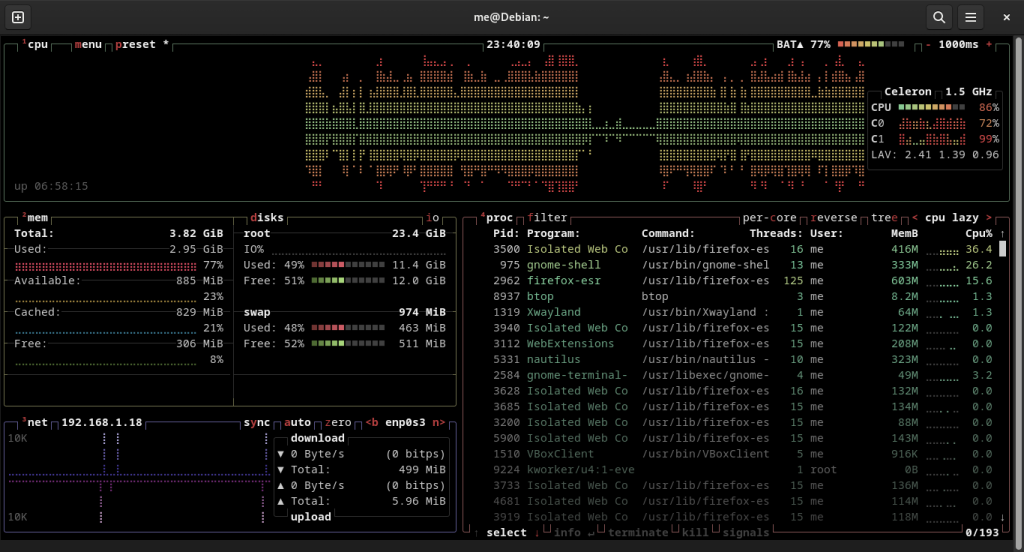
The top panels show processor, memory, disk, and network activity, while the process panel shows the command, CPU use, memory use, and process identifier.
Choose btop, htop, or top for the job
btop puts the overall load beside the process list, helping you tell whether one application explains the slowdown or several resources are busy.
top remains the dependable choice on a minimal server because it is commonly present without an additional package. htop offers an interactive process view with less visual detail, which can be enough when you only need to sort processes and check a command.
| Tool | Use it when | Boundary |
|---|---|---|
| btop | You need CPU, memory, disks, network activity, and processes in one interactive view. | Install it through your package manager. |
| htop | You want an interactive process browser with familiar controls. | It may not be present on a minimal image. |
| top | You need a monitor that is likely already available over a remote shell. | Its interface exposes less information at once. |
The interface does not replace resource-specific checks. A full disk, a memory leak, and a process waiting on network activity can look similar at first, so use the panel that changed as the starting point for a narrower command.
Use btop to narrow a resource problem
Sort the process list by CPU when the machine becomes slow or by memory when available RAM shrinks, then check the command name before acting on its process identifier.
- Open btop and watch the CPU, memory, disk, and network panels.
- Sort the process list to expose the process using the resource you are investigating.
- Check the complete command and process identifier before taking action outside btop.
Use the Linux top command on a minimal installation, choose htop for another interactive option, or follow CPU, disk, and memory troubleshooting for focused commands.
Choose the next command after btop
btop identifies the process consuming resources, but you should inspect the service or application before sending it a signal.
| What btop shows | Useful next step |
|---|---|
| A memory-heavy process | Compare it with other ways to check available memory. |
| A process consuming CPU | Review the top processes by CPU and memory before changing anything. |
| A process you have confirmed should stop | Use the Linux kill command with its process identifier. |
| An Ubuntu desktop process you need to stop | Follow the safer checks in how to kill a process in Ubuntu. |
Press q to exit btop, or keep it open while reproducing a slowdown and use the process name with its resource column for the next diagnostic step.
Is btop available in Linux repositories?
btop is available through the repositories of Debian-based distributions, Fedora, and Arch Linux. Use your distribution package manager first, then confirm the executable with btop –version.
How do I start btop after installation?
Run btop in a terminal. The dashboard opens with system resource panels and a running-process list.
Can btop replace the Linux top command?
btop can monitor the same kinds of system activity through an interactive dashboard. Keep top available for minimal systems or environments where btop is not installed.
Install btop from your distribution repository, verify it with btop –version, and use the process list to choose the next diagnostic command rather than stopping a process on a guess.