
Why give a machine’s name its own 127.0.1.1 entry, as the Debian Reference example does? I’m drawn to the separation: the hostname entry lets the machine name resolve without replacing localhost.
Trace a system name lookup through the sources selected in /etc/nsswitch.conf. You’ll also see how /etc/hosts maps names locally without changing the hostname stored in /etc/hostname.
What /etc/hosts does
The hosts file in Debian is a local text table at /etc/hosts that associates hostnames with Internet Protocol (IP) addresses. Its entries affect name lookup on that computer, not your whole network.
The Name Service Switch (NSS) selects the sources that applications use for system name lookup. Its hosts line in /etc/nsswitch.conf sets the source order, as explained in Debian’s nsswitch.conf(5) manual.
The Domain Name System (DNS) resolves names using name servers, while /etc/hosts supplies local mappings through the files source. To change which DNS server your computer queries, use the Linux DNS configuration guide.
The configured hostname in /etc/hostname names your computer, while /etc/hosts maps that name to an address for local lookups without renaming the machine.
| File | Job | What it does not do |
|---|---|---|
| /etc/hosts | Maps names to addresses on this machine | Does not publish records to other machines |
| /etc/hostname | Stores the machine’s configured hostname | Does not define the lookup-source order |
| /etc/nsswitch.conf | Sets name-service sources and their order | Does not contain the host-to-address entries |
The Debian Reference’s hostname-resolution section uses 127.0.1.1 for the machine’s own name when it has no permanent IP address. That is also an IPv4 loopback address, but the separate entry lets the machine name resolve without replacing localhost.
Read a hosts entry
Debian’s hosts(5) manual permits an IPv4 or IPv6 address, a canonical hostname and optional aliases, with spaces or tabs between fields and a hash starting a comment.
127.0.0.1 app.test alias # local development
| Value | Meaning |
|---|---|
| 127.0.0.1 | IPv4 loopback address for this machine |
| app.test | Canonical hostname for the entry |
| alias | Optional second name for the same address |
| # local development | Comment ignored after the hash |
The .test name is reserved for testing by RFC 2606, and app.test points to this machine, so 127.0.0.1 fits only when the service listens locally.
Add a local hostname mapping
A hosts entry changes name lookup on this computer, so the service must listen at the address you map. Check the result through the system lookup path.
1. Choose the address
For another device, use its reachable IP address. Find it with the Linux IP address guide, and use static IP configuration if it must stay fixed.
2. Open the file for editing
Use sudoedit if the sudo package is installed and your account has permission. Otherwise, use an editor from a root session.
sudoedit /etc/hosts
Add 127.0.0.1 app.test on its own line, then save without removing the existing localhost or machine-name entries.
3. Check the lookup
getent queries the NSS hosts database using the configured sources. After saving the entry, query app.test through that path and confirm that its IPv4 address is 127.0.0.1.
getent ahostsv4 app.test
To see the same lookup mechanism with an existing name, query localhost. Debian’s getent(1) manual explains that ahostsv4 restricts the query to IPv4.
getent ahostsv4 localhost
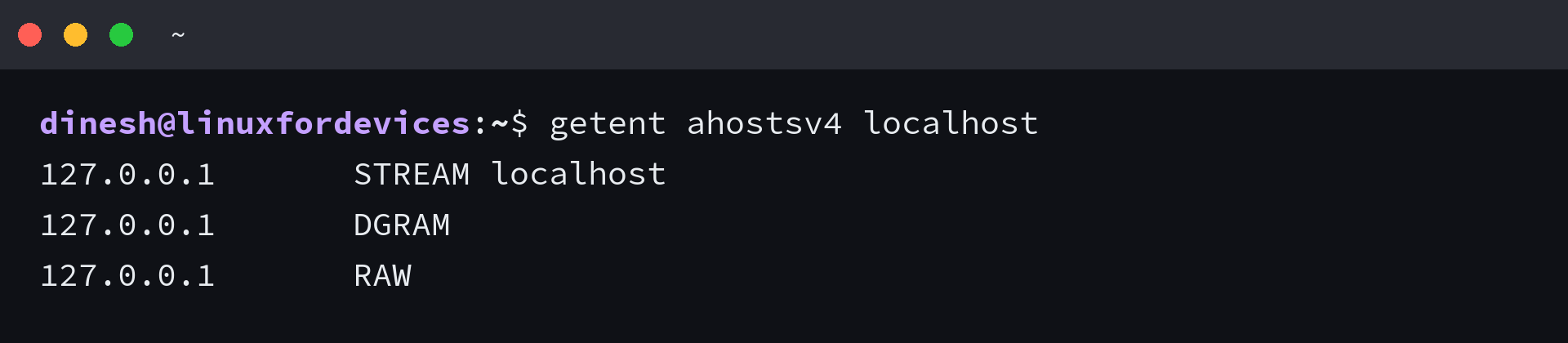
I got the same 127.0.0.1 address for each socket type when I queried localhost. The repeated rows describe different socket types rather than different servers, so compare the address column when testing your mapping.
When a hosts entry appears to do nothing
A valid line does not guarantee that every application follows the same lookup route. Check the source order and the lookup tool before changing the mapping.
- Read the hosts line in /etc/nsswitch.conf. Debian Reference shows files before dns as one example, but your system can include other sources or action clauses.
- If nslookup gives a different answer, it queried an Internet name server rather than the local NSS path. Debian’s nslookup(1) manual documents that DNS behavior, so use getent to test the system lookup result.
- Check the address, spelling, and position of any comment marker. Text after # is ignored, so a hostname placed there is not an active field.
- A program can use its own resolver or keep a cached result. A successful getent lookup confirms the system lookup result, not every application’s behavior.
- /etc/hosts.allow and /etc/hosts.deny hold access rules for services using Transmission Control Protocol (TCP) wrappers. They do not contain the name-to-address mappings used by /etc/hosts. The Debian hosts_access(5) manual describes their access-rule purpose.
A hosts-file edit does not change an interface address, so use the Ubuntu network configuration guide and its network restart instructions only when changing interface settings.
Check the lookup order before changing DNS
Inspect the hosts line before changing DNS settings to fix a local mapping. If files precedes dns without an intervening action that stops the lookup, the local entry can answer the system lookup without a DNS query.
grep '^hosts:' /etc/nsswitch.conf
Hosts file questions on Debian
These answers cover the remaining distinction between local host mappings, machine identity, and name-service lookup.
What is the hosts file used for in Debian?
It maps hostnames to IP addresses on one Debian computer. Programs that use the configured NSS path can consult those mappings during name lookup.
Where is the hosts file in Debian?
The file is /etc/hosts. Edit it with administrator privileges because it is a system configuration file.
Does /etc/hosts replace DNS?
No. It is one local name-service source, and /etc/nsswitch.conf controls the configured sources and their order for system lookups.
Why does Debian use 127.0.1.1 in /etc/hosts?
Debian Reference uses 127.0.1.1 to map the machine hostname when it has no permanent IP address. It is also an IPv4 loopback address, but the separate hostname entry does not replace localhost.
Can /etc/hosts block a website?
A mapping can send a hostname to a different address for programs using the system lookup path, but /etc/hosts is not a firewall or a general website filter. Subdomains require their own names, and a program using a separate resolver may not consult the file.