

Long if-elif-else chains get hard to read once a script needs more than two or three outcomes. The bash case statement handles that job with one value, a list of globs, and the first matching block runs.
I rebuilt the examples on Ubuntu 24.04 with Bash 5.2 and ran each one to confirm the match, default, and fall-through behavior shown below. By the end you’ll be able to parse script flags, sort files by type, and control exactly where a case block stops.
If you’re new to the terminal, start with this guide to the Linux command line first.
What a case statement does in a bash script
A case statement compares one value against a list of globs and runs the commands under the first match. It is the shell’s version of the switch statement in languages like C and JavaScript, with one difference that matters: bash stops after the first match instead of falling through to the next clause.
The construct earns its place when one variable can take several known values. Menus, script flags, and input validation all fit that shape. If each branch tests a different condition instead of matching values, an if-else statement is still the right tool.
| Aspect | case | if-elif-else |
|---|---|---|
| Reads best for | one value, many candidate matches | different conditions per branch |
| Matching | glob matching built in | explicit test expressions |
| After a hit | skips the remaining clauses | skips the remaining branches |
| Default | asterisk clause | else |
Bash is only one of the shells available on a Linux system. If you script across several of them, the types of shell in Linux guide explains where they differ.
Basic syntax of the bash case statement
Every case block opens with the case keyword, names the value to test, and closes with esac, which is case spelled backwards.
#!/bin/bash
echo -n "Continue? [y/n]: "
read answer

case $answer in
    yes | y)
        echo "Confirmed"
        ;;
    no | n)
        echo "Cancelled"
        ;;
    *)
        echo "Please answer yes or no"
        ;;
esac
Each clause tests the value against a glob, the shell’s filename-match syntax, and ends with a closing parenthesis. The double-semicolon terminator closes each clause. Globs are checked top to bottom, the first hit runs, and everything after it is skipped, which is why the asterisk catch-all belongs last.
A first example with three paths
This script takes a name as its first argument and falls back to a default when you pass nothing. A listed match, a shared clause, and the catch-all each print their own line.
#!/bin/bash
name="${1:-HowLinux}"

case $name in
    "Linux" | "Fedora")
        echo "Open-source classic."
        ;;
    "HowLinux")
        echo "That's right!"
        ;;
    *)
        echo "$name is not on the list. Add it to the list above."
        ;;
esac
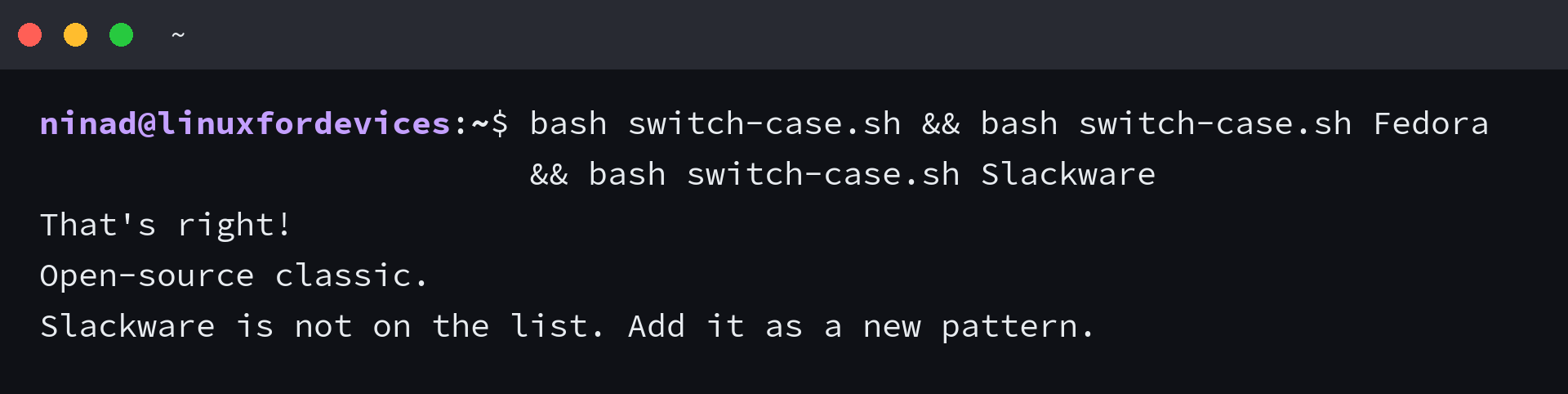
The bare call matches HowLinux, Fedora trips the clause it shares with Linux, and Slackware lands in the catch-all.
Because every clause ends with the double-semicolon terminator, bash exits the whole block after the first hit. Slackware never gets compared against the Linux clause, and change the terminator and that behavior changes, as the fall-through section below shows.
Glob matching in a case block
Case globs use the same characters the shell uses for filenames, so a single clause can match whole families of values without listing them.
| Character | Matches |
|---|---|
| * | any string, including an empty one |
| ? | any single character |
| [abc] | any one character listed |
| [a-z] | any one character in the range |
A file-type sorter shows the technique.
#!/bin/bash
case "$1" in
    *.sh)           echo "$1 is a shell script" ;;
    *.py)           echo "$1 is a Python script" ;;
    *.jpg | *.png)  echo "$1 is an image" ;;
    *.txt | *.md)   echo "$1 is a text file" ;;
    *)              echo "unknown file type: $1" ;;
esac
I ran it against five extensions and each landed in its clause, from notes.txt is a text file through to unknown file type for a binary nobody planned for. The same glob logic is what file tools rely on when they count files in a directory by extension.
Case-insensitive matching with nocasematch
Glob matching is case-sensitive by default, so YES does not match yes. The nocasematch shell option relaxes that for the blocks that follow it.
shopt -s nocasematch

answer=YES
case $answer in
    yes) echo "Confirmed" ;;
    no)  echo "Cancelled" ;;
esac

shopt -u nocasematch
With the option on, the value YES still prints Confirmed, which I verified on Bash 5.2. Turn it off with shopt -u after the block so the rest of the script keeps normal case-sensitive matching.
A practical example: parsing script arguments
Command-line flags are the classic case use. The script below creates or deletes a file depending on the argument you pass, and rejects anything it doesn’t recognize.
#!/bin/bash
case $1 in
    "--create")
        echo "Creating new file $2"
        touch "$2"
        ;;
    "--delete")
        echo "Deleting file $2"
        rm "$2"
        ;;
    *)
        echo "Not a valid argument"
        exit 1
        ;;
esac
The script quotes the file argument, so names with spaces survive, and it exits with status 1 when the flag is unknown. Here is the full sequence in action, from creating a file through to the rejected flag:
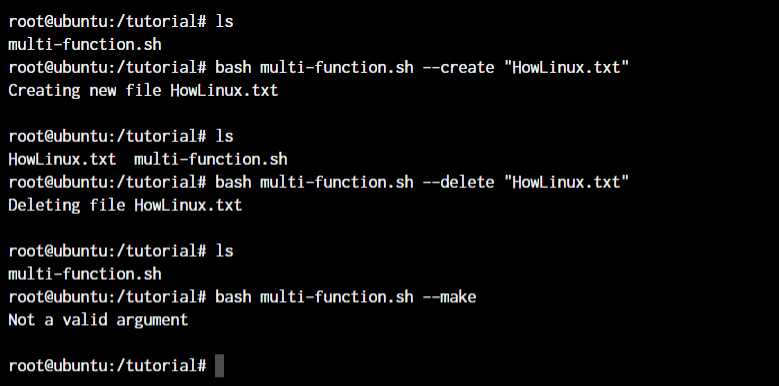
Create and delete hit their clauses, confirmed by the ls calls in between, and the invalid –make flag drops into the catch-all and prints the rejection message.
With the exit 1 line in place, a calling script can also read that failure from the exit status instead of parsing the output.
touch creates the file empty, so the next step is putting something in it. Any of the standard ways to edit files in Linux will do.
Fall-through terminators: three ways to end a clause
The double-semicolon terminator stops the whole block after the first match. Bash ships two more terminators that change what happens next, and both are worth knowing before you debug a script that prints too much.
#!/bin/bash
os="Ubuntu"

case $os in
    "Ubuntu" | "Debian")
        echo "Debian family"
        ;;&
    "Ubuntu")
        echo "specifically Ubuntu"
        ;;
    *)
        echo "something else"
        ;;
esac
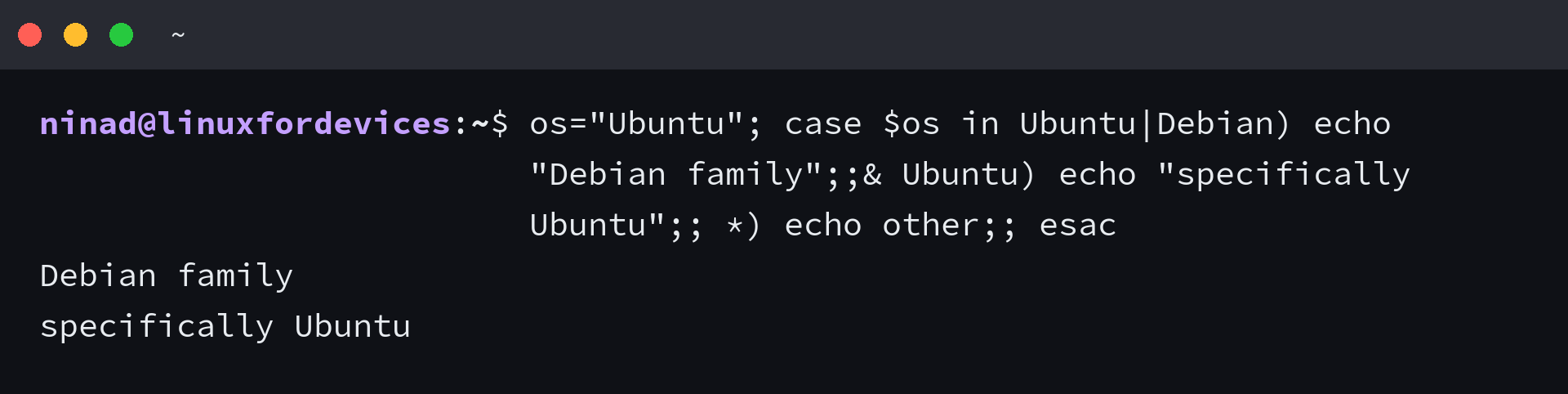
After a hit with the triple-semicolon terminator, bash keeps testing the remaining clauses instead of stopping. Ubuntu satisfies both of the first two clauses, so both lines print.
lvl=1
case $lvl in
    1) echo "one" ;&
    2) echo "two" ;&
    3) echo "three" ;;
esac
The semicolon-ampersand terminator skips testing altogether. Start at level 1 and the block prints one, two, and three in order, which suits shared setup steps several values have in common.
Case statement syntax at a glance
| Piece | Job |
|---|---|
| case VALUE in | opens the block and names the value to test |
| yes) | a clause: the glob to match, then a parenthesis |
| yes | y) | one clause matching either value |
| * | catch-all clause, always matches, keep it last |
| double-semicolon terminator | ends a clause and exits the block after the first match |
| semicolon-ampersand terminator | runs the next clause without testing its glob |
| triple-semicolon terminator | keeps testing later clauses after a match |
| esac | closes the block |
One default to remember: without a catch-all clause, a value that matches nothing simply exits the block with status 0 and runs nothing. Add the asterisk clause whenever a silent no-op would hide the problem you’re debugging.
These are the questions that come up most often once the syntax is clear.
What does the bash case statement do?
It compares one value against a list of globs and runs the commands under the first match. It is bash’s equivalent of the switch statement in other languages.
How do I match multiple values in one case clause?
Separate the values with the vertical bar, as in y | Y | yes. Any of them triggers that clause’s commands.
What is the default case in bash?
The asterisk glob acts as the default because it matches anything. Put it last so it only catches values the earlier clauses missed. Without it, a value that matches nothing exits the block silently.
When should I use case instead of if-elif-else?
Use case when one value can take several known forms. Use if-elif-else when each branch tests a different condition.
Where to take your scripts next
A good next build is the argument handler above, extended with a list flag that prints every file it created. That single change turns the script into a small undo log you can actually trust.
And once a script is worth running regularly, put it on a schedule with cron jobs instead of typing it by hand.