
You have a message to send from an Ubuntu terminal, along with a file to attach. GNU Mailutils is a command-line mail client that can send a message with a file attached.
I’ll show you how to check the attachment option available on your system and send an email with a file attached.
TL;DR
With GNU Mailutils on Ubuntu, pipe the message body to mail and use -A to attach a file. The same client uses -a to add a message header, so that flag is not interchangeable with the attachment option.
The command below prepares a message for [email protected]. Replace that reserved example address with the recipient you intend to contact. Mailutils also needs a configured local mail transfer agent or SMTP relay for delivery.
printf '%s\n' 'The weekly report is attached.' |
  mail -s 'Weekly report' \
    -A "$HOME/reports/weekly summary.pdf" \
    [email protected]
What is the Ubuntu mail command?
A command-line mail client composes the message, while an MTA or SMTP relay carries it to another mail server.
MIME labels each message part with a content type, and its disposition can mark a part as an attachment. The recipient’s mail app uses these fields to decide how to display or open plain text and files. GNU Mailutils assembles the message parts and boundaries, so you do not write those markers by hand.
| Term | Role in an attachment email |
|---|---|
| MUA | The mail user agent gathers the address, subject, text, and files. The command-line mail program is the MUA used here. |
| MIME | Describes the message’s parts so a recipient’s mail app can separate the text from attached files. |
| MTA or SMTP relay | Accepts the outgoing message and routes it to another mail server. |
If the command reports a missing sendmail-compatible program, see Ubuntu’s Postfix documentation and our Ubuntu SMTP relay guide for setup options.
The visible From header and SMTP envelope sender may differ, and a relay can rewrite or reject an unverified domain. Use the provider’s approved sender settings because an attachment flag cannot authorize that identity.
Choose a concise filename that helps identify the file without exposing account numbers or other private details, since recipients can see the name even when the contents are encrypted. For sensitive documents, inspect stored properties too: a PDF can contain its author or title, and an office file may retain comments or tracked changes. Use the format’s properties panel to review those fields, and save a separate copy if you remove metadata so the original stays unchanged.
How to send an email with an attachment from Ubuntu CLI
The examples use a weekly report, so the subject and body describe the same attachment. Update both if the PDF covers another period or topic, and remove the sample wording before sending. For recurring reports, keep a reviewed command template instead of retyping its recipient and paths.
1. Check for GNU Mailutils
On Ubuntu, the package is named mailutils. Install it only if the mail command is absent and you have permission to make system-wide package changes.
sudo apt install mailutils
On a production server, review any default mail transfer agent prompt and run apt-cache policy mailutils to inspect package metadata without installation. Installed reports the current version, while Candidate shows the version available from enabled repositories. The version table below lists each available source and its priority, which helps explain how apt selected the candidate.
2. Prepare a short message body
Pipe a line of text to mail, and use -s for the subject. Replace the example recipient with a checked address before sending because example.org is reserved for documentation and will not deliver mail.
printf '%s\n' 'The weekly report is attached.' |
  mail -s 'Weekly report' [email protected]
printf uses a fixed format string, with the report as a separate argument. That prevents percent signs in the report from being treated as formatting instructions. Quote a subject containing spaces so the shell passes it as one value.
For a longer message, review a plain-text draft, remove internal notes and temporary URLs, and keep it separate from the PDF attachment.
mail -s 'Weekly report' \
  -A "$HOME/reports/weekly summary.pdf" \
  [email protected] < "$HOME/reports/message.txt"
3. Add the attachment and send
GNU Mailutils accepts -A or –attach=FILE to name a file, and the shell expands $HOME for the account running mail, which may differ if you switch users. Double quotes keep paths with spaces together, and the account must be able to read the file on this Ubuntu host. This command pipes the body and attaches a PDF:
printf '%s\n' 'The weekly report is attached.' |
  mail -s 'Weekly report' \
    --attach="$HOME/reports/weekly summary.pdf" \
    [email protected]
Before sending, check that the chosen file exists, opens as expected, and is readable to the account running the command. If another program generated it, wait for that process to finish and inspect the completed file because a filename extension cannot verify the contents.
| Part of the command | Purpose | Example value |
|---|---|---|
| Body on standard input | The text the recipient reads in the message | The weekly report is attached. |
| -s | Sets the subject line | Weekly report |
| -A or –attach=FILE | Reads a file into an attachment part | $HOME/reports/weekly summary.pdf |
| Final address argument | Names the recipient | [email protected] |
Use the breakdown to distinguish the body, subject, attachment, and recipient arguments. The final address follows the options so mail parses it as the destination.
Check the attachment flags on your Ubuntu system
I checked the local help and GNU Mailutils MIME manual. On this host’s GNU Mailutils 3.17, -A attaches a file and -a appends a message header. The help also shows that –content-type and –encoding apply to subsequent –attach options, so put them before the file they describe.
siddharth@linuxfordevices:~$ mail --help | grep -E 'attach|append'
  -A, --attach=FILE          attach FILE
  -a, --append=HEADER: VALUE append given header to the message being sent
      --attach-fd=FD         attach from file descriptor FD
                             the next --attach option
                             --attach option
      --content-type=TYPE    set content type for subsequent --attach options
      --encoding=NAME        set encoding for subsequent --attach options
      --[no-]skip-empty-attachments
                             skip attachments with empty body

[exit 0]
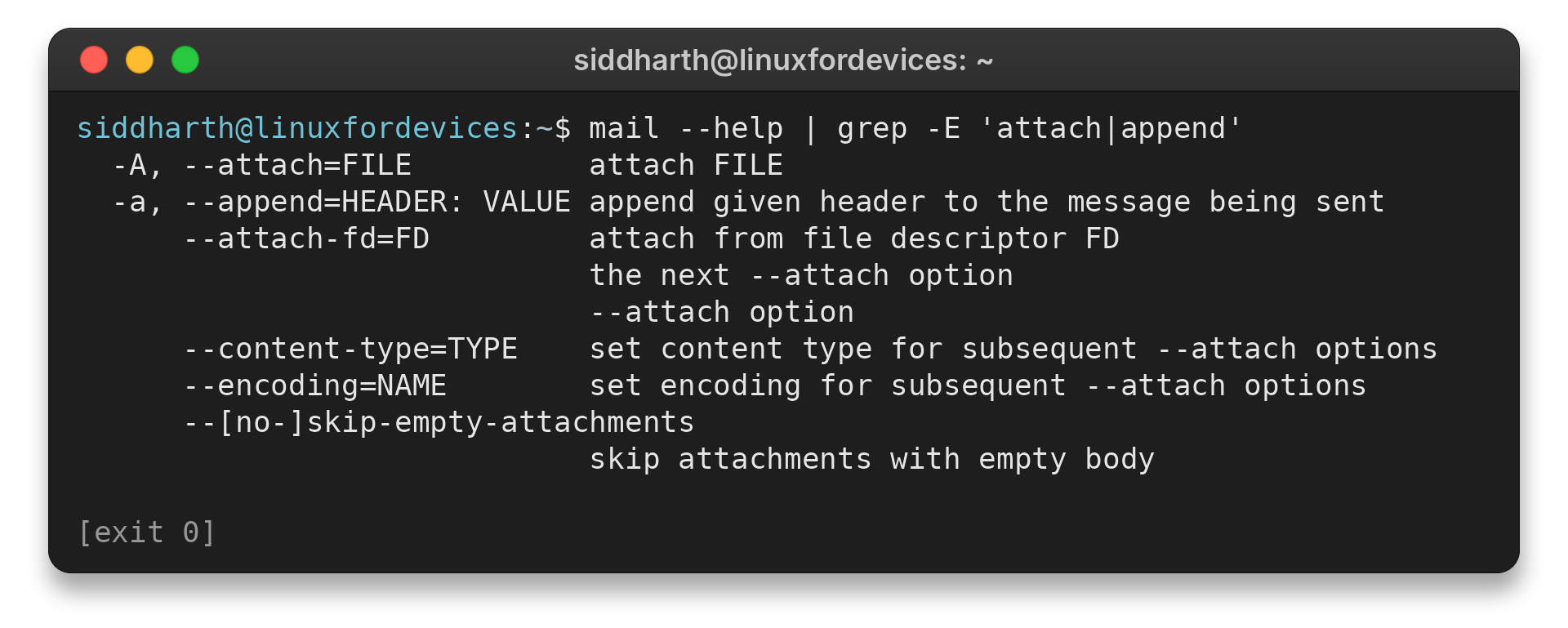
I did not send an email because this check covers available options, not delivery. GNU Mailutils explains MIME settings in its MIME manual.
Fix blank bodies, missing files, and delivery errors
Check the exact command, its exit status, and any error text before retrying because the first message often narrows the cause. “No such file” points to a missing path, while “permission denied” indicates an access problem. Use the table to distinguish input, option, and delivery errors, then change one part at a time because changing several values together hides which fix worked.
| Symptom | Likely stage | Next check |
|---|---|---|
| The recipient sees a file but no message text | Message body | Pipe text to the command or redirect a checked message file. Open the body file to verify it contains the intended wording. |
| The command reports that it cannot open the file | Path or permissions | Check the full, case-sensitive path and the account’s read access. Linux treats names with different capitalization as different files. A readable file can still be inaccessible when a parent directory lacks search permission. Relative paths use the current working directory, which may differ in a script. Quote paths with spaces or use an absolute path when the working directory is unclear. |
| The attachment flag is rejected | Mail implementation | Run mail –version and inspect that program’s help. Match the syntax to the implementation installed on this system. |
| The command returns but no message arrives | Delivery route | Check the configured MTA or SMTP relay and its logs. If the message may already be queued, inspect its status before retrying to avoid sending a duplicate. |
| The recipient cannot open the file | Source file or media type | Open the original locally and confirm the filename matches the file contents. Renaming a file does not convert its format. |
| The message is rejected as too large | Relay or recipient limit | Check both services’ limits. Use an approved restricted-access sharing link for a large file when email limits are too low. |
For server delivery, use the system administrator’s supported mail route. Our Postfix SMTP relay guide is a starting point for Ubuntu. Keep relay credentials out of shell commands and source files, then follow the provider’s current authentication and TLS instructions.
If the local service accepted a message but the relay has not confirmed delivery, check the queue or relay status before resending to avoid a duplicate.
Handle multiple, large, or sensitive files
GNU Mailutils accepts repeated attachment options, so one message can carry several files. Name each intended file explicitly because a wildcard can include temporary data. Give the files distinct descriptive names, and state the expected count in the body so the recipient can spot a missing attachment.
printf '%s\n' 'The logs and report are attached.' |
  mail -s 'Monthly files' \
    --attach="$HOME/reports/summary.pdf" \
    --attach="$HOME/logs/application.log" \
    [email protected]
| Situation | Safer next step |
|---|---|
| Several related files | Attach each file explicitly, or place them in an archive and attach that one archive. |
| A file is near the recipient’s size limit | Check both the sending relay and recipient limits. Encoding and message headers make the email larger than the original file, so do not assume the original file size is the full message size. Ask whether the limit applies per attachment or to the complete message. |
| The recipient cannot access a large file | Use an approved file-sharing link with access restricted to the intended recipient and an appropriate expiry, if available. |
| The attachment contains sensitive information | Use encryption intended for the recipient and share any decryption secret through a separate trusted channel. Ordinary email or transport TLS alone does not provide end-to-end file encryption. |
- Related files: a ZIP archive combines files into one package. Tar can preserve directory structure, and the recipient needs a compatible extraction tool. See our guides to ZIP and unzip on Linux and the tar command.
- Already-compressed files: a ZIP may not reduce the size of PDFs or photographs. GNU gzip creates a .gz file and, by default, removes its uncompressed input. Use -k to keep both, and decompress the .gz file before opening it as the original format.
- Confidential material: compression and transport TLS alone do not provide end-to-end protection for confidential files. Use a recipient-compatible encryption method such as our Linux file encryption guide and share any decryption secret through a separate trusted channel.
- Recipient policy: check accepted file types, encryption requirements, and size limits before preparing the file.
- Large files or links: sending and receiving services may enforce different limits, and a local mail command can accept a file that the next server later rejects. If email limits are too low, use an approved link restricted to the intended recipients and check its expiry.
Conclusion and next steps
For MIME details, read the GNU Mailutils MIME manual.
Frequently Asked Questions
These answers cover the Mailutils option, message body, delivery route, and recipient size limits.
Which option attaches a file in GNU Mailutils?
Use -A FILE or –attach=FILE. In GNU Mailutils, -a or –append adds a message header instead.
How do I include text in the email body?
Pipe the body text to mail, or redirect a checked text file into it. The attachment option adds a file part. It supplies no message body by itself.
Why does mail run but the recipient get nothing?
The command-line client prepares a message, but a local MTA or SMTP relay must accept and route it. Check the delivery configuration and its logs, then use a working route.
How large can an email attachment be?
Limits vary between senders and recipients. Check both services. For a large file, use an approved restricted-access sharing link if available.