
A shared file may open for one Linux account but not another. Linux checks account and group identities against the file’s permission bits to decide access.
I’ll show how to add a user to a group without replacing existing memberships, then how to check whether that membership grants access to a file.
TL;DR: How Linux Users, Groups, and Permissions Fit Together
A Linux user identifies an account, groups collect accounts for shared access, and file permissions decide what each identity can do. Check the account with id, then check a file with ls -l before changing either membership or mode bits.
- Use the append option with usermod to add a supplementary group without replacing existing memberships.
- Use chown to change ownership and chmod to change access bits.
- Start a new login session after membership changes so new processes receive the updated groups.
What Are Linux Users, Groups, and Permissions?
Linux represents each account with a user ID (UID) and each group with a group ID (GID).
Each account has a primary group, often used as the default group owner for new files, and may have supplementary memberships.
Local entries in /etc/passwd and /etc/group are one source of account records. NSS can also query configured directory services, so a local-file edit does not manage a directory account.
On shadow-password systems, /etc/passwd stores account fields and commonly an x marker rather than the password hash, while protected /etc/shadow holds password and aging data. Use the passwd command rather than editing these files by hand, and consult the passwd(1), passwd(5) and shadow(5) manuals for their formats and behavior.
| Bit | Regular file | Directory |
|---|---|---|
| Read (r) | Read file contents | List entry names |
| Write (w) | Change file contents | Create, remove or rename entries when traversal permissions also allow it |
| Execute (x) | Run as a program when other requirements allow | Search or traverse names in the directory |
For traditional mode bits, Linux uses owner permissions when the process UID matches the owner, group permissions when one of its groups matches the file GID, and other permissions otherwise. The three octal digits represent owner, group and other in that order, with read=4, write=2 and execute=1 summed within each digit.
For example, a report owned by alice:finance with mode 640 is writable by alice and readable by a matching finance group.
Some files also have POSIX ACL entries beyond the three mode classes. A trailing plus sign in ls -l signals an extended ACL. Use getfacl FILE to inspect named users, groups and the effective mask before changing basic mode bits.
The leading digit in a four-digit mode sets special bits such as setuid, setgid or the sticky bit. On a shared writable directory, sticky limits who may remove or rename entries, but does not change the files’ read and write bits.
When a program creates a file, its requested mode is filtered by the process umask. For example, a request for 666 with umask 027 produces mode 640. Later mode changes with chmod are separate from the defaults used for new files.
How to Manage Users, Groups, and File Access Step by Step
The steps below trace a local account’s route to accessing a file through group membership.
Step 1: Check the account and its current groups
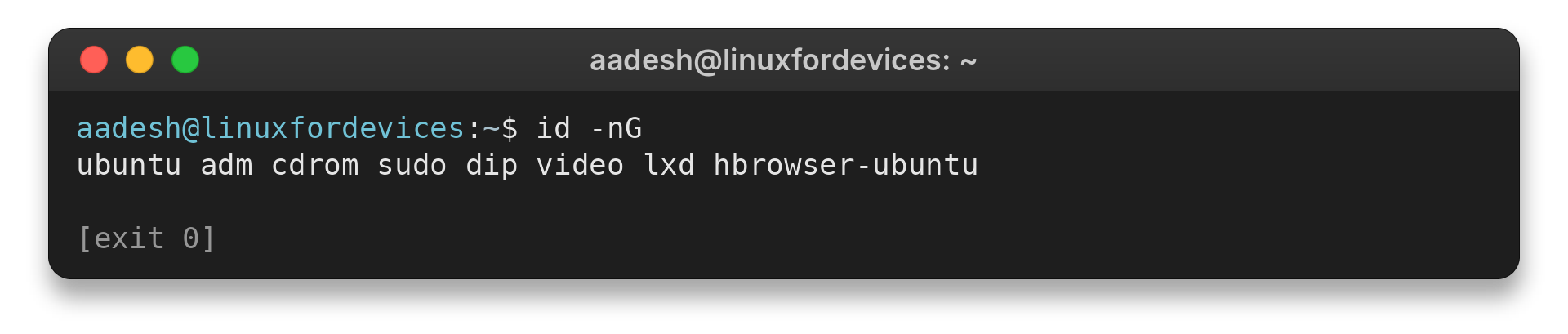
Use id USER for one account’s UID, primary GID and resolved group memberships. I ran id -nG without a username, which shows the calling process’s groups rather than a named user’s list.
id -nG
aadesh@linuxfordevices:~$ id -nG
ubuntu adm cdrom sudo dip video lxd hbrowser-ubuntu
For a fuller lookup walkthrough, see the Linux user and group guide.
For one named account or group, query it with getent passwd USER or getent group GROUP. Named lookups avoid relying on full enumeration, which some directory sources do not support.
Step 2: Create a local user when needed
Check that the account name is available, then use the distribution’s documented account tool. With shadow-utils, the create-home option requests a home directory. Defaults such as the primary group and login shell depend on local configuration.
sudo useradd --create-home USER
id USER
Creating an account changes the system’s identity database and requires administrator access. This command was not run here. On Ubuntu, adduser is a recommended interactive wrapper for common account creation, while supplementary memberships remain a separate task.
The example does not set a password or grant sudo rights. Login credentials and administrative access are separate policy decisions, so do not assume a new account can sign in or administer the host after creation.
Step 3: Create the group when it does not exist
Check for the named group first, then create it with groupadd if local group administration is appropriate. This avoids an accidental duplicate attempt and makes the intended scope explicit.
getent group PROJECT
sudo groupadd PROJECT
The first command is a read-only lookup, and an empty result means no group resolved from configured sources. Creating a local group requires administrator authority, so use the directory service when it manages that group.
Step 4: Add the user without replacing existing groups
Use the append option with usermod to add one supplementary group while preserving existing memberships. Specifying a group list without append replaces the existing supplementary list and can remove access the account relies on.
sudo usermod --append --groups PROJECT USER
id USER
Use the exact account and group names, then check the resulting membership. Do not treat membership alone as proof of file access: the file must also have a matching group owner and suitable group mode bits.
Step 5: Set the file’s group and permission bits
Inspect the target first. The first command changes only group ownership and needs administrator access. Choose the smallest mode that grants the required access.
sudo chown :PROJECT FILE
Use chown only when the file’s group owner needs to change. I ran a separate permission demo in the workspace because its chmod example changes only a temporary file there. Changing ownership does not itself change the mode bits.
printf '%s' 'shared project data' > project.txt
chmod 660 project.txt
ls -l project.txt
Save the lines in file_mode_demo.sh and run it from a new working directory to create project.txt with owner and group read-write access.
bash file_mode_demo.sh
aadesh@linuxfordevices:~$ bash file_mode_demo.sh
-rw-rw---- 1 ubuntu ubuntu 19 Oct 19 18:49 project.txt

The permission string grants read and write to the owner and group without setting an execute bit for this text file.
Create the example directory in a location you control, noting that the following ownership change requires administrator access.
mkdir shared-dir
sudo chown :PROJECT shared-dir
Save the mode-check commands in directory_mode_demo.sh, then run it after creating shared-dir.
chmod 2770 shared-dir
ls -ld shared-dir
Run the source file to see how the permissions appear in a long listing.
bash directory_mode_demo.sh
aadesh@linuxfordevices:~$ bash directory_mode_demo.sh
drwxrws--- 2 ubuntu ubuntu 4096 Oct 19 19:08 shared-dir

Mode 2770 on a shared project directory sets setgid and grants read, write and search access to its owner and group, with no mode-bit access for others. New entries inherit the directory group, but existing files retain their previous owner and group and new-file write bits still depend on creation mode and umask.
Step 6: Verify access from a fresh session
New group membership is normally picked up when a new login session starts. After logging in, inspect the account and target path, then test with the intended file operation. id USER shows resolved group names, while ls -l FILE displays the file owner, group and mode.
id USER
ls -l FILE
For sudo membership, consult the LinuxForDevices sudoers guide. A group change alone does not guarantee a command is permitted, because sudoers rules determine that access.
Linux User and Permission Issues to Check
Use the table below to match each symptom with a relevant next check, because access can be affected by identity resolution or path permissions.
| Symptom | Check | Next step |
|---|---|---|
| User missing from a group lookup | Identity source and group query | Confirm the source and requested group |
| New membership appears absent | Compare id USER with the current shell’s id -nG | Start a fresh login session |
| Group has no usable file access | ls -l FILE | Check group owner and group read/write bits |
| Directory cannot be entered | namei -l PATH | Inspect each parent component for search permission |
A pathname is checked one component at a time. Opening /srv/team/report.txt requires search permission on /, /srv and /srv/team before the final file’s own mode can apply. If available, namei -l /srv/team/report.txt shows each component’s owner and permissions, so use it to locate the first inaccessible directory instead of widening permissions across the whole tree.
The member list in a local /etc/group record shows supplementary memberships, not users whose primary GID is that group. Check the account’s primary GID before concluding that a user is missing.
Avoid recursive permission changes unless every descendant needs the same policy. For a new local user, read the Linux user administration guide for account details.
A group change is not an account lockout, and a password lock may not revoke access through every authentication method. Handle sudo policy, SSH keys and centralized accounts through their own controls. The groupadd command guide covers creating a local group, while the Linux filesystem hierarchy guide helps identify paths before editing their ownership.
Conclusion: Check Identity Before Changing Access
Make the smallest change that matches the task, then verify the intended workflow before granting broader access.
For authoritative details, read the usermod manual, the chmod manual and the chown manual. For a practical command reference, see our Linux chmod and chown guide. For the local-versus-directory account boundary, consult Ubuntu’s user management documentation.
FAQ
These answers cover the group change and permission checks readers commonly need to make.
How do I add a user to a group in Linux?
Use usermod with the append option to add one group without replacing the account’s other supplementary memberships. Check with id USER and start a new login session before testing access.
What is the difference between a primary and supplementary group?
A user’s primary group is the main GID associated with the account and is commonly used as the group owner for new files. Supplementary groups add other group identities that can grant access.
Why does a group change not affect my current shell?
A running process retains the group credentials it received when it started. Log out and back in, or open a new login session, then check the account’s groups again.
What is the difference between chmod and chown?
chmod changes a file’s permission bits. chown changes its user owner or group owner.