

When you look for Hannah Montana Linux, you may find an original release and a separate v26 remaster. It is a themed Linux distribution, but the two projects are based on different systems.
I’ll show you how to identify the release you mean and try its ISO in a virtual machine without replacing your current system. A virtual machine runs the downloaded system in a window with a disk separate from your computer’s files.
TL;DR: Hannah Montana Linux has two generations
Hannah Montana Linux first meant a Kubuntu-based, purple-themed system from 2009, while a separate 2026 remaster brings the theme to a newer Debian-based system.
- The original uses KDE 4.2 and Debian apt.
- The v26 project uses Debian live-build, Calamares and KDE Plasma 6, according to its project README.
- Use the matching project’s own release page, and try an unfamiliar ISO in a virtual machine first.
What is Hannah Montana Linux?
Hannah Montana Linux is a themed distribution with two distinct projects. The original is based on Kubuntu, uses Debian apt for packages and runs KDE 4.2. This apt package list guide shows a related package-management task on Ubuntu.
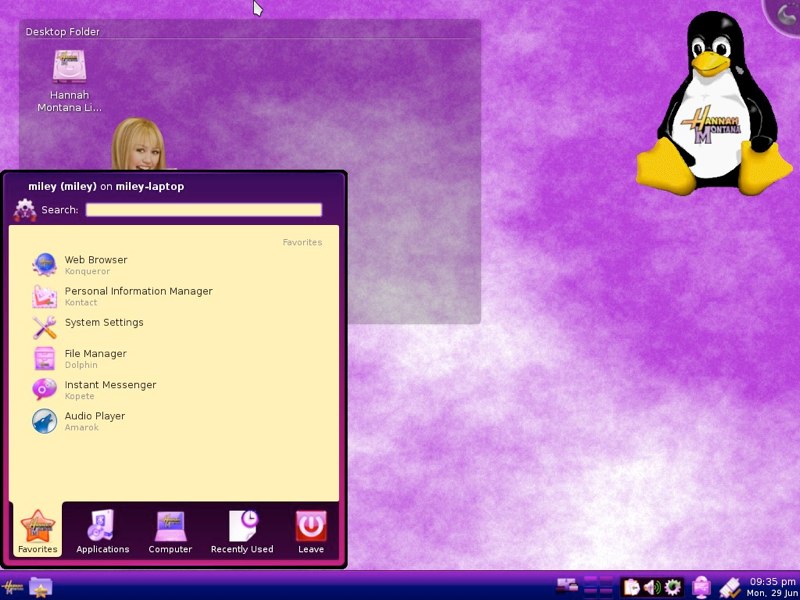
Kubuntu is an Ubuntu variant with KDE software. The old release added themed wallpapers, icons and colors, as shown below. See this Kubuntu and Ubuntu comparison.
The v26 README describes Debian live-build, Calamares and KDE Plasma 6. It is not an in-place update.
HML26 Lite is a separate LXQt fork. This comparison of Ubuntu and Lubuntu explains another Linux desktop built around LXQt.
How to try Hannah Montana Linux safely
The safe first step is to identify which generation you mean, then boot its ISO in a virtual machine rather than replacing a computer’s operating system. A virtual machine runs the guest system inside a window and keeps its disk separate from the host’s files.
Step 1: Choose the project and release
For the remaster, open the v26 project’s releases page and read its notes before downloading. The repository shows a 26.1 tag, so do not assume an older ISO link points to the current file.
The SourceForge project site describes the original Kubuntu and KDE 4.2 edition. If its download is unavailable, an archive mirror does not imply current maintenance or support.
Step 2: Check the image before booting
Check architecture and requirements in the release notes. The README says Plasma 6 can be sluggish on older hardware and links to HML26 Lite, a separate LXQt fork. Compare a project-published checksum with the ISO.
Step 3: Boot it in a virtual machine
Create a virtual machine, attach the ISO as its virtual optical disk, and disconnect host folders. This VirtualBox walkthrough covers another Linux guest.
Choose a live session if offered. It lets you inspect the desktop without changing the host. VMware users can read about guest integration tools.

This image documents only the original installer. The new project’s screens can differ, so follow the downloaded ISO’s prompts rather than this historical screenshot.
Common errors when choosing a Hannah Montana Linux ISO
The main risk is treating similarly named images as the same release. Check the project owner and release notes before booting, especially when a search result points to a mirror or a copied repository.
- If an ISO has no checksum published by its project, do not treat an independently posted checksum as proof of integrity.
- If a VM fails to boot, check the release notes and virtual machine settings before concluding that the image is universally incompatible.
- If you only want the old desktop appearance, use a maintained Linux system and a trusted compatible theme instead of installing the archived OS.
Can you upgrade the original Hannah Montana Linux?
No in-place upgrade from the Kubuntu original to v26 is documented. The latter is a separate OS image, not a package update.
Use the project name and release page to identify an ISO. An archive mirror does not imply current support.
| Release | Source | What it is |
|---|---|---|
| Original | SourceForge or identified archive | Kubuntu, KDE 4.2 |
| v26 remaster | Its own release page | Separate Debian-based image |
The old system is outside current security support. Debian’s archive preserves old distributions, but archived packages do not receive current security maintenance. Keep it offline and away from accounts or sensitive files.
If the goal is the old look rather than the old operating system, use a currently maintained distribution and apply a compatible theme from a source you trust. A desktop theme changes appearance. It does not install an obsolete kernel, package repository or system base.
Conclusion: choose the release by its project source
Hannah Montana Linux began as a Kubuntu and KDE 4.2 themed distribution, and its name now also labels a separate Debian-based remaster. Check the project and release notes before downloading, then use a virtual machine to explore an unfamiliar ISO.
For more background, see the original Hannah Montana Linux project description, the v26 source repository and Debian’s guide to distribution archives.
What is Hannah Montana Linux based on?
The original is based on Kubuntu and uses KDE 4.2. The separate v26 remaster is described by its project as Debian-based and uses KDE Plasma 6.
Is Hannah Montana Linux v26 an upgrade to the original?
No in-place upgrade path is documented. The v26 remaster is a separate project and should be treated as a separate operating system image.
How can I try Hannah Montana Linux?
Download the ISO from the release page for the project you mean and boot it in a virtual machine first. Follow that release’s own notes and prompts.