

Scripts sometimes need to run the same task with different input. A Bash function names a group of commands and accepts arguments when the script calls it.
I’ll walk through passing arguments to functions and choosing between a status and printed data for results.
TL;DR
A Bash function gives a name to commands you can call with arguments, while its status and printed output remain separate channels.
- Define it before calling it with name() { commands; }.
- Pass arguments as separate words and read them through “$1” or “$@”.
- Use return for a success or failure status, and standard output for data.
- Declare temporary variables with local to limit accidental changes.
What Are Bash Functions?
A Bash function is a named group of shell commands that runs when its name is called.
For example, a validation function can keep a repeated check in one place and give it a name the main script can call.
How to Write and Call Bash Functions
The steps build from a small definition to argument handling and reusable helpers.
Step 1: Define a function
The name is followed by parentheses and a brace-delimited body. The body is not executed while the shell reads the definition.
greet() {
    printf 'Hello, %s\n' "$1"
}
Here, greet reads the first passed value through $1. Keep each command on its own line so later edits remain clear.
Step 2: Call it with arguments
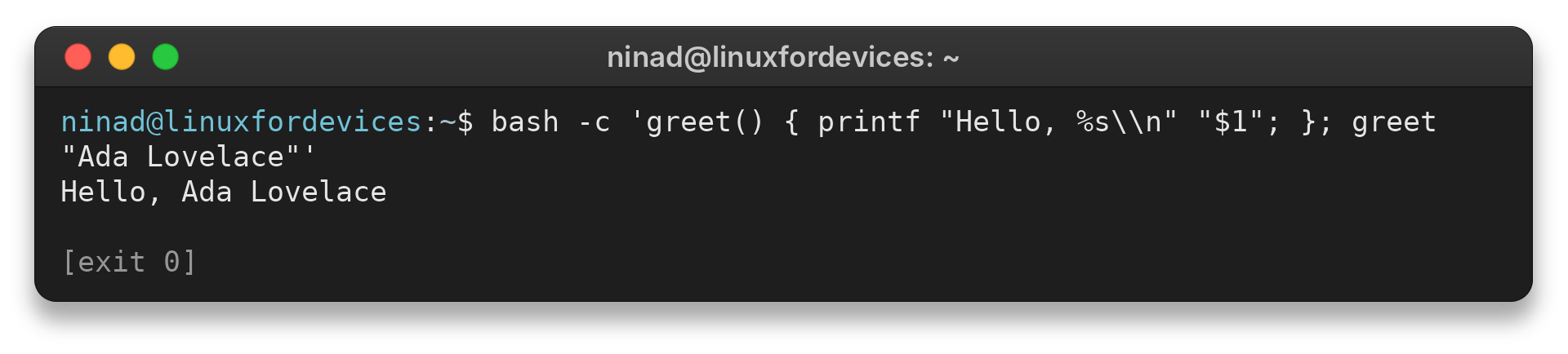
Call the function by its name and place values after it as separate shell words. Read positional parameters as $1 and $2. Quote a value with spaces to keep it as one argument.
greet "Ada Lovelace"
A helper receives its own positional parameters. Save a script argument in a named variable before calling it when both sets of values are needed.
For fixed-arity functions, test the count and return a failure status when the call is incomplete.
Running the command below prints this exact line:
Hello, Ada Lovelace
Step 3: Forward every argument
Use “$@” to forward every argument to another command or function. It also preserves an empty argument as an empty value.
print_args() {
    printf 'Argument: %s\n' "$@"
}

print_args "red apple" pear
Each input argument becomes one format value in this call.
Step 4: Call one function from another
format_name() {
    printf '%s, %s\n' "$2" "$1"
}

show_user() {
    format_name "$1" "$2"
}

show_user "Ada" "Lovelace"
The call chain passes both values to the formatting helper.
Bash Function Arguments, Scope, and Return Values
A function can receive positional parameters, change variables, print data, and set a status.
| Need | Use | What it carries |
|---|---|---|
| One argument | $1 | First word after the function name |
| Argument count | $# | Number of arguments in this call |
| All arguments | “$@” | Separate words, preserving spaces |
| Temporary variable | local name=value | Function-local variable in Bash |
| Success or failure | return status | Exit status checked by the caller |
| Text or computed data | Standard output | Data that can be captured by $(…) |
These choices make the caller’s next operation explicit.
Use local variables to avoid side effects
An unqualified assignment changes a variable visible outside the function.
format_total() {
    local total="$1"
    printf '%s\n' "$total"
}
Bash locals are dynamically scoped, so a nested helper can see a caller local of the same name. Choose distinct names in nested helpers.
Use return for status, not arbitrary data
The return builtin ends the current function and sets its exit status. Bash status values are in the range 0 to 255, with zero conventionally meaning success and save the status immediately because the next command replaces $?.
check_file() {
    [[ -r "$1" ]] || return 1
    return 0
}

if check_file "./settings.conf"; then
    printf 'Readable\n'
else
    status=$?
    printf 'Check failed: %s\n' "$status"
fi
The conditional tests status directly. Inside else, $? holds the failure code.
Choose documented nonzero codes when the caller needs to distinguish failure causes. Use standard output for a complete data value.
validate_count() {
    [[ "$1" =~ ^[0-9]+$ ]] || return 2
    (( $1 > 0 )) || return 1
    return 0
}
This example uses status 2 for malformed input and status 1 when the count is zero. Bash exposes the latest command status through $?, assign it immediately when later commands must inspect it.
Use recursion only with a stopping condition
A recursive function calls itself, usually with a smaller or simpler input. It must have a base case that stops further calls, or the calls continue until the shell reaches a resource limit.
countdown() {
    local n="$1"
    (( n <= 0 )) && return 0
    printf '%s\n' "$n"
    countdown "$((n - 1))"
}
The condition n less than or equal to zero is the stopping case. For deeper or unbounded work, prefer a loop to limit function-call growth.
Choose between a return status and printed data
Use a status to tell the caller whether an operation succeeded, and print data the caller needs. Keep standard output free of progress messages when the caller captures a result.
read_count() {
    [[ -r "$1" ]] || return 1
    wc -l < "$1"
}

if count=$(read_count "./items.txt"); then
    printf 'Lines: %s\n' "$count"
fi
The function uses its status to report whether the file can be read and prints the count for the caller to capture.
Send data through standard output
For a computed value, print it and capture standard output with command substitution. The function then runs in a subshell, so its ordinary variable changes do not persist in the caller.
make_label() {
    printf '%s-%s\n' "$1" "$2"
}

label=$(make_label "build" "42")
The function prints one string, and the assignment captures it without a trailing newline. Keep diagnostic messages on standard error if standard output is meant to contain machine-readable data.
Load reusable functions from another file
Source the helper file before the call that depends on it.
source ./helpers.sh
format_total 42
The source builtin reads a helper file in the current shell, so assignments in it can affect the caller. Use a trusted path. A script can resolve its own directory when the helper path must not depend on the caller working directory.
How to Get Data Out of a Function
Use standard output when the caller needs a value, and use the function status when the caller needs a yes-or-no result. Keeping those channels separate lets a caller capture data without mistaking it for success or failure.
Command substitution captures standard output, removes trailing newline characters, and runs the function in a subshell. Changes to ordinary variables inside that function therefore do not update the parent shell.
get_extension() {
    local file="$1"
    printf '%s\n' "${file##*.}"
}

extension=$(get_extension "report.csv")
printf 'Extension: %s\n' "$extension"
This prints the computed value for the caller to store. Keep logging and progress messages on standard error so they do not become part of the captured value.
Best Practices for Bash Functions
A function is more reusable when its inputs and outputs are clear. I keep one purpose per function and use descriptive names so the calling code reads like a sequence of tasks.
- Quote expansions such as "$1" and "$@" so spaces remain within their intended arguments.
- Use local for temporary variables and choose distinct names in nested functions because Bash local variables are dynamically scoped.
- Send returned data to standard output and diagnostics to standard error.
- Check a status directly in if or while when branching on success.
- Source only helper files from paths you trust, because source runs their commands in the current shell.
These choices reduce hidden changes to the caller and make each function's contract visible where it is used.
Common Errors with Bash Functions
Arguments can split unexpectedly when the call or parameter expansion is unquoted. Captured values can also include status messages printed to standard output.
| Problem | Why it happens | Correction |
|---|---|---|
| Only the first argument arrives | Arguments were forwarded as an unquoted $* or one parameter | Use "$@" to preserve each argument |
| Captured value contains a status message | The function prints both data and progress to standard output | Send diagnostics to standard error |
| Caller variable did not change | Command substitution ran the function in a subshell | Return data through output or call directly when changing caller state is intended |
| Function command not found | The call happened before its definition or the helper file was not sourced | Move the definition earlier or source the trusted file first |
When a script supports more than one shell, check its shebang and run it with that interpreter. Bash-specific syntax such as local and [[ condition ]] should not be assumed to work unchanged in every POSIX shell.
Conclusion: Keep Functions Small and Explicit
A function should have one clear result contract for its caller. Use the GNU Bash Reference Manual for the full function and parameter rules.
For the surrounding script structure, see our tutorials on shell variables, if-else statements, and Bash for loops.
FAQ
A few Bash function questions come up when a script starts passing values between named tasks.