

An empty arp listing gives you no IPv4 neighbor mapping to inspect in that snapshot. I appreciate the clear boundary: it reports the host’s cache, not the network’s head count.
In a populated arp listing, the Address and HWaddress columns let you identify a neighbor mapping. That gives you a practical way to make sense of what the ARP table contains.
What the ARP table contains
Address Resolution Protocol (ARP) lets a host learn a neighbor’s link-layer address on the same local network using Internet Protocol version 4 (IPv4). The Linux arp command displays or changes the kernel’s IPv4 neighbor cache, so it shows entries the host knows about rather than searching the subnet.
The arp(8) manual describes that IPv4 cache, while the broader ip command can inspect neighbor objects for IPv4 and Internet Protocol version 6 (IPv6).
| Output field | What it means |
|---|---|
| Address | The neighbor’s IPv4 address, or its resolved name unless numeric output is requested. |
| HWtype | The link-layer address type, such as ether. |
| HWaddress | The neighbor’s link-layer address, commonly a Media Access Control (MAC) address on Ethernet or Wi-Fi. |
| Flags | C marks a complete entry, M marks a permanent entry, and P marks a published entry. |
| Mask | A network mask used for an entry that has one. It can be blank. |
| Iface | The local interface associated with the neighbor entry. |
What you need before using arp
The arp utility comes from net-tools, which may not be installed on a Linux system. Check for it first, and identify the interface before filtering or changing an entry.
command -v arp
ip -br link show
If the first command prints a path, arp is available. On Ubuntu, install the net-tools package with apt when the command is missing. Other distributions use their own package manager.
sudo apt install net-tools
Display operations do not change the neighbor cache. Adding or deleting an entry changes local network state and normally requires administrator permission, so use those options only when you know the correct address, hardware address, and interface.
- Use an IPv4 address for arp. IPv6 neighbors are handled by Neighbor Discovery and appear through ip neigh.
- Use the interface name shown by ip -br link show rather than copying a device name from another machine.
- Do not treat a static mapping as a fix for duplicate IP assignment. It changes only this host’s mapping.
How to use the arp command
Start with a read-only listing. Add a filter only after you know which interface or address you need, and reserve the final steps for cases where a local mapping genuinely needs to change.
1. Display the current ARP cache
Run arp with no options to list the current entries in the Linux format. The alternate arp -a form lists them in an alternate format.
arp
arp -a
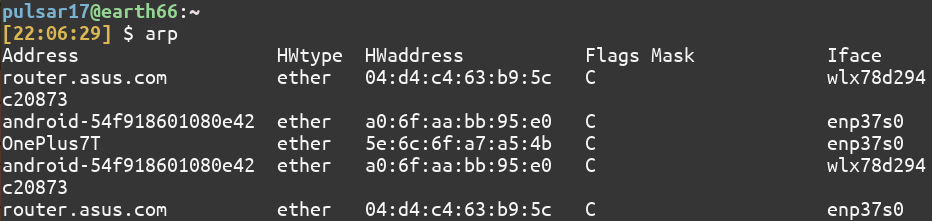
The output is a snapshot of the host’s cache, not a list of every device currently connected to the network. Host names may appear in the Address column when name resolution is enabled.
2. Show numeric addresses and filter by interface
Use -n to avoid resolving addresses to names. The same option is useful when name lookup is slow or when you need to copy an IPv4 address from the table.
arp -n
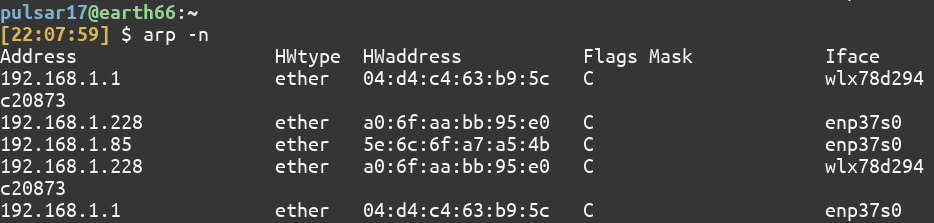
To restrict the display to one device, add its interface name with -i. Replace IFACE with a name from ip -br link show.
arp -n -i IFACE
I prefer ip neigh show when a neighbor’s state matters, because its output labels states such as REACHABLE and STALE. The two commands expose different views of the same local neighbor information.
ip neigh show
3. Add a static neighbor entry only when needed
The legacy arp -s option inserts a manual mapping into this host’s IPv4 cache. Use a documentation address in an example and replace it with the intended neighbor and hardware address on your own network.
sudo arp -s 192.0.2.20 02:00:00:00:00:01
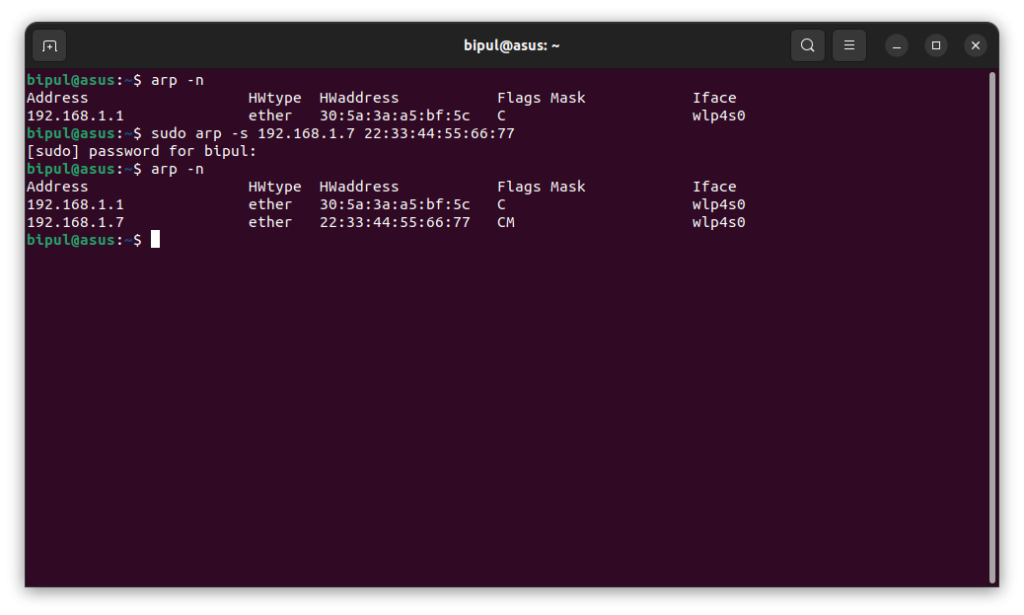
A manual mapping can send traffic to the wrong device if the MAC address is incorrect. It also does not resolve two devices claiming the same IPv4 address, and a command-line entry is not persistent network configuration.
The iproute2 form names the interface explicitly, which helps when more than one network device is active.
sudo ip neigh replace 192.0.2.20 lladdr 02:00:00:00:00:01 dev eth0 nud permanent
4. Delete an entry from the local cache
Remove an entry only when you have a reason to discard that local mapping. The legacy command accepts the neighbor address.
sudo arp -d 192.0.2.20
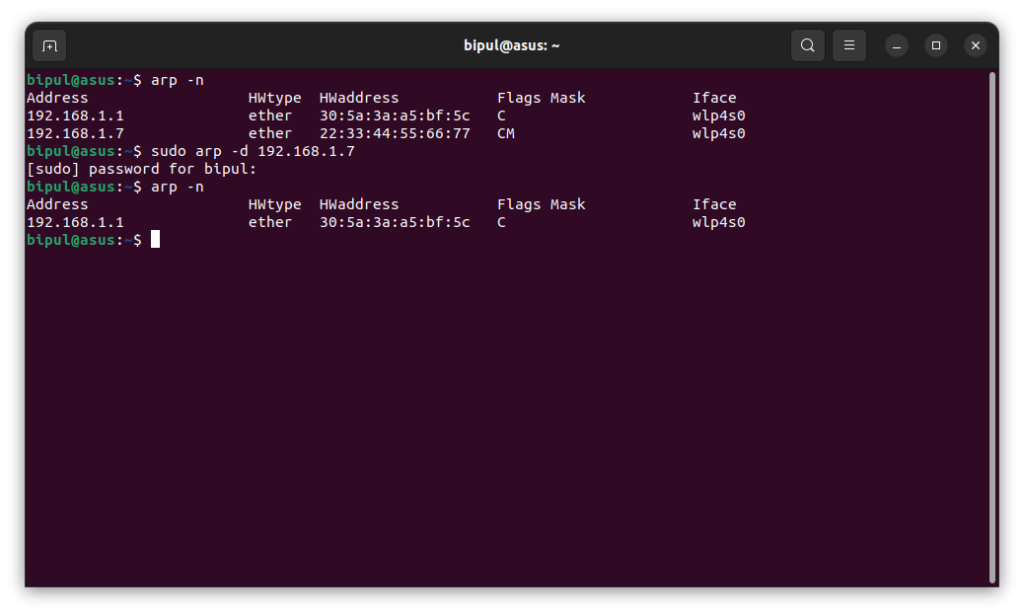
The ip neigh equivalent requires the interface name, which avoids ambiguity when more than one device could use the same address.
sudo ip neigh del 192.0.2.20 dev eth0
Deleting an entry does not block the neighbor. When the host sends traffic to that address again, the kernel can resolve and add the mapping back.
5. Load several mappings from a file
The arp(8) manual documents arp -f for reading mappings from a text file, with each line holding a host name and hardware address. An IPv4 literal can replace the name.
192.0.2.20 02:00:00:00:00:01
192.0.2.21 02:00:00:00:00:02
sudo arp -f ./arp-entries.txt
This applies the file’s mappings to the local cache. It does not check that the addresses are correct or save them as persistent interface configuration.
The arp(8) input-file syntax differs from the documented /etc/ethers database format, which puts the hardware address before the IP number.
Why arp may not show every device
The kernel adds a neighbor entry when it needs to resolve an IPv4 address on the local link. arp reads that state, but it does not send requests to every subnet address.
- An empty or short table does not prove that other devices are offline. The host may not have communicated with them recently.
- For traffic outside the local subnet, the cache usually contains the next-hop router’s address, not the remote server’s MAC address.
- ARP is for IPv4. Use ip neigh to inspect both IPv4 and IPv6 neighbor entries.
- Host discovery is separate from arp. The arp-scan project describes a utility that uses ARP to find IPv4 hosts on a local network. The Linux traceroute manual describes tracing the IP route to a destination through intermediate gateways.
If the interface itself is down, diagnose its configuration before restarting a network service. The Ubuntu network configuration guide and Ubuntu networking restart guide cover those separate tasks.
To identify the local address, use the Linux IP address guide. If the local gateway has a neighbor entry but a remote destination fails, see the Linux traceroute guide.
The ARP table is a local view
An empty arp table says what this host has cached, not how many devices share the network. For current neighbor states across IPv4 and IPv6, query the kernel’s broader neighbor table.
ip neigh show
References
These manuals document the utility syntax, neighbor states, and file formats used above.
| Reference | What it documents |
|---|---|
| arp(8) | Legacy Linux IPv4 neighbor-cache display and management options. |
| ip-neighbour(8) | Neighbor objects, operations, interfaces, and states. |
| ethers(5) | The /etc/ethers address database format. |
Frequently asked questions
Does the arp command scan every device on a network?
No. The arp command displays the local host’s IPv4 neighbor cache. Use a separate authorized discovery tool when you need to probe a local subnet.
Does arp show IPv6 neighbors?
No. The arp utility handles IPv4. The ip neigh command can display IPv4 and IPv6 neighbor entries.
Why can a deleted ARP entry appear again?
The kernel can learn the mapping again when the host sends traffic to that IPv4 address. Deleting a cache entry does not block the device or remove its address.