

`cmake -S . -B build` configures a project, but it depends on having CMake installed first. I appreciate how the install choice determines which CMake release that command will run.
Connect the installation choice to the work your project needs CMake to do. Follow how `CMakeLists.txt` becomes instructions a build tool can use.
What CMake generates
CMake reads CMakeLists.txt and generates native build instructions for a compiler and build tool such as Make.
CMake does not compile the source files itself. The compiler does that after configuration.
The top-level CMakeLists.txt describes targets and their source files. CMake turns those instructions into a buildsystem such as a Makefile, which a tool like GNU Make then uses to build the target.
| Project part | What it contains | What CMake does with it |
|---|---|---|
| Source tree | CMakeLists.txt and project source files | Reads the project configuration |
| Generator | Make or another installed build tool | Creates native build instructions |
| Build tree | Cache, generated files, and build output | Keeps generated artifacts separate from source |
Choose what to install
Choose the distribution package when its version meets your project’s requirement, or choose Kitware’s binary when you need its upstream release.
- APT, DNF, or pacman installs CMake from the distribution’s configured repositories.
- Kitware’s Linux download provides separate binaries for x86_64 and aarch64.
- A C++ project also needs a compiler and a build tool such as Make or Ninja.
Kitware’s current stable download table shows which Linux installer matches your machine architecture.
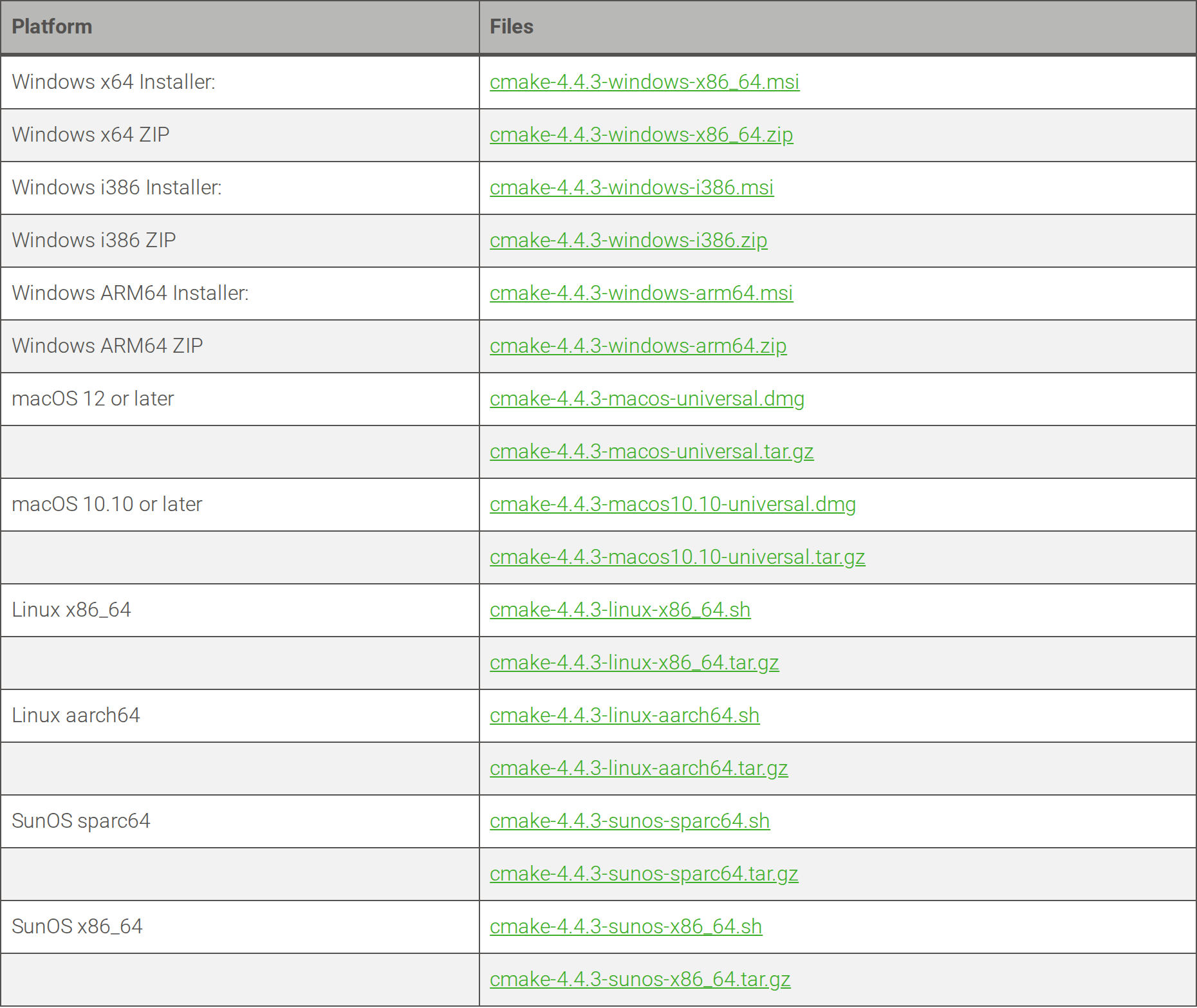
The table includes both a shell installer and a tar.gz install tree for each listed architecture. The download page marks 4.4.3 as the latest stable release.
I use the repository package when its version is sufficient because updates and removal stay with the distribution. For example, Ubuntu Noble lists CMake 3.28.3, while Kitware’s download page lists 4.4.3 as the latest stable release.
Install CMake with your distribution’s package manager
The native package manager installs its maintained CMake version and can add compiler tools in the same transaction.
| Distribution | CMake package | Build tools |
|---|---|---|
| Ubuntu or Debian | cmake | build-essential |
| Fedora | cmake | gcc-c++ and make |
| Arch Linux | cmake | base-devel |
1. Ubuntu and Debian
APT installs CMake on Ubuntu or Debian, while build-essential supplies the compilers and Make. Follow the Ubuntu version check first if the release is unclear.
sudo apt install cmake build-essential
The build-essential package supplies the compiler and Make along with development files. To check whether APT already has CMake installed, use this guide to listing installed packages with APT.
2. Fedora
DNF installs CMake, the GNU C++ compiler, and Make from Fedora’s repositories.
sudo dnf install cmake gcc-c++ make
3. Arch Linux
Install CMake with the Arch build tools. The Pacman package manager guide covers package installation and updates.
sudo pacman -S cmake base-devel
The repository route keeps CMake integrated with the distribution, while Kitware’s user-local binary supplies the upstream release when you need it.
Install Kitware’s current Linux binary
Kitware distributes Linux installers as self-extracting .sh files and install trees in tar.gz archives. Its binaries cover x86_64 and aarch64.
The official CMake download page lists the latest stable files, and the CMake command-line manual explains configure, build, and install modes.
1. Choose the matching installer
Run uname to see the machine architecture. Choose the matching Linux .sh file from Kitware’s current stable release, then save it as cmake-linux-installer.sh.
uname -m
The output is x86_64 or aarch64 on the two Linux binaries shown above. Kitware also publishes a SHA-256 file beside each release, which lets you compare the downloaded installer with its listed checksum.
2. Install into a user-local prefix
Create the destination before running the installer.
I chose a user-local prefix so the system package remained available. My first attempt stopped because the directory did not exist.
mkdir -p "$HOME/.local"
sh cmake-linux-installer.sh --skip-license --prefix="$HOME/.local" --exclude-subdir
The skip-license flag accepts the installer license without displaying it, so review the license before using that option. The prefix keeps this copy under your home directory rather than replacing the distribution package in /usr/bin.
3. Put the user-local binary on PATH
Add the user-local bin directory to the front of PATH for the current shell, then ask CMake for its version.
export PATH="$HOME/.local/bin:$PATH"
cmake --version
The version command reports whichever CMake the shell selects. The troubleshooting section below shows how to identify that path when two copies are installed.
If you download the .tar.gz install tree instead, extract it and keep its bin, share, man, and doc directories together. Our tar archive guide explains the extraction step, and the cURL download guide covers retrieving a file from a terminal.
Configure and build a small C++ project
A single source file and a named executable make it clear what CMake configures and the compiler builds.
Place these files in a project directory. CMakeLists.txt must use that capitalization and sit beside hello_world.cpp.
cmake_minimum_required(VERSION 3.18)
project(MyProject VERSION 0.0.1 LANGUAGES CXX)
add_executable(hello hello_world.cpp)
The target named hello comes from the first argument to add_executable. CMake uses the following source file to produce that target.
#include <iostream>

int main() {
    std::cout << "Hello World!\n";
    return 0;
}

This project tree has the source file and project description at its root. Configure it from that directory and send generated files to build.
cmake -S . -B build
The source path is the current directory, and the build path is a separate directory named build. I configured this sample with CMake 4.4.3 and GNU 13.3.0. The configuration completed and generated build files.
You can also change into the build directory and point CMake at its parent. A terminal capture of that form shows configuration completing with GNU 8.3.1. That compiler version belongs to the captured environment, not a CMake requirement.
cd build
cmake ..
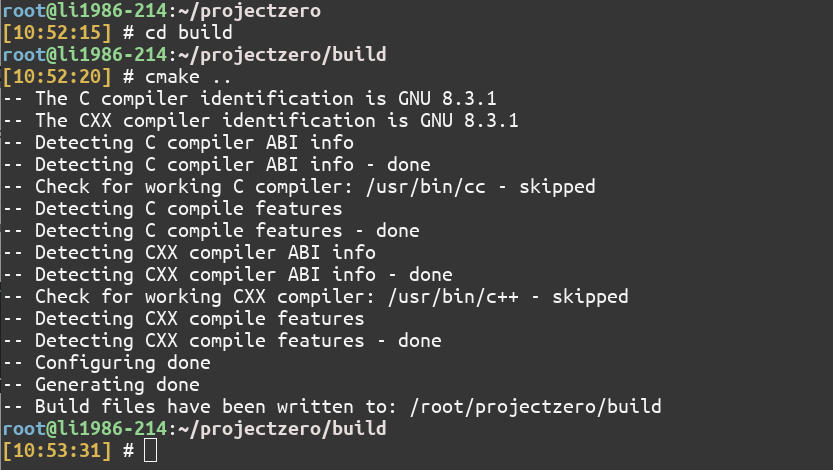
Both commands create a build tree, but the explicit source and build paths avoid changing directories. The files below are from the configured Makefiles generator.
ls build
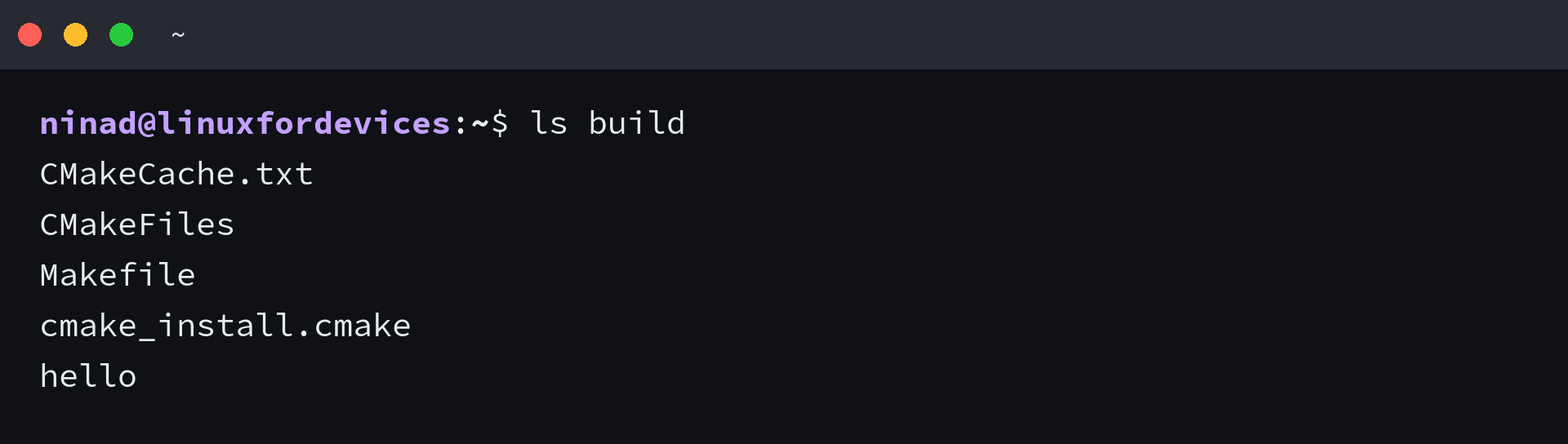
I used the Unix Makefiles generator for this project, so the build tree contains a Makefile and cmake_install.cmake. CMakeCache.txt stores configuration choices and CMakeFiles holds generator data, while a Ninja generator creates a different build file set.
From the project root, CMake asks its configured build tool to compile and link each target.
cmake --build build
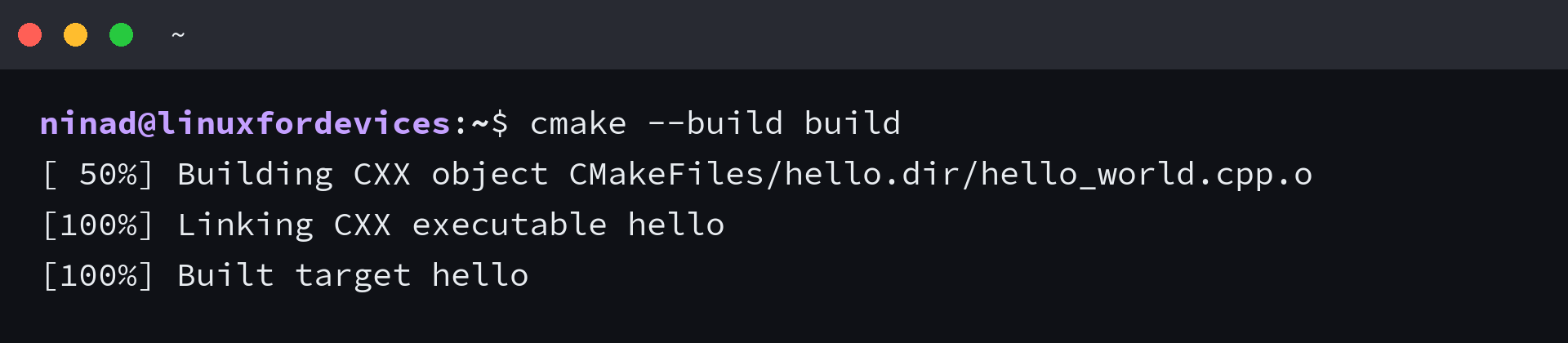
When CMake reports that hello built, run the executable from the project root to see the program output.
./build/hello

I ran the generated executable after the build, and it printed Hello World! CMake has finished its job at that point. The compiler produced the program, and the shell ran it.
Fix a CMake version or PATH mismatch
When several CMake copies are installed, the shell runs the first matching path. Use this table to separate a version choice from a failed installation.
| Symptom | Likely cause | Next step |
|---|---|---|
| cmake –version shows the distro release | /usr/bin appears before the user-local bin directory | Prepend $HOME/.local/bin to PATH in this shell |
| The installer cannot enter its target directory | The prefix does not exist yet | Create the prefix with mkdir -p, then rerun the installer |
| Configuration cannot find CMakeLists.txt | The source path points at the wrong directory | Run the configure command from the project root or set the source path explicitly |
| Configuration finds no C++ compiler | A compiler is not installed | Install the compiler package for the distribution |
This terminal output shows the selected upstream version. If your shell finds another executable first, its version can differ from the installer you ran.
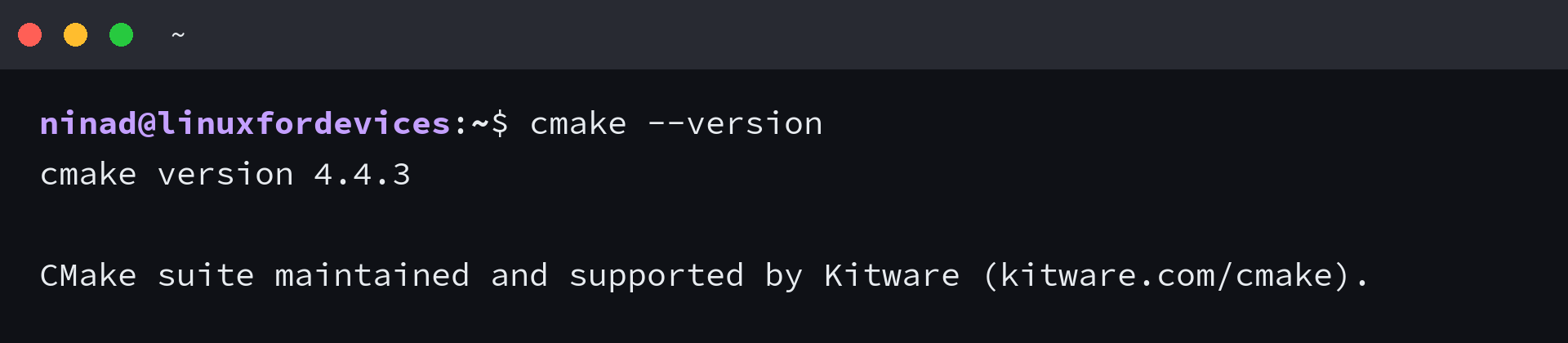
The screenshot reports CMake 4.4.3. Use type -a cmake to see every matching executable in lookup order.
type -a cmake
If APT reports CMake installed but the command still shows another version, list the package and compare its executable path with the first entry in this output.
Keep the selected CMake first on PATH
PATH decides which CMake starts when both a distribution package and a user-local binary are present. Put the version you intend to use first, then keep that choice consistent for configure and build commands.
command -v cmake
CMake installation questions
Package names differ by distribution, but the install decision stays tied to the version and build tools your project needs.
How do I install CMake on Linux from the terminal?
Use your distribution’s package manager for its maintained CMake version. On Ubuntu or Debian, install cmake and build-essential with APT. Use Kitware’s matching Linux installer when you need its upstream release.
How do I install CMake on Ubuntu?
Run sudo apt install cmake build-essential. APT installs the CMake version in the configured Ubuntu repositories along with the compiler and build tools.
Can I use CMake on Linux without a compiler?
You can install and run CMake without a compiler, but you need a compiler and a native build tool to build a C or C++ project.