

mv report.txt archive/ places report.txt inside the archive directory under its original name. I can’t resist the detail that a successful move removes the old source path rather than leaving a second copy.
Follow the source operand to the destination operand to see where the file goes. Compare the paths to tell whether mv renames the file or places it in a directory.
What mv does
The mv command moves a file or directory to a new path, or renames it when the new path stays in the same parent directory. A successful move removes the source path, whether GNU mv uses a rename or a copy-and-remove fallback.
SOURCE names the file or directory you want to move, and DEST names its new path or the directory that receives it. The GNU Coreutils manual and Linux mv manual page explain how an existing directory changes the result.
| Command form | Result |
|---|---|
| mv draft.txt final-report.txt | Rename a file in its current directory. |
| mv report.txt archive/ | Place the file inside an existing directory under its current name. |
| mv first.txt second.txt archive/ | Move both source files into the existing directory. |
| mv project archive/ | Move the project directory inside the existing archive directory. |
Check both paths before moving
Relative paths start from the shell’s current directory. The Linux command-line primer explains how to locate it when archive/ is relative.
Before you move a file, confirm the source and the destination you intend to use. If you want a disposable example to follow, first create a test file in Linux.
- Run pwd to identify the current directory when a relative path is unclear.
- Run ls -la to see both ordinary names and dot-prefixed files.
- Decide what should happen if the destination file already exists before you run mv.
pwd
ls -la
Move or rename one path
The operands determine the outcome because a same-parent destination renames the source, while an existing directory receives it.
Rename a file
Use the existing filename as SOURCE and a new filename as DEST. I ran this form on a disposable draft, and the old path disappeared while the new path kept the file’s contents.
mv draft.txt final-report.txt
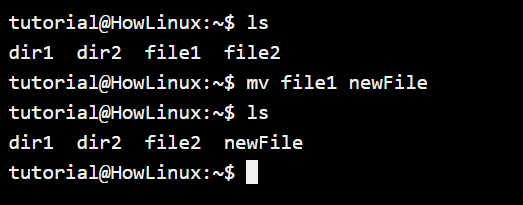
Move a file into a directory
When DEST is an existing directory, mv keeps the source basename and places the file inside it. Add -v when you want the command to print the path it chose.
mv -v report.txt archive/

I ran mv -v, and its output named the full destination path. For a batch, check each expected source in the destination instead of relying on one line of output.
Move several files or a directory
Put each source path before the final directory operand, and use a source directory as one item when you want to move the whole directory.
mv first.txt second.txt archive/
mv project archive/
If archive/ exists, the second command places project beneath it instead of merging project into archive/. GNU’s -T option treats DEST as a path rather than a directory operand, so an existing directory is not used as a container. See how to rename a directory in Linux for other directory-specific cases.
You can move a dot-prefixed file by naming it directly. For example, hidden files in Linux keep their dot-prefixed names when moved with mv.
mv .config archive/
Choose what happens to an existing file
When DEST is an existing file, GNU mv replaces it by default. Choose one collision rule before moving anything you need to keep.
| Choice | Behavior | Use it when |
|---|---|---|
| Default | Replace the existing destination file. | The replacement is intended. |
| -i | Ask before replacing each existing destination file. | You want to decide at the prompt. |
| -n | Do not replace an existing destination file. | Keeping the old destination is the priority. |
| -b | Save the old destination as a backup, using ~ as the default suffix. | You want the new file in place and a copy of the old one. |
The image shows mv -i waiting for a response, not a completed choice. Type y to replace the destination or n to leave both paths unchanged.
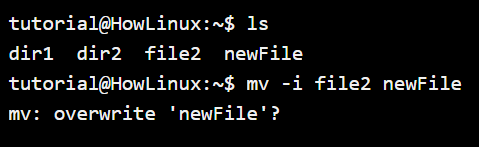
I tested a refusal with GNU Coreutils 9.4, and answering n left both files unchanged with exit status 1.
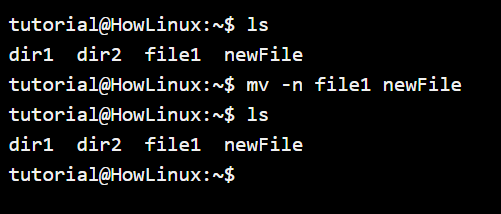
The no-clobber image shows the two names, but not their contents. I ran -n with different text at each path, and both files kept their original contents even though GNU Coreutils 9.4 returned status 1.
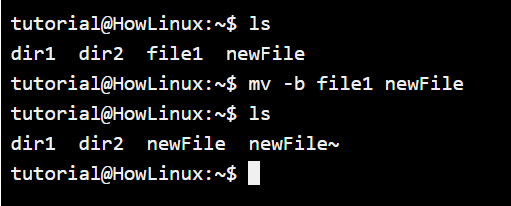
I tested -b with different text at both paths, and the tilde-suffixed backup kept the old destination before the source took its place. The GNU manual says only the last of -i, -f, and -n takes effect when combined, and it rules out combining -n with -b.
When the destination is on another filesystem
When a rename cannot cross filesystem boundaries, GNU mv copies the item and removes the source only after the copy succeeds.
A multi-source command can leave earlier moves complete when a later source fails. GNU mv does not roll them back.
- Inspect both source and destination after a reported failure before you rerun the same command.
- Use GNU mv’s –no-copy option when a cross-filesystem copy fallback is not acceptable.
There is no general undo command for mv. A backup made with -b or a separate backup is the recovery path when a destination was replaced.
Verify the new path before moving on
An existing directory receives the source, and an existing file invokes the chosen collision rule, so DEST type decides the action.
List the destination you named to see which paths are present. For a move into archive/, inspect that directory directly.
ls -l archive/
For a batch move, compare the names you expected with the destination listing. The Linux directory-count guide can help when you need a count, but matching the specific filenames is the stronger check.
Frequently asked questions
mv keeps no history of the previous path, so the source and destination determine what recovery remains.
What does the mv command do in Linux?
The mv command moves or renames files and directories. Give it a new pathname to rename a source, or an existing directory to move the source inside that directory.
How do I rename a file with mv?
Run mv followed by the current filename and the new filename, such as mv draft.txt final-report.txt. The source and destination need to describe the path you intend.
Does mv overwrite an existing file?
GNU mv replaces an existing destination file by default. Use -i to answer a prompt, -n to skip an existing destination, or -b to preserve the old destination as a backup.
Can I undo an mv command?
mv has no general undo feature. Move the file back if the destination is still available, or restore the replaced contents from a backup made with -b or another backup system.