
A TP-Link Wi-Fi adapter needs a driver for its chipset, not for the TP-Link brand name alone. Identify the adapter’s USB ID first, use the Linux kernel driver when one already supports it, and install an out-of-tree module only when the exact chipset requires one.
Find the TP-Link model, hardware version, and chipset
Read the model and hardware version from the adapter or its label. Archer T2U, TL-WN722N, and TL-WN823N revisions can use different chipsets, so a driver chosen from the product name may be wrong for the device in your hand.
Connect the adapter and run the following command.
If terminal work is new to you, review the Linux command-line basics before continuing.
lsusb
Find the line containing TP-Link, Wireless, WLAN, or 802.11. A result such as ID 2357:010c identifies both the vendor and product, while the text may also name the chipset as RTL8188EUS.
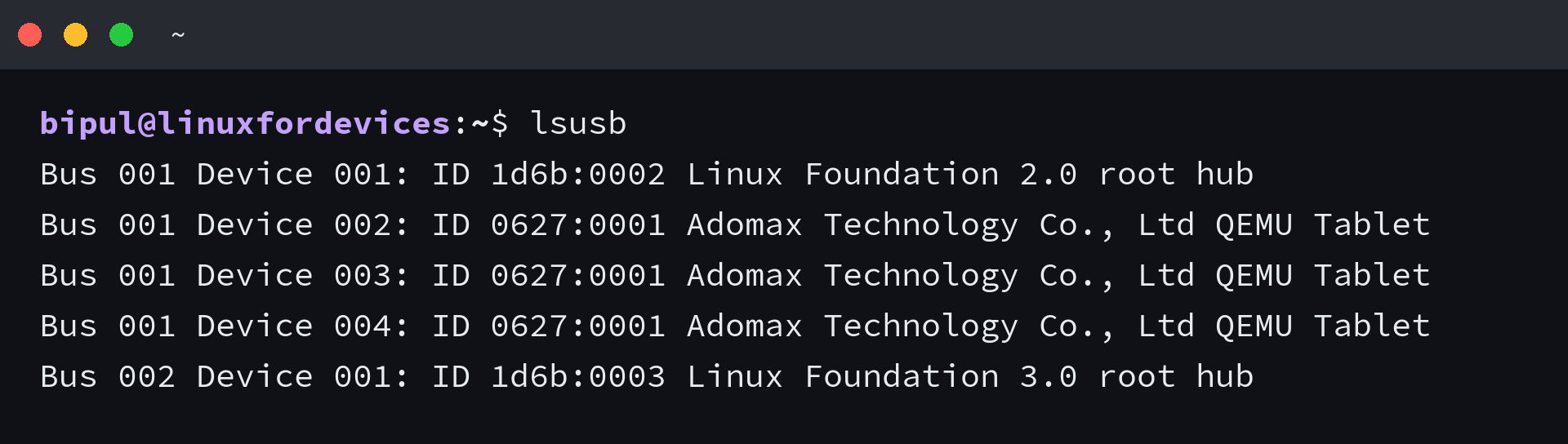
The output above contains no TP-Link entry. That absence means the USB bus has not detected the adapter, so installing a kernel module is premature.
- Unplug the adapter and connect it directly to another USB port.
- Avoid an unpowered hub while diagnosing the device.
- Run lsusb again and compare the output.
- In a virtual machine, attach the USB adapter to the guest instead of leaving it with the host.
If Kali runs as a guest, the USB attachment step belongs in the hypervisor configuration. The Kali Linux VirtualBox setup shows where that guest environment begins.
Check whether Linux already loaded a driver
Ubuntu 26.04 includes kernel drivers for many RTL-based USB chipsets. The Linux Wireless documentation lists rtl8xxxu for RTL8191EU, RTL8192EU, RTL8188EU, and related devices, while rtw88 covers several newer USB chipsets.
Inspect the network hardware and interface list before installing anything.
sudo lshw -C network
ip -brief link
A working USB adapter should appear as a wireless interface with a logical name such as wlx followed by its MAC address. In the lshw output, the configuration line names the loaded driver.
If you know the wireless interface name, query its driver directly.
sudo ethtool -i wlx001122334455
Replace wlx001122334455 with the interface shown on your system. A driver line confirms that Linux has bound a kernel module to the adapter, so another driver installation may create a conflict rather than fix the connection.
Repair firmware and package state on Ubuntu
Update the package index and ensure the standard firmware bundle is installed. You can review how apt and repositories fit together in the Linux package management guide.
sudo apt update
sudo apt install --yes linux-firmware
Reboot after a firmware or kernel update, then run lsusb, lshw, and ip again.
The Linux reboot command reference explains the clean restart path if you are working without the desktop menu.
Do not run a full distribution upgrade merely to install one Wi-Fi adapter. That broad change makes diagnosis harder because it changes the kernel, firmware, and many unrelated packages at once.
Install an out-of-tree driver only for a matched chipset
TP-Link’s Linux support page says kernel compatibility varies by model and hardware version. Its older vendor packages target limited kernel ranges, so TP-Link points unsupported configurations toward community-maintained drivers.
Use the USB ID from lsusb to confirm the chipset in the candidate repository’s supported-device list. Do not clone a repository because its name resembles the adapter model.
| Observed state | Next action |
|---|---|
| No TP-Link line in lsusb | Fix USB detection or virtual-machine attachment first |
| Adapter and wireless interface both appear | Keep the loaded kernel driver and troubleshoot the connection |
| Adapter appears but no interface exists | Read kernel messages, confirm the chipset, then evaluate a matched driver |
| Module builds but will not load | Check Secure Boot signing and kernel messages |
For a supported rtw88 USB chipset, install the compiler, Dynamic Kernel Module Support (DKMS), Git, and headers for the running kernel.
sudo apt install --yes build-essential dkms git linux-headers-$(uname -r)
The current rtw88 repository recommends DKMS because it rebuilds the module after kernel updates. Clone the repository only after its supported-chipset list matches your USB ID.
git clone https://github.com/lwfinger/rtw88
cd rtw88
sudo dkms install "$PWD"
sudo make install_fw
sudo cp rtw88.conf /etc/modprobe.d/
These commands install rtw88. They are not a generic recipe for every TP-Link adapter, and a device based on another chipset needs the maintainer’s matching driver or the driver already shipped by the kernel.
Reboot, then repeat the detection checks.
If the interface appears, connect through the desktop Wi-Fi panel and use the Linux IP and DNS checks when association succeeds but websites still fail.
Handle Secure Boot without hiding the cause
Ubuntu Secure Boot verifies kernel modules. Canonical-supplied modules are signed, while a custom DKMS module must be signed with an enrolled Machine Owner Key (MOK) before the kernel will load it.
Check the current state first.
mokutil --sb-state
If Secure Boot is enabled, follow the driver repository’s DKMS signing instructions and Ubuntu’s key-enrollment prompt. Disabling the protection can make an unsigned module load, but it changes the machine’s boot trust policy, so treat the Secure Boot configuration as a deliberate fallback rather than the first repair.
Read the kernel message before changing drivers
When the adapter appears in lsusb but no wireless interface exists, inspect the current boot log.
sudo journalctl -k -b --no-pager | grep -Ei 'usb|firmware|wlan|wifi'
A missing-firmware message calls for the named firmware file or package. An unknown USB ID calls for chipset and driver research, while a key-rejection message points to Secure Boot signing.
Also check whether Wi-Fi is blocked.
rfkill list
A soft block can be cleared in software, while a hard block usually comes from a hardware switch, firmware setting, or platform control. Installing another module does not remove either block.
Kali Linux uses the same hardware checks
Kali’s troubleshooting documentation starts with lsusb or lspci, kernel messages, firmware, and rfkill. That sequence is the same whether you need ordinary network access or plan to use security tools.
Monitor mode and frame injection are separate capabilities.
A driver that connects to an access point may not support either feature, so choose an adapter and driver that explicitly document them instead of replacing a working network driver by default.
Verify the adapter after installation
Finish with the same evidence that guided the repair.
- lsusb shows the expected TP-Link vendor and product ID.
- lshw names a wireless interface and its driver.
- ip -brief link shows the wireless interface.
- The desktop Wi-Fi panel can scan for nearby access points.
- The interface reconnects after a reboot.
If one check fails, return to that layer instead of reinstalling everything. USB detection comes first, then the kernel driver, firmware, interface creation, radio state, and network configuration.
Frequently asked questions
Do all TP-Link Wi-Fi adapters use the same Linux driver?
No. Different models and hardware revisions can use different chipsets, so identify the USB ID with lsusb and match that chipset to a kernel or community driver.
Why does lsusb show the adapter but Ubuntu has no Wi-Fi interface?
The USB bus can detect hardware before a suitable kernel module binds to it. Check lshw and the kernel log for a missing driver, missing firmware, or module-signing error.
Should I blacklist rtl8xxxu for a TP-Link adapter?
Not by default. Blacklist a kernel module only when the matched replacement driver documents that conflict and you have a recovery path, because rtl8xxxu supports several Realtek USB chipsets.
Why does a DKMS driver stop loading with Secure Boot enabled?
Secure Boot rejects untrusted kernel modules. Enroll the Machine Owner Key created for DKMS or follow the repository’s documented signing process before loading the module.
Keep the lsusb ID and driver name with your maintenance notes. Those two identifiers let you recheck compatibility after a kernel update without repeating the entire diagnosis.