
Run ip addr show to find the addresses assigned to Kali Linux. It lists every interface, including the loopback device, and marks an IPv4 address with inet and an IPv6 address with inet6.
Use ip addr show for the address inventory and ip route get 1.1.1.1 for the source Kali selects for that route. The distinction prevents a common wrong answer when a VPN or virtual adapter is active.
Find your current address with ip addr show
The ip command from iproute2 is the best starting point because it shows the interface name, address family, prefix length, and interface state together, look below the interface that is UP for an inet line when you need IPv4.
ip addr show
On an Ethernet or wireless connection, the address is usually beneath an interface such as eth0, enp1s0, or wlan0. Do not use 127.0.0.1 from the lo interface when another device needs to reach Kali.
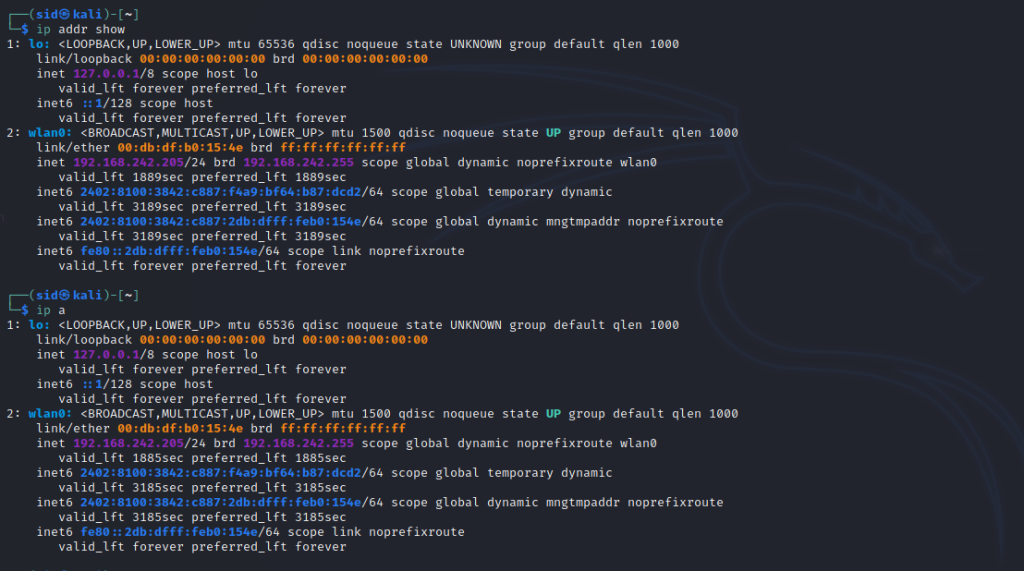
The short form ip a produces the same address view. Use the full command in notes and support requests because it makes the object being queried clear.
Show one interface and one address family
Once you know the interface name, narrow the output to it, this avoids confusing a VPN, container bridge, virtual adapter, and physical adapter when several are present.
ip addr show dev wlan0

Replace wlan0 with the name shown by ip addr show. A virtual machine often uses a name such as eth0 or enp0s3, so copying wlan0 unchanged can return a device-not-found error.
ip -4 addr show dev wlan0
The -4 option leaves only IPv4 entries. Use it when an application asks for an IPv4 address and the complete listing includes both families.

ip -6 addr show dev wlan0
The -6 option shows IPv6 entries, a fe80 address is link-local and works only on the connected network segment, while a globally routed IPv6 address has a broader scope.

Find the address Kali uses to reach another host
An address list tells you what exists. A route lookup answers a different question, which interface and source address Kali chooses for a destination.
ip route get 1.1.1.1
Read the src value in the result. That is the address Kali selects for traffic to the destination, so it is the one to check when a tunnel, second adapter, or routing rule changes your connection.
If Kali runs in VirtualBox, confirm that the virtual adapter is connected before troubleshooting the command, my instructions to install Kali Linux in VirtualBox cover the machine setup that supplies that adapter.
Use hostname -I for a compact local list
hostname -I prints the non-loopback addresses assigned to the host as a compact list. It is useful for a quick check, but ip addr show remains more useful when you need to identify the interface or address family.
hostname -I

hostname -i resolves the current hostname instead. It can return a loopback address or depend on local name resolution, so it is not the right command when you need the active network address.
When ifconfig is available
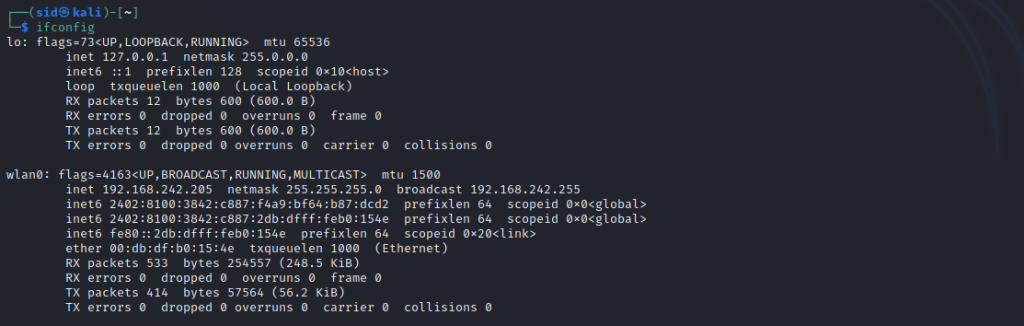
ifconfig comes from the legacy net-tools package and is absent on many current installations, if it is installed, it can still display interface addresses, but ip addr show is the supported everyday command.
ifconfig
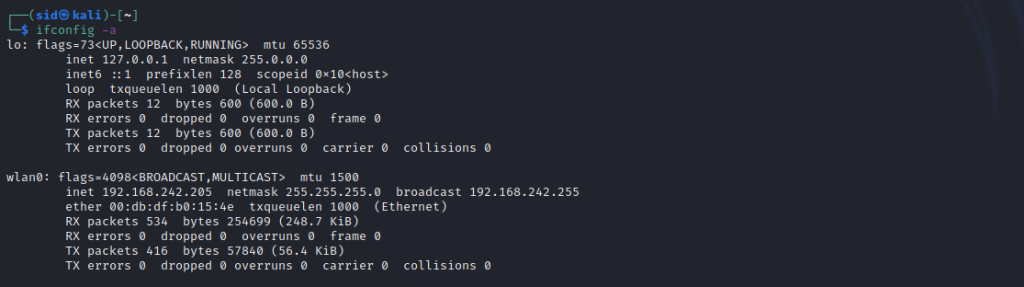
Use ifconfig -a only when you also need interfaces that are down. The output can help establish whether an adapter exists before you investigate its connection state.
ifconfig -a
Use the interface name after ifconfig to restrict its output. The same rule applies, replace wlan0 with the device that exists on your Kali installation.
ifconfig wlan0

Check the desktop connection details
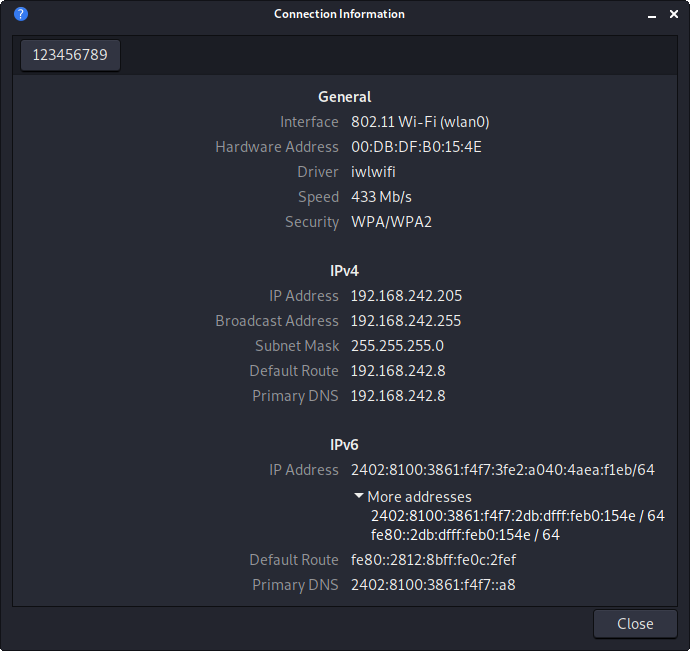
On a Kali desktop, open the network menu and choose Connection Information to inspect the active connection, the panel can show IPv4, IPv6, gateway, DNS, and hardware-address details without requiring a terminal.
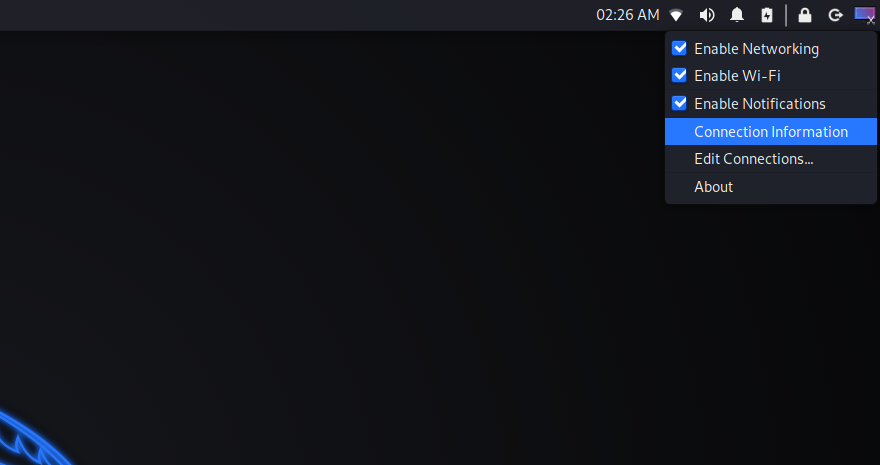
Use the panel when you need to compare the connection selected by the desktop with the interface returned by ip addr show. If no wireless interface appears, start by learning how to fix a missing Wi-Fi adapter before changing network settings.
Choose the address that matches the task
Your local address identifies Kali on the current network. Your public address is the address a service on the internet sees after routing or network address translation, and it can differ from the address shown by ip addr show.
| Need | Command or place | What to use |
|---|---|---|
| Address on a selected interface | ip addr show dev INTERFACE | inet or inet6 value |
| IPv4 only | ip -4 addr show dev INTERFACE | inet value |
| Source selected for a destination | ip route get DESTINATION | src value |
| Compact local address list | hostname -I | Non-loopback values |
| Desktop connection details | Connection Information | Active connection address |
If you are assigning addresses on a local network, learn how to configure a DHCP server on Linux, if a task mentions a MAC address, it is a hardware identifier rather than an IP address, and my guide to change a MAC address on Linux explains the distinction.
When an address is present but a hostname still fails, check routing and name resolution rather than changing the address. The IP configuration and DNS walkthrough helps you understand IP configuration and DNS, while the Anonsurf tutorial shows how to use Anonsurf on Kali Linux with a clear view of the network interface involved.
Frequently asked questions
These checks keep the command choice tied to the address you need.
What command shows my IP address in Kali Linux?
Run ip addr show. Find the active interface and read the inet line for IPv4 or the inet6 line for IPv6.
Why does Kali Linux show more than one IP address?
Kali can have loopback, wired, wireless, VPN, virtual-machine, container, IPv4, and IPv6 addresses at the same time. Use the interface and destination to decide which one applies.
How do I find the IP address Kali uses for a destination?
Run ip route get followed by the destination address. The src field in the result shows the source address Kali selects for that route.
Start with ip addr show, then use ip route get when the address must work for a particular destination, that pair gives you both the address inventory and the route decision.