
Testing an application on Ubuntu can involve sending a message from one program and reading it in another. Apache Kafka stores messages from applications for other applications to read later.
I’ll show you how to download and install Kafka on Ubuntu, then check that a consumer can read a test message.
TL;DR
Download Kafka from Apache, use a Java 17-or-newer runtime, and follow the current KRaft quickstart to start a local broker without ZooKeeper.
- For this walkthrough, use Apache Kafka 4.3.1 and its Scala 2.13 binary archive.
- Initialize the local KRaft storage once, start the broker in a terminal, then create a topic and send a test record.
- This single-broker setup is for local learning, not a production cluster.
What Is Apache Kafka?
Apache Kafka is a distributed event-streaming platform: applications publish records to it, and other applications read those records later. The broker is the Kafka server process that accepts client connections and stores records for topics.
A topic is a named stream, such as quickstart-events. It stores records as one or more partitions, which Kafka can assign across brokers.
For a first test, use one local broker because it exercises the producer and consumer flow without requiring a cluster.
A Kafka record contains a value and can also carry a key and headers. Records within a partition stay ordered, and a consumer tracks its progress with an offset. Replication copies data across brokers to keep it available if one broker fails.
| Term | What it means here |
|---|---|
| Broker | The local Kafka server process listening for client requests. |
| Topic | A named stream that groups records. |
| Producer | A client that writes records to a topic. |
| Consumer | A client that fetches records from a topic. |
| KRaft | Kafka’s metadata mode for this workflow. The quickstart does not start ZooKeeper. |
How to Download and Run Kafka on Ubuntu
These steps use Apache’s supported Kafka 4.3.1 binary archive and its KRaft quickstart. I compared the archive link on Apache’s downloads page with the 4.3.1 quickstart commands.
Keep the broker terminal open while you test it from a second terminal. Run each Kafka command from the same extracted folder.
1. Check the Ubuntu release and Java version
Kafka’s current quickstart requires Java 17 or newer. Check the Ubuntu release first so you know which packages its repositories provide, then ask the Java runtime for its version:
java -version
If Java is missing or older than 17, Ubuntu 24.04 provides the headless Java 21 runtime package. I compared its package record with Kafka’s documented minimum.
Refresh the package index and install it with this command:
sudo apt update && sudo apt install -y openjdk-21-jre-headless
Kafka’s broker and command-line tools need a Java runtime. The JRE is enough for this quickstart. A full JDK also supports compiling Java applications.
Run java -version again after installation to confirm which runtime the shell selects. Ubuntu releases can offer different package names, so check the repository before switching sources.
The Ubuntu version guide shows how to identify your release. Use the installed-package list guide to check whether Java is already present.
2. Download and extract the Kafka binary
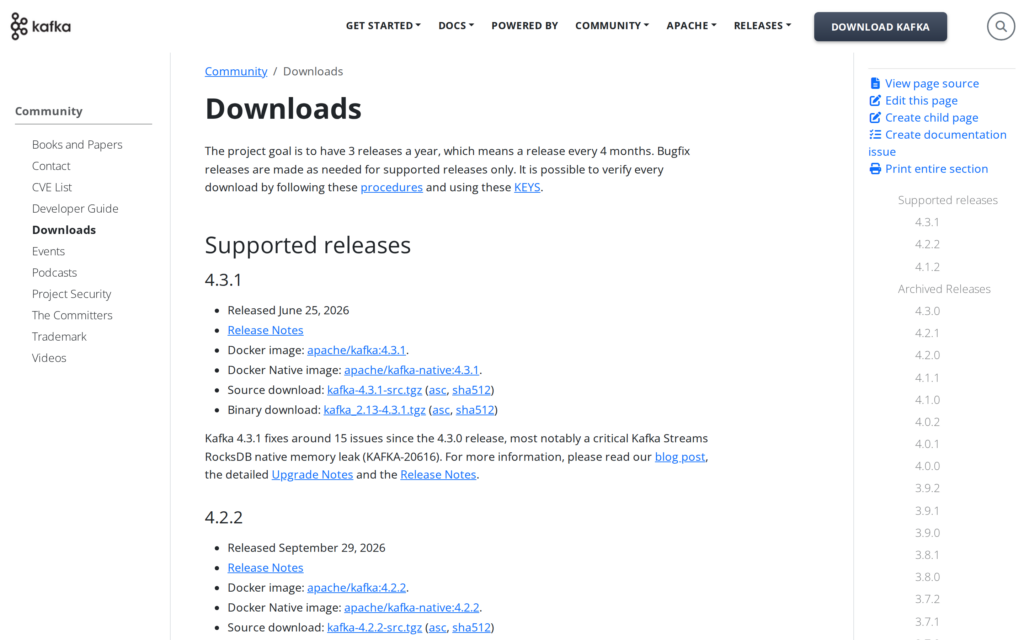
Apache’s downloads page lists supported releases and provides the binary archive alongside the source package. This walkthrough uses kafka_2.13-4.3.1.tgz.
The 2.13 part identifies the Scala build line. Apache recommends this archive when you do not need a particular Scala version.
The downloads page also lists Apache’s SHA-512 checksum file. Compare it with the archive before extracting the package.
The official Apache mirror redirect may send the request to a nearby download server. The explicit output filename keeps the next extraction command predictable even when the request follows that redirect.
Fetch the binary through Apache’s official mirror redirect, then unpack it and enter the new directory:
curl -fL -o kafka_2.13-4.3.1.tgz 'https://www.apache.org/dyn/closer.lua/kafka/4.3.1/kafka_2.13-4.3.1.tgz?action=download'
tar -xzf kafka_2.13-4.3.1.tgz
cd kafka_2.13-4.3.1
The -f option catches HTTP errors, -L follows Apache’s mirror redirect, and -o names the archive. For more, see our cURL download guide and tar command guide.
3. Format KRaft storage
Before starting the broker, generate a cluster ID with Kafka’s script and format the metadata directory with that ID:
KAFKA_CLUSTER_ID="$(bin/kafka-storage.sh random-uuid)"
bin/kafka-storage.sh format --standalone -t "$KAFKA_CLUSTER_ID" -c config/server.properties
The first command stores the generated ID in a shell variable. The second initializes metadata using Kafka’s server configuration.
Keep both commands in the same shell, and format a fresh local data directory only once.
If Kafka says the directory is already formatted, check which server configuration and data path the command uses. Keep existing data intact while you investigate.
The quickstart configuration uses temporary storage defaults. For data you intend to keep, select persistent log and metadata directories before starting Kafka.
4. Start the Kafka broker
Start the broker from the extracted Kafka directory and leave this terminal running. The quickstart keeps the client listener local for a single-machine test.
bin/kafka-server-start.sh config/server.properties
The broker runs in the foreground and keeps that terminal occupied. Open another terminal in the same directory, and watch the first for startup errors.
Use localhost:9092 as the bootstrap server. It is the local address a Kafka client uses to discover the broker.
Stop the broker with Ctrl+C when the test is complete. This quickstart does not configure a public listener.
5. Create a topic and test a message
Create a topic using the broker address and Kafka’s current bootstrap option:
bin/kafka-topics.sh --create --topic quickstart-events --bootstrap-server localhost:9092
Kafka’s bundled configuration uses one local broker, so keep the topic’s replication factor at one for this test. Describe its settings with:
bin/kafka-topics.sh --describe --topic quickstart-events --bootstrap-server localhost:9092
Start the producer in one terminal. Type a line and press Enter to send it as a record. Leave that terminal running while you start the consumer.
bin/kafka-console-producer.sh --topic quickstart-events --bootstrap-server localhost:9092
In a second terminal, run the consumer with –from-beginning so it reads records already stored in the topic:
bin/kafka-console-consumer.sh --topic quickstart-events --from-beginning --bootstrap-server localhost:9092
Seeing your line confirms the path. Stop both clients and the broker with Ctrl+C. The Linux service guide covers a later systemd setup.
What Can Go Wrong With a Local Kafka Setup?
Check the failing layer before changing Kafka configuration because each symptom points to a different next step:
| Symptom | What to check |
|---|---|
| Kafka exits with a Java version error. | Run java -version and confirm Java 17 or newer is selected by the shell. |
| The archive download fails or is an HTML page. | Use the official binary link, keep cURL’s redirect option, and confirm the file is the .tgz archive before extracting it. |
| The broker refuses to start after storage formatting. | Check that formatting completed and that you started Kafka from the extracted 4.3.1 directory with its matching config file. |
| A client cannot connect to localhost:9092. | Keep the broker process running and use the same host and port in each client command. |
| Topic creation requests too many replicas. | The quickstart uses one broker. Set the topic replication factor to one. |
I compared this archive’s SHA-512 digest with Apache’s published checksum, and the values matched. A mismatch means you should fetch the archive again before extracting it.
If the package command is unavailable on your Ubuntu release, use the distribution’s package catalogue to find a Java runtime that meets Kafka’s documented minimum.
Conclusion: Keep the KRaft Setup Local
Kafka is ready for a local check when the broker stays running, the topic command succeeds, and a consumer can read the record you sent. Keep this quickstart for learning the command flow.
For the authoritative archive, release notes and signatures, use Apache Kafka downloads. Follow the Apache Kafka quickstart for the supported procedure.
If you later decide to remove the Java runtime, consult the apt package removal guide before removing dependencies shared by other software.
FAQ
These answers cover the release, metadata mode, and the limits of this single-machine setup.
Can I install Kafka 4.3.1 without ZooKeeper?
Yes. This Kafka 4.3.1 quickstart uses KRaft storage formatting and does not start ZooKeeper. Older ZooKeeper commands belong to a different workflow.
Which Kafka download should I choose?
Use the binary archive from Apache’s supported releases page. This walkthrough uses kafka_2.13-4.3.1.tgz; the page also lists supported releases such as Kafka 4.2.2. Keep the commands and configuration matched to the version you extract.
Is one local Kafka broker suitable for production?
No. The quickstart is a single-broker learning environment and has no broker redundancy. Production needs a separately designed cluster, storage, security, monitoring, and operational plan.