
Under Other Software in Software & Updates, a third-party source can appear while applications installed from it remain installed. I find that separation useful.
Choose the source change you want to make. Think about what APT stops using when you remove the repository.
What changes when you remove an APT repository
An APT repository supplies package indexes and downloadable software, so removing its source entry stops future package searches and installs from using it while leaving software already installed from it in place.
Choose the action by what you want to change, because removing a source and rolling back packages are different operations.
| Action | What changes | What stays |
|---|---|---|
| Remove or disable a source | APT stops reading that repository’s package indexes | Installed packages remain installed |
| Run ppa-purge | The PPA is disabled and affected packages may be downgraded to Ubuntu versions | Package cleanup remains a separate decision |
| Remove a package | The selected application is uninstalled | The repository entry may still be configured |
Find the repository entry first
Ubuntu accepts .list files and deb822 .sources files, so the absence of a matching .list file does not mean the repository is missing from APT. Inspect the matching entry in /etc/apt/sources.list or a candidate file under sources.list.d, especially when apt update reports an error.
The repository helper lists enabled sources but does not show entries that are already disabled.
add-apt-repository --list
On Ubuntu 24.04.5, I ran the helper’s help command, which labels –remove as “Disable repository.”
add-apt-repository --help
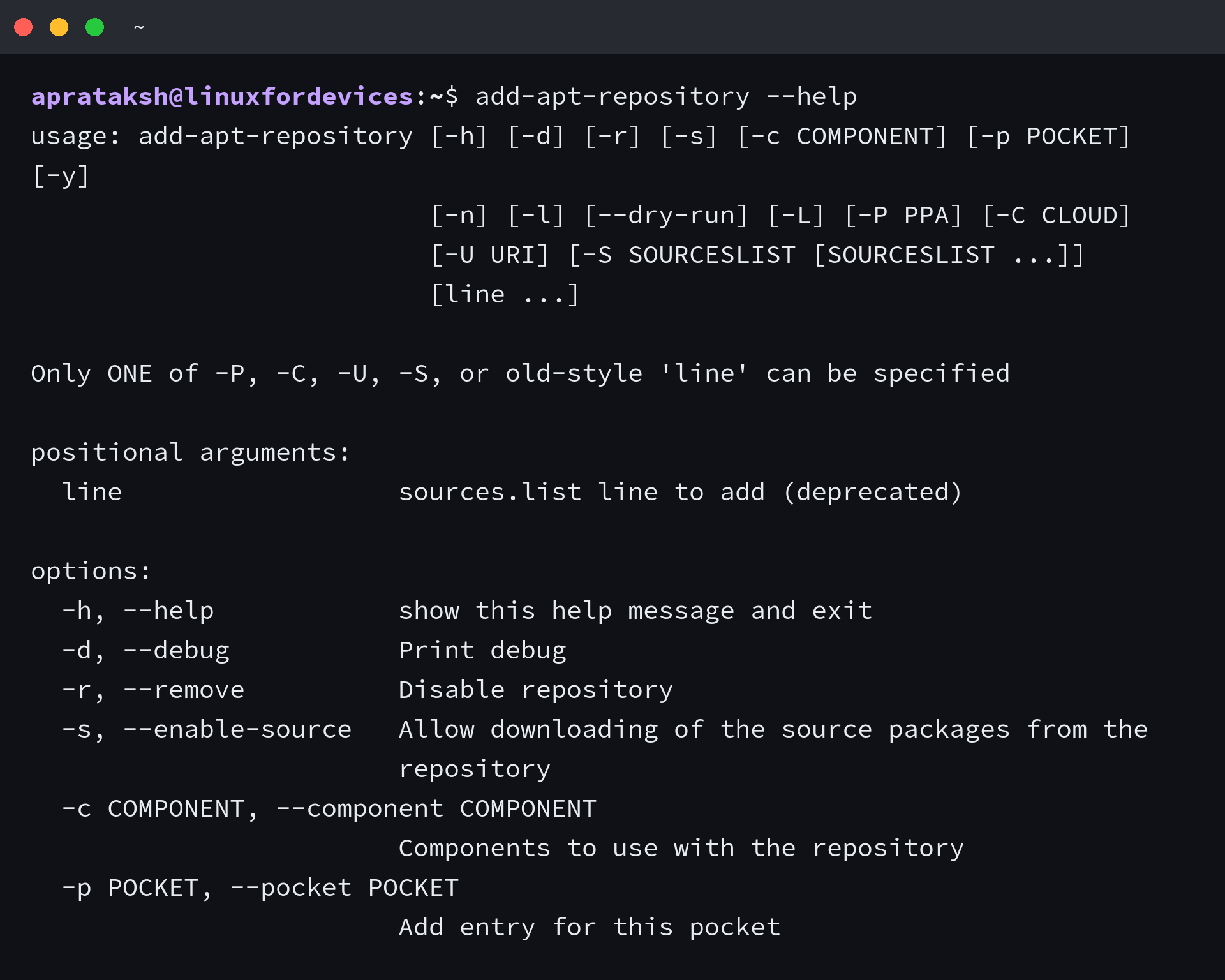
The main sources file or a file under sources.list.d holds the entry for a manually added repository. A .sources filename is valid too, so do not assume the entry is missing because there is no .list file.
Remove a repository in Ubuntu
Pick a method that matches how the source was added. Use ppa-purge only when you want a package rollback, because the other routes leave installed package versions alone.
Remove a PPA with add-apt-repository
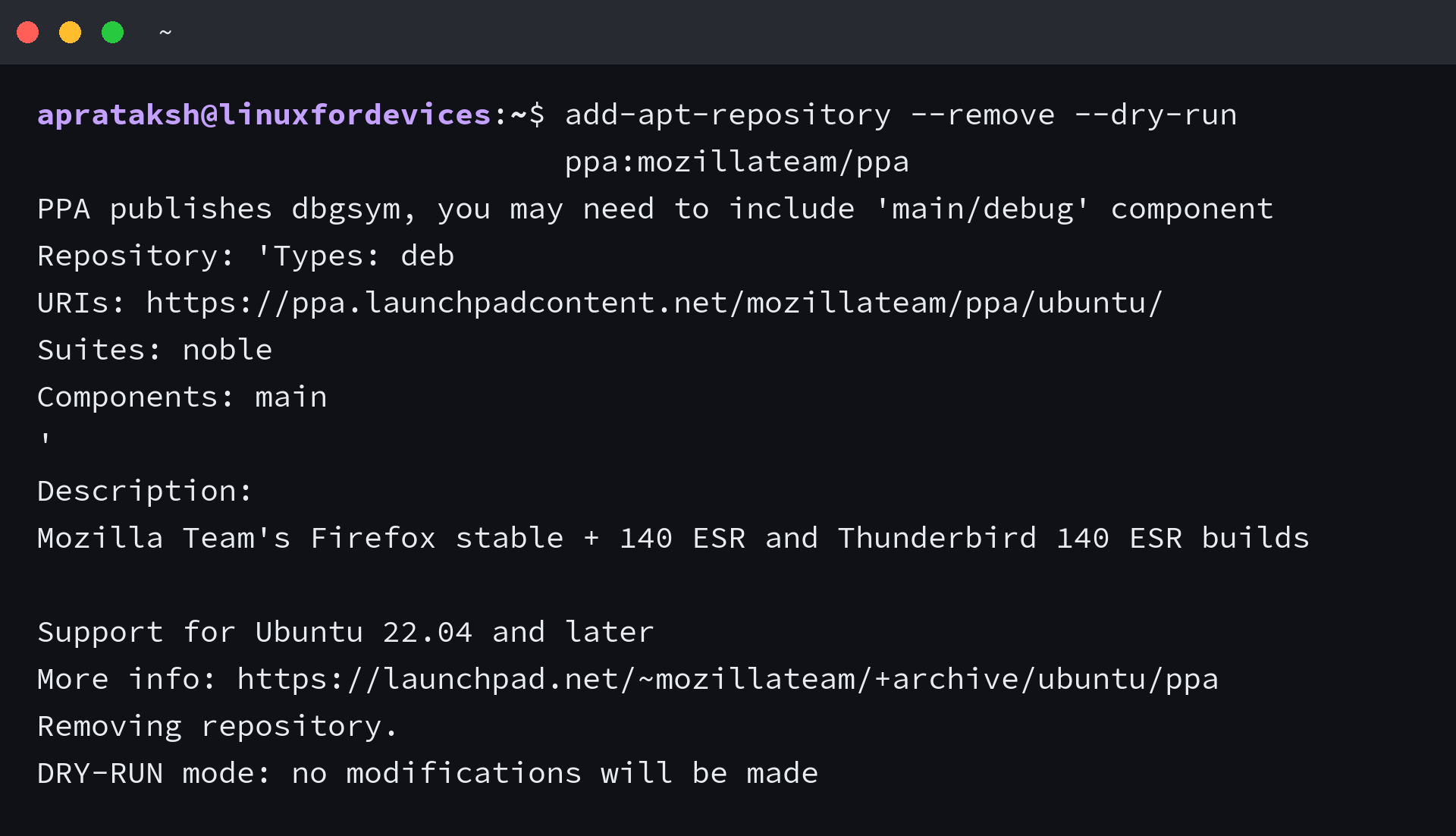
For a Launchpad PPA, use this when you know its owner and archive name. The dry-run option previews the source the helper resolves before it changes anything.
The example previews Mozilla Team’s PPA. Replace it with your target PPA to preview that source.
add-apt-repository --remove --dry-run ppa:mozillateam/ppa
I ran the preview on Ubuntu 24.04.5. Its output named the PPA’s Noble source and ended with “DRY-RUN mode: no modifications will be made.”
Once the owner and archive match the source you want to remove, run the removal command. Replace owner/archive with that PPA’s actual Launchpad name.
sudo add-apt-repository --remove ppa:owner/archive
The helper disables matching source lines. It may leave a file behind when that file also contains other entries, so check the active source list rather than treating the file’s presence as proof that removal failed.
Use Software & Updates
On Ubuntu Desktop, open Software & Updates from Activities and select the Other Software tab. Select the third-party source and click Remove. Authenticate when prompted, then close the window so the package sources can reload.
The Ubuntu Desktop Guide names the same application and tab in its software repository instructions. Applications already installed from a removed source stay installed.
Edit or remove the matching source file
Use the file route when the repository was added manually or the helper cannot identify it. Open the matching file in a text editor such as nano, then change only the entry that belongs to the repository.
| File format | Safe source-only change |
|---|---|
| .list | Comment out the matching deb or deb-src line by placing # at its start |
| .sources | Add Enabled: no to the matching deb822 stanza |
| sources.list | Comment out only the matching repository line |
APT accepts traditional one-line source files and deb822 files in its additional-source directory. A deb822 file can contain several entries, so disabling the whole file may affect unrelated sources.
If a source file contains only the repository you want gone, remove that exact file. Do not use a wildcard or remove Ubuntu’s shared source file.
If you choose permanent file removal, confirm the filename and its contents first by following the rm command reference for targeted paths.
Use ppa-purge only for package rollback
Use ppa-purge when you want to disable a PPA and attempt to return affected packages to versions in Ubuntu’s archives. The tool can change package versions, so review the proposed package transaction before confirming it.
sudo apt install ppa-purge
sudo ppa-purge ppa:owner/archive
Ubuntu publishes ppa-purge in its package archive. If your goal is to uninstall an application rather than roll back its PPA version, use the separate apt remove and purge workflow.
Check APT after the source change
Refresh the package index after changing a source. This makes APT read the remaining configured repositories.
sudo apt update
- If the same error remains, look for another entry for that repository in sources.list or a second file under sources.list.d.
- If the removed PPA no longer appears but the package is still installed, that is expected. Check installed packages separately.
- Do not delete a shared signing key just because one source was removed. A source may name its own key with Signed-By, and another repository may still use that keyring.
If you need to compare apt with apt-get before refreshing the index, see the LinuxForDevices apt command comparison. An update error can also persist when a duplicate or malformed source line remains in another file.
Installed packages need a separate decision
Removing a source changes where APT looks for packages, while installed packages keep their current state. Check whether the package remains installed before deciding whether to keep it, uninstall it, or roll it back.
apt list --installed apt
Replace apt with the package name you want to inspect. The installed-package listing guide covers other ways to find that name.
Frequently asked questions
A package can remain installed after its repository is removed, and a .sources stanza can be disabled without deleting its file.
Does removing a PPA uninstall its packages?
No. Removing the source stops APT from using it for future package indexes, but packages already installed stay installed.
How do I remove a repository stored in a .sources file?
Find the entry in the additional-source directory. For temporary deactivation, add Enabled: no to its deb822 stanza, or remove the dedicated file only if it contains no other sources.
When should I use ppa-purge?
Use ppa-purge when you intend to remove a PPA and ask APT to roll back affected packages to available Ubuntu versions. Choose separately whether to uninstall the application.
Do I need to delete the repository’s signing key?
No, removing the source entry stops APT from reading that source. Delete a dedicated key file only after checking that no other repository uses it.