
Composing a message or checking local mail from a Linux terminal starts with knowing what the mail command can do on your system. The Linux mail command is a terminal client for writing messages and reading the current user’s local mailbox.
I’ll show how to check which mail implementation is installed and use GNU Mailutils to compose a message.
TL;DR: Linux mail command
The Linux mail command composes messages and reads local mailboxes, while a configured mail transfer agent or SMTP relay handles delivery beyond the machine.
- Use mail with a recipient and -s to compose a message.
- Pipe text to mail for noninteractive use.
- Run mail without a recipient to inspect the current user’s mailbox.
What is the Linux mail command?
The Linux mail command is a terminal client. GNU Mailutils sends when given a recipient and reads the current user’s system mailbox without one. An MTA, or mail transfer agent, routes outgoing messages to a mail server because the client and delivery route are separate parts of the process.
How to use the Linux mail command step by step
Choose interactive composition or standard input for the message body. The examples use GNU Mailutils syntax, so replace the reserved example address before sending.
Step 1: Check the installed mail implementation
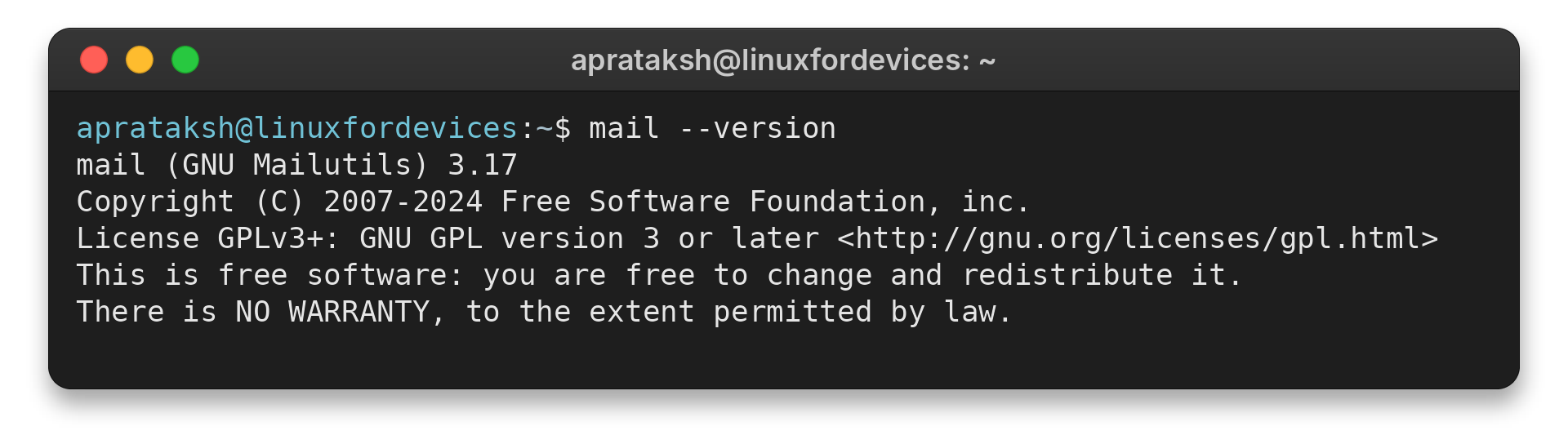
Check the version before choosing an attachment option. I ran this check in this refresh and it returned GNU Mailutils 3.17 with exit status 0.
mail --version
The output names the installed client and its release.
aprataksh@linuxfordevices:~$ mail --version
mail (GNU Mailutils) 3.17
Copyright (C) 2007-2024 Free Software Foundation, inc.
License GPLv3+: GNU GPL version 3 or later <http://gnu.org/licenses/gpl.html>
This is free software: you are free to change and redistribute it.
There is NO WARRANTY, to the extent permitted by law.
If mail is missing on Ubuntu or Debian, the mailutils package provides GNU Mailutils mail. Use the distribution’s package manager and review its setup prompts before proceeding. Our APT package search guide shows how to check an Ubuntu package name, and the Linux package management guide covers the broader installation tools.
sudo apt install mailutils
Use the package manager and package name documented for your distribution when they differ.
Step 2: Compose an email interactively
Mail prompts for a Cc address, then accepts the body. Finish the input with Ctrl+D to hand it to the configured local mail route.
mail -s "Build report" [email protected]
Replace the example address with a checked destination. The subject is quoted so the shell passes its two words as one argument. Ctrl+D ends standard input, so use it only after the complete message body is ready.
Step 3: Provide the message body from a command or file
Pipe text to mail to avoid interactive composition, and use printf with a fixed format string when message text can contain percent signs. For shell input basics, see our Linux command-line guide.
printf '%s\\n' 'The build completed.' | mail -s "Build report" [email protected]
To send a longer prepared body, redirect a checked text file into the command.
mail -s "Build report" [email protected] < "$HOME/build-report.txt"
The redirect sends file contents as the body, not as an attachment. For text with shell variables or special characters, quote carefully and keep private data out of command history.
Step 4: Attach a file with GNU Mailutils
GNU Mailutils uses -A or the long-form attachment option for a file. The body still comes from standard input, and the recipient remains a separate argument.
printf '%s\\n' 'The report is attached.' | mail -s "Build report" -A "$HOME/reports/build.pdf" [email protected]
Check the path, read permission and contents before sending. A file name does not verify its format, and message encoding adds overhead beyond the original file size. See our Ubuntu CLI email attachment guide for a focused walkthrough of that workflow.
This behavior is specific to GNU Mailutils. Check the local manual before adapting the command to another mailx program.
Step 5: Read and manage local mail
The local mailbox shows message headers first. Enter a message number to read it, use + or – to move through messages, and enter d followed by a number to mark a message for deletion.
mail
# At the mail prompt:
1
+
d 1
quit
These prompt commands operate on local mailbox contents, not a remote webmail account. GNU Mailutils normally moves read messages from the system mailbox to the user’s mbox when the session closes, while deleted messages are removed. The exit command leaves without applying session changes.
Mail command errors and delivery limits
The table links each symptom to a check because the client, shell and delivery route can fail independently.
| Symptom | What to check |
|---|---|
| mail: command not found | Check the distribution package and install it with the approved package manager. Confirm the program is installed and available on PATH. |
| Cannot open a file | Check spelling, case, current directory, file readability and parent-directory access. |
| Send command completes but nothing arrives | Check the local MTA or SMTP relay configuration and its delivery logs or queue. |
| Attachment option is rejected | Identify the installed program and consult its help. Flag meanings vary. |
| Remote server rejects the message | Check relay authentication, sender policy, recipient validity and size limits with the administrator or provider. |
Remote mail requires a configured MTA or SMTP relay, and the route logs show its delivery status.
For scripts, pipe explicit text rather than relying on an interactive prompt, and log the program’s exit status. Our Linux shell types guide explains which interpreter runs a shell script.
Conclusion: use mail with a configured route
The GNU Mailutils manual documents its message and mailbox options. Check your distribution’s manual page for its packaged command.
FAQ
These answers cover the common distinction between sending, reading and delivering mail.
How do I install the Linux mail command?
Install the mail client package provided by your distribution, such as mailutils on Ubuntu and Debian. Package installation may offer MTA configuration choices.
How do I read mail with the Linux mail command?
Run mail without a recipient to open the current user’s local system mailbox, then enter a message number to read a message.
How do I attach a file with mail?
With GNU Mailutils, use -A or its long-form attachment option. Check your installed implementation because other mailx variants can use different flags.
Why does mail not deliver to an external address?
The client needs a configured local mail transfer agent or SMTP relay to route messages beyond the machine. Check that route and its logs.