

Vim keeps the :q you type on screen as text when the editor is in Insert mode. That is why the window looks frozen and nothing you press closes it.
Press Escape once and the same two characters run as a command.
Why the :q you type lands in the file as text
Vim reads every keystroke according to the mode it is in, and Insert mode treats each character as content for the buffer, so the colon and the q go into the line under your cursor like any other letter.
I typed :q into a file in Insert mode to see what the screen shows. The characters landed in the buffer and the status line still read — INSERT –.
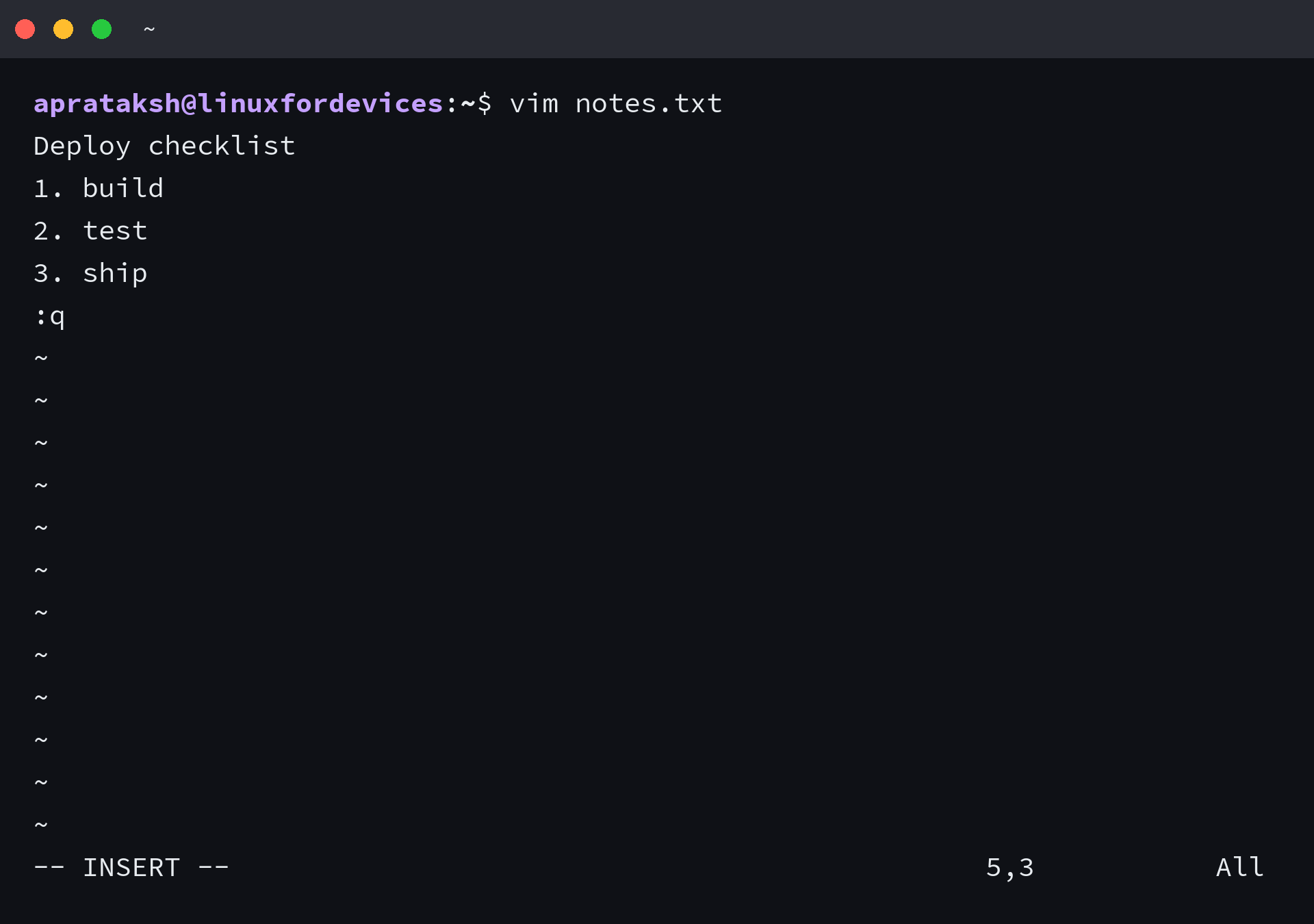
Escape returns you to Normal mode, and the same two characters then open a command line at the bottom. I pressed Escape and typed the same command again, and Vim closed without touching the file.
Press Escape first if it shows — INSERT –, — REPLACE — or — VISUAL –. A single pass through a Vim tutorial makes the mode model stick, but for leaving the editor the indicator carries the whole lesson.
The two questions every exit command answers
Every exit answers the same pair of questions, and they are worth settling before you type anything. Should this exit keep your edits, and what should Vim do when it cannot?
Every quit command is one of those two answers, and the exclamation mark always means the same thing: go ahead and lose what the plain form protects.
| Command | Writes your edits | With a changed buffer | Where it runs |
|---|---|---|---|
| :q | no | refuses with E37 | command line |
| :q! | no | discards and quits | command line |
| ZQ | no | discards and quits | Normal mode |
| :cq | no | discards and returns exit status 1 | command line |
| :wq | always | writes and quits | command line |
| 😡 | only when changed | writes and quits | command line |
| ZZ | only when changed | writes and quits | Normal mode |
| :qa | no | refuses once, then names the buffer | command line |
| :qa! | no | discards every change and quits | command line |
| :wqa | always | writes every changed buffer and quits | command line |
Read the table by column rather than by command. The spellings collapse into three jobs: leave and keep, leave and drop, or stay and say what is in the way.
These commands have behaved the same way for years, and the version check takes one line. My copy is Vim 9.1.
vim --version | head -1

Quit without saving anything
:q! is the command to reach for when you opened a file by accident or changed your mind about an edit. It writes nothing and leaves the file on disk exactly as it was.
I added a line to a file, left with :q! and read the file back with cat. The added line was gone and the original contents were untouched.
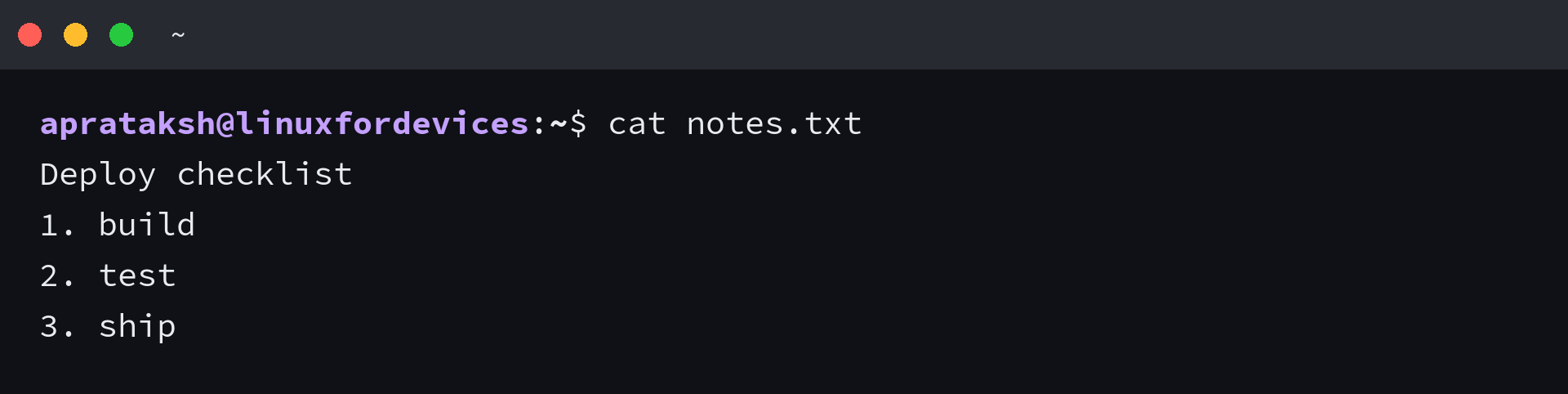
ZQ does the same job from Normal mode, with no colon involved.
:cq is the one to use inside a script or a commit message, because it returns exit status 1 instead of 0. Whatever launched the editor can then tell a finished edit from an abandoned one, which is how a git commit message gets cancelled cleanly.
vim -c q notes.txt; echo "q exit: $?"; vim -c cq notes.txt; echo "cq exit: $?"
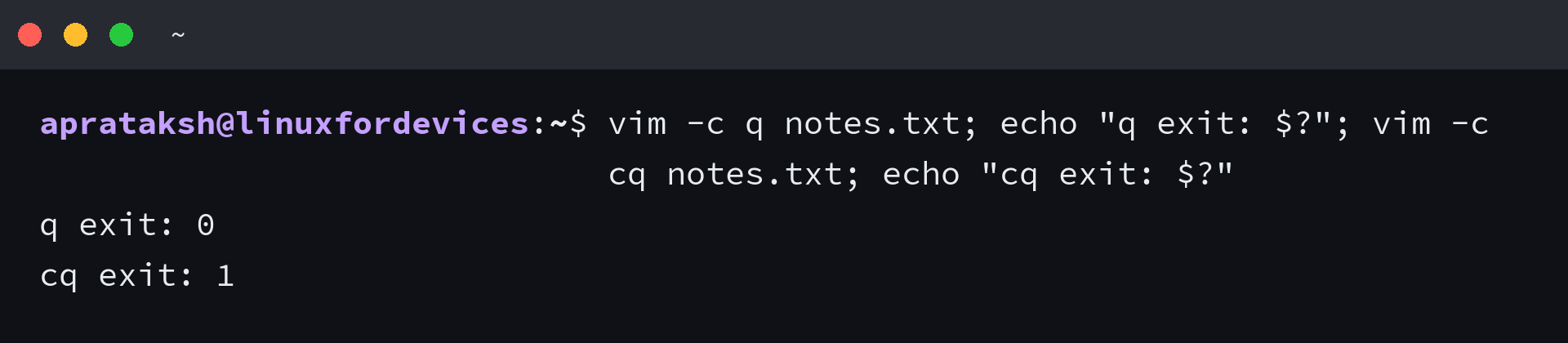
I read 0 from :q and 1 from :cq at the shell prompt, so the two exits are distinguishable from the outside.
Quit when you changed nothing
:q is the safe exit and it closes Vim only when the buffer still matches the file on disk.
The refusal is the error readers meet first. Vim prints E37: No write since last change (add ! to override) and stops at a Press ENTER prompt with the editor still running.
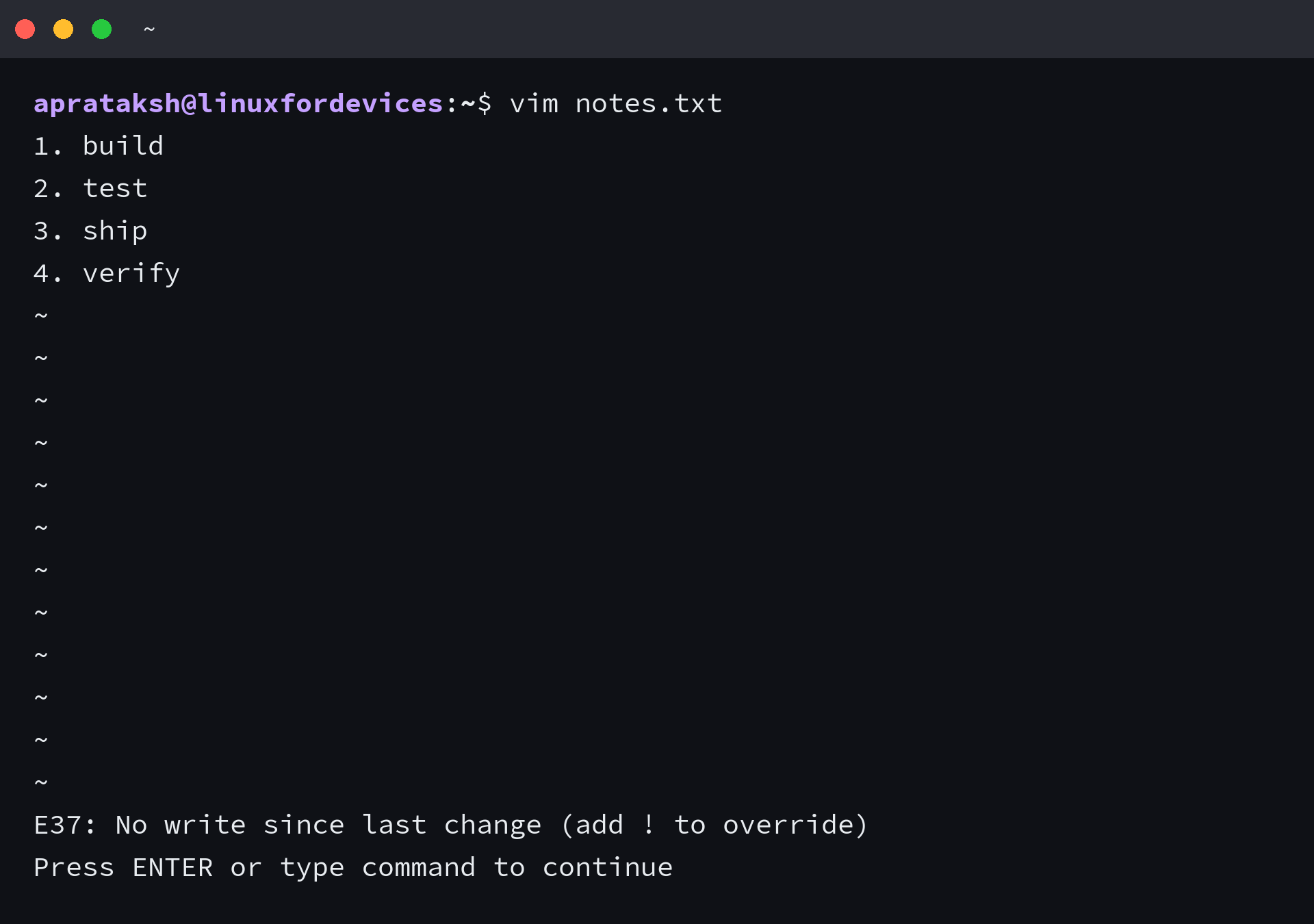
Press Enter to clear the message, then pick a side: :wq to keep the change, or :q! to drop it.
The keys people press when the screen looks stuck do something else entirely.
| Key | What it actually does |
|---|---|
| Escape | returns to Normal mode, and does nothing at all if you are already there |
| Control-C | leaves Insert mode the same way Escape does, and interrupts a command that is still running |
| Control-Z | suspends Vim and drops you at the shell, where fg brings the session back |
| Closing the terminal window | ends the process and leaves a swap file behind |
Save and quit
:wq writes the file and closes the window. 😡 and ZZ do the same thing with one difference that decides which one you should use.
The Vim manual describes 😡 as being like :wq but writing only when changes have been made, and ZZ as the Normal-mode spelling of the same command. :wq writes either way.
That difference is visible on disk. I ran the same file through both commands with no edits pending and compared the modification time after each one.
stat -c %y notes.txt; vim -c x notes.txt; stat -c %y notes.txt; vim -c wq notes.txt; stat -c %y notes.txt
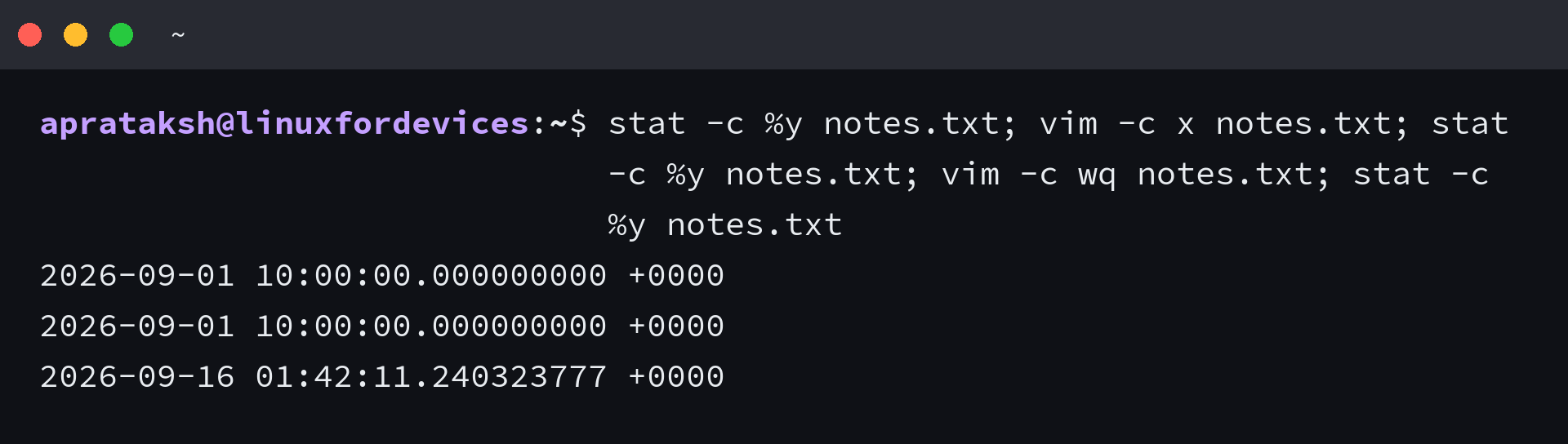
The first two timestamps match and the third one moved. Anything watching that file, a build tool or a sync client, sees a write from :wq and nothing from :x.
I typed ZZ into a buffer with an unsaved line and the file came back with the line in it, which is the behaviour the manual promises. Once leaving is automatic you are ready for changing and replacing text in Vim, where the same mode rules decide what each key does.
Close every file you opened at once
A session with several files open holds several buffers, and quitting them separately is how an edit gets forgotten. :qa closes all of them, and it refuses when any buffer holds unsaved work.
The refusal names the buffer that would lose something. With two changed files open, Vim printed E37: No write since last change and then E162: No write since last change for buffer “two.txt”, which tells you where the unsaved work is sitting.
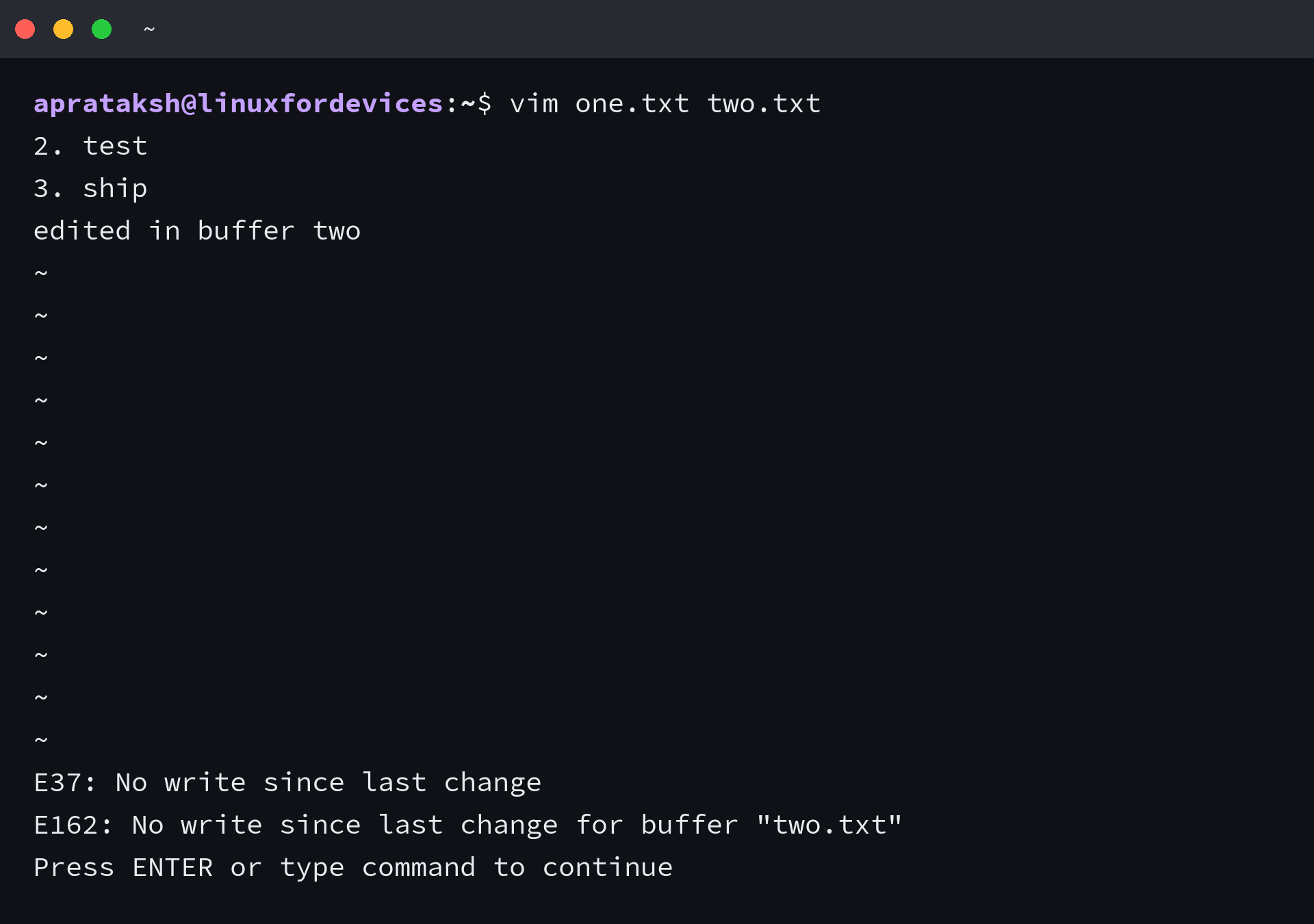
The multi-file exit has three spellings, and the choice between them is the same one as before.
- :qa! quits every file and discards all of the changes
- :wqa writes every changed buffer first, then quits
- ZQ and :q! cover the single buffer, so they leave the others untouched
The bang keeps the same meaning when you move between files, since :next refuses to leave a changed buffer and :next! leaves it and throws the change away.
To watch :wqa write both files, edit two buffers in one session and print them afterwards.
vim -o one.txt two.txt -c 'call setline(1,"alpha")' -c 'wincmd w' -c 'call setline(1,"beta")' -c 'wqa'; cat one.txt two.txt
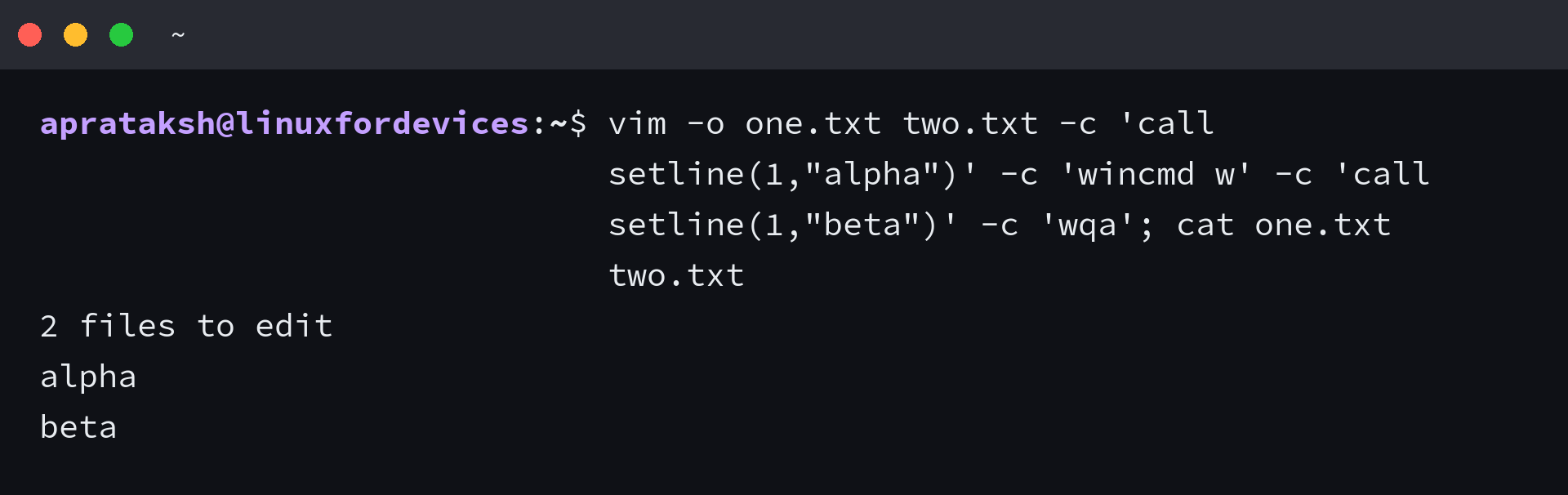
I ran that session myself and both files came back with their new first lines, which is what write-all is for. The same session left with a bang in the middle would have destroyed those edits instead.
When Vim still refuses
Every refusal names its own reason, and the message tells you which command to reach for.
| Error | Meaning | Type this |
|---|---|---|
| E37: No write since last change | the buffer holds edits that this command would discard | :wq to keep them, :q! to drop them |
| E32: No file name | there is no file to write yet | :wq notes.txt, or save with :w notes.txt |
| E45: ‘readonly’ option is set | the file opened read-only, often because of its permissions | :wq! to write anyway, or fix the file mode |
| E162: No write since last change for buffer “name” | a different buffer in the session holds the change | :wqa to write everything, :qa! to discard everything |
I produced both of those messages myself, because the exact text is what you search for later.
vim -c 'wq' -c 'q!'; vim -R notes.txt -c 'wq' -c 'q!'
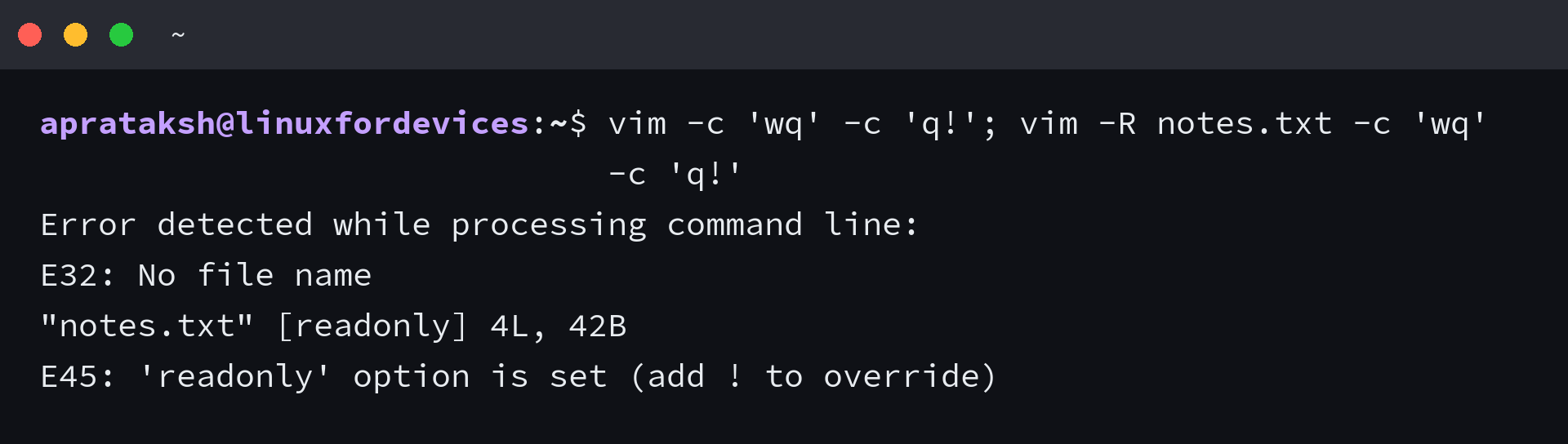
The read-only case turns up on configuration files, since editing a system config file usually means opening it through sudo or inheriting a mode you cannot write with. Changing the file mode is the cleaner repair, and the bang is the quick one.
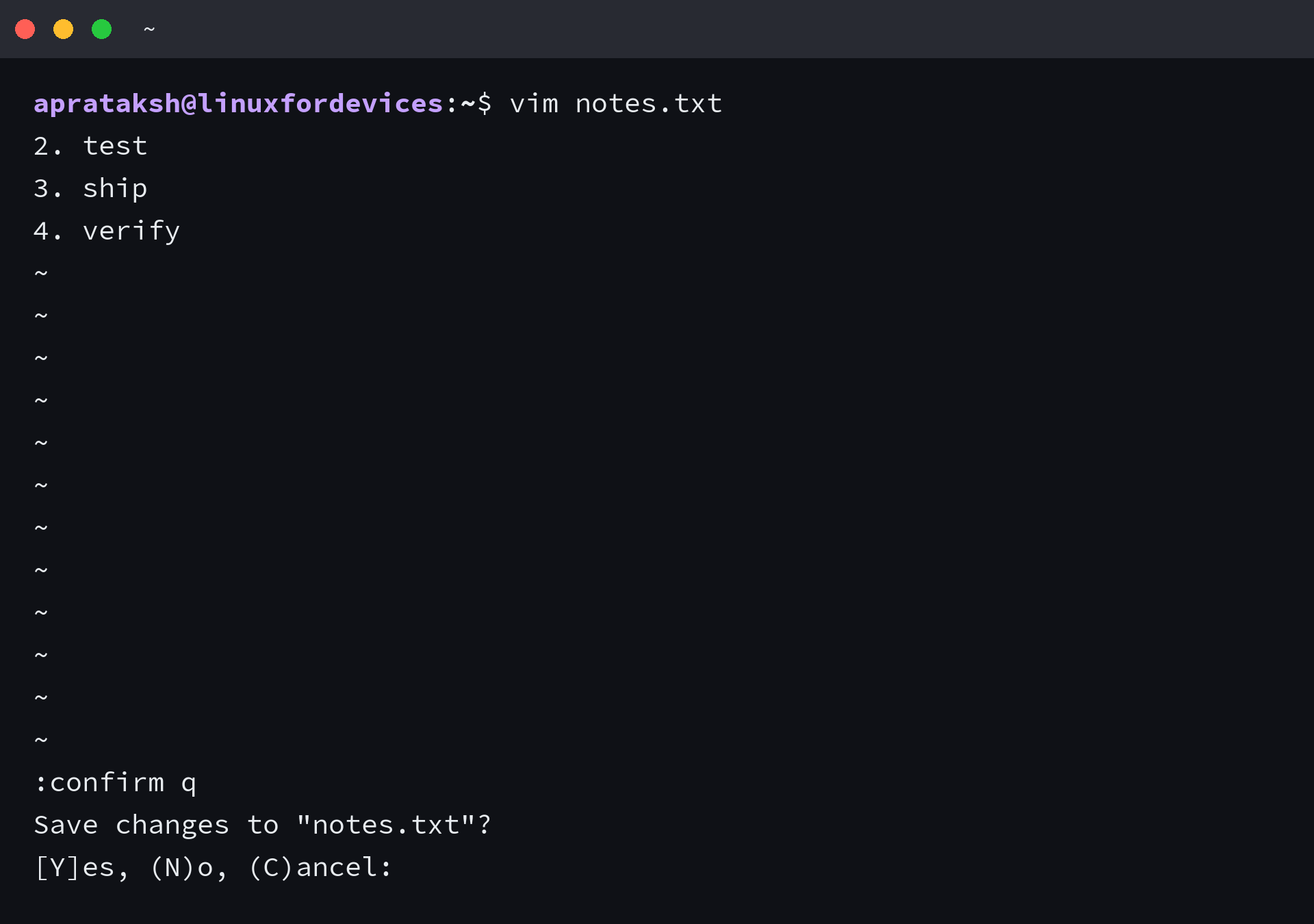
The confirm prompt asks instead of refusing. You reach it with :confirm q, and a letter then picks save, discard, or stay.
When the screen stops responding altogether, the last resort sits outside Vim, where another terminal can find the process and end it with the kill command. Reopening the file afterwards lets Vim offer to recover the buffer from its swap file.
Practise the quit on a scratch file
Leaving Vim comes down to reading the mode indicator at the bottom of the screen and then picking the command that matches what you want to happen to your edits.
Make a scratch file and run the three outcomes once each. The first quit refuses, the second keeps the edit, and the third drops it.
printf 'line one\n' > /tmp/scratch.txt
vim /tmp/scratch.txt
Pressing i, typing a word, then pressing Escape and typing :q makes Vim refuse with E37. That refusal is the safe default doing its job rather than a fault.
Type :wq instead and reopen the file to see the added word, then change it once more and leave with :q! to watch the edit disappear.
The next steps are search and replace in Vim and your own key bindings. If modal editing itself is what you dislike rather than the commands, nano keeps its shortcuts on screen, the comparison with Vim covers the trade, and other terminal editors are worth a look.
Frequently asked questions
How do I exit Vim without saving?
Press Escape, then type :q! and press Enter. The exclamation mark discards your changes. From Normal mode, ZQ does the same thing without a colon, and :cq quits the same way while returning exit status 1.
What is the difference between :wq and 😡 in Vim?
Both write the file and quit. :wq writes whether or not the buffer changed, while 😡 and ZZ write only when there is something to save, which leaves the file’s modification time alone when nothing changed.
How do I quit all open files in Vim at once?
:qa closes every file in the session, and it refuses when any buffer holds unsaved changes. Use :qa! to discard them all, or :wqa to write every changed buffer before quitting.
What does E37 No write since last change mean?
Vim is holding edits that the command you typed would throw away. Type :wq to write them and quit, or repeat the same command with a bang, as in :q!, to discard them.
Why does :q appear in my file instead of closing Vim?
You typed it in Insert mode, so Vim stored the characters in the buffer instead of running a command. Press Escape to return to Normal mode, then type :q and press Enter.