

ArmCord is now Legcord, so the supported Linux packages, project site, and app identity use the Legcord name. Install Legcord from its official download page or GitHub repository, then choose a package that matches your distribution and processor architecture.
ArmCord is now Legcord
The former ArmCord GitHub address redirects to the Legcord repository, while armcord.app no longer belongs to the client project and currently serves unrelated adult content.
Legcord wraps Discord’s web app in Electron and can load Vencord, Equicord, or Shelter. The project is not affiliated with Discord and says that using it breaks Discord’s Terms of Service.
Choose the right Linux package
Use Flatpak for a distribution-neutral install with sandboxed updates, choose the Debian package on Ubuntu-family systems, or use AppImage for a portable file.
| Package | Best fit | Update path |
|---|---|---|
| Flatpak | Most desktop distributions | Flatpak update |
| DEB | Debian and Ubuntu families | Download the next release package |
| AppImage | Portable use | Replace the AppImage file |
If package formats are new to you, Linux package management explains repositories and dependencies. The Linux command-line primer covers the terminal navigation used below.
Install Legcord on Debian or Ubuntu
Open the Legcord releases page and download the DEB file for your architecture. Run the architecture check first so you choose amd64 for most Intel or AMD PCs, arm64 for 64-bit ARM systems, or armhf for 32-bit ARM where a matching release exists.
dpkg --print-architecture
From the directory containing the downloaded package, let APT install the file and resolve its dependencies. The wildcard keeps the command valid when the release number changes.
sudo apt install -y ./Legcord-*-linux-$(dpkg --print-architecture).deb
If you copy a release asset URL instead of downloading in your browser, the wget command reference shows how to save the file with a chosen name. Verify the installed package before opening the desktop app.
dpkg-query -W -f='${Package} ${Version} ${Architecture}\n' legcord

The output names the installed package, release, and architecture. If the architecture differs from the value returned by dpkg, remove the package and download the matching DEB.
Install Legcord with Flatpak
The Legcord project sanctions the Flathub package, although Flathub labels the listing unverified. Install it from the configured Flathub remote, then launch the same application ID.
flatpak install flathub app.legcord.Legcord
flatpak run app.legcord.Legcord
Flatpak limits some host access. Rich Presence can be restricted because a sandboxed client cannot scan every running process.
Run Legcord as an AppImage
Download the AppImage that matches your processor from the official releases page. Mark it executable, then run it from the download directory.
chmod +x Legcord-*-linux-*.AppImage
./Legcord-*-linux-*.AppImage
If the shell reports Permission denied, chmod and chown on Linux explains the executable permission.
Complete the first-run setup
Legcord opens a setup flow before loading Discord. Choose a client mod only when you need its plugins, and confirm the app came from the official project before signing in.
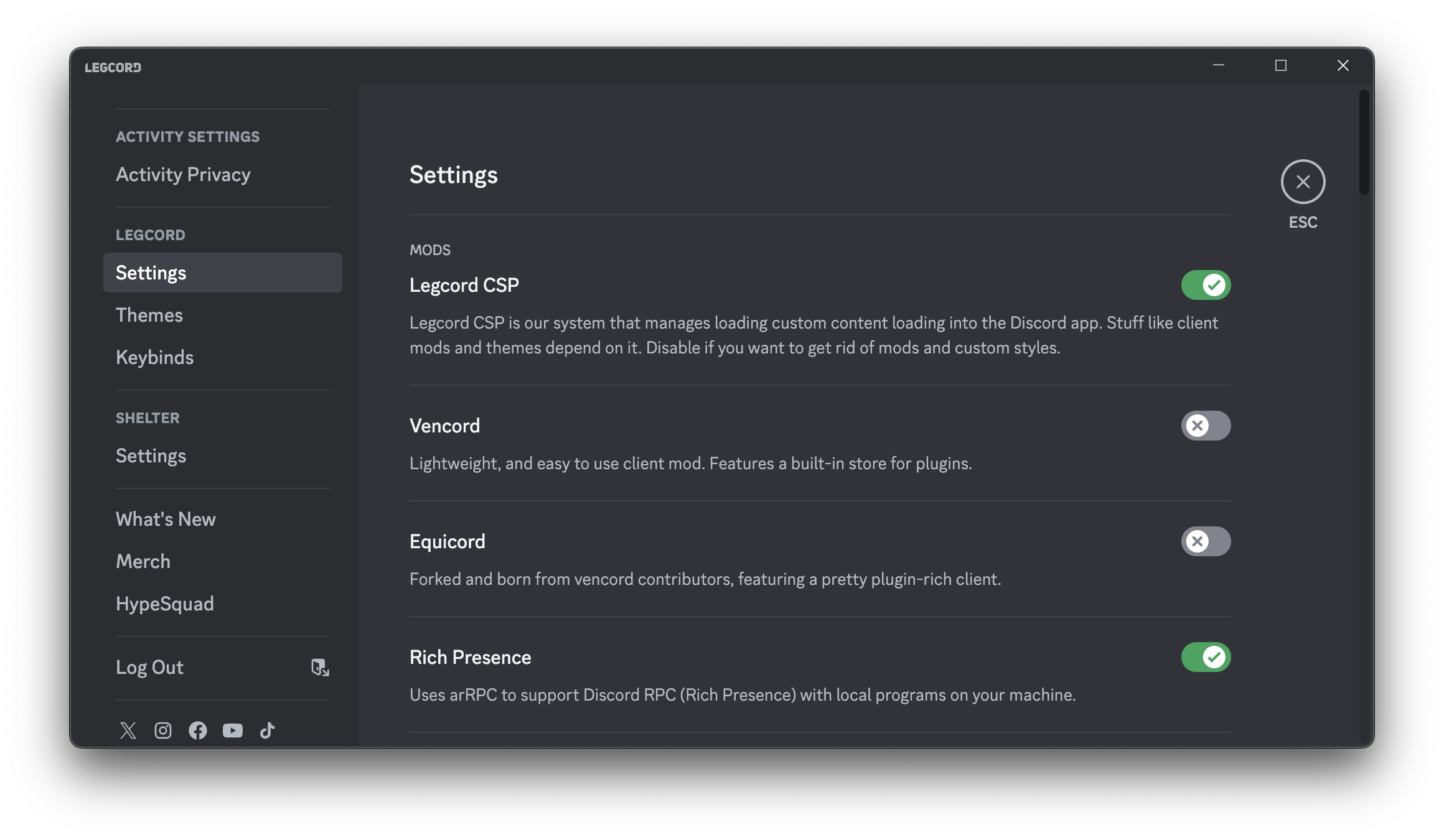
Open Discord settings and select Legcord Settings to change mods, themes, keybinds, or Rich Presence. If an Electron window behaves differently on Wayland, the Sway setup guide explains the compositor layer.
Remove Legcord
Use the removal command that matches the installed package, or delete the AppImage file for the portable version.
sudo apt remove legcord
flatpak uninstall app.legcord.Legcord
Legcord FAQ
Is ArmCord the same as Legcord?
Legcord is the current project name. The former ArmCord GitHub repository redirects to Legcord, and current packages use the Legcord application and package names.
Is Legcord safe to use?
Download Legcord only from legcord.app, its GitHub repository, or the project-sanctioned Flathub listing. The source is public, but Legcord is a third-party Discord client and its project says use breaks Discord’s Terms of Service.
Does Legcord support ARM Linux devices?
Yes. Current releases provide packages for 64-bit ARM and selected 32-bit ARM systems alongside x86-64 builds. Match the release asset to the architecture reported by your package manager.
Install one package path, verify its architecture, then open Legcord Settings before enabling any mod. Stop before signing in if the download source or app identity does not match the official Legcord project.