
Before updating a Java application on Linux, identify which Log4j version it uses. Apache Log4j is a Java logging library that an application can include as a dependency.
I’ll show you how to check package records and a JAR manifest, then update the package or application dependency that owns the copy.
TL;DR: Check Log4j in the package database and JAR manifest
Check the Linux package database for distribution-managed copies, then inspect the manifest inside an application JAR when the package query does not identify the version your service loads.
- Debian and Ubuntu: query installed packages with dpkg-query.
- For a JAR file, read META-INF/MANIFEST.MF and its Implementation-Version.
- Update through the package manager or the application’s Maven/Gradle dependency, not by replacing a guessed system file.
What is Apache Log4j?
Apache Log4j is a Java logging project. Log4j API is the interface code can call, while Log4j Core is the reference runtime implementation that processes those logging calls.
That distinction matters when checking a version. A package query reports a distribution package. An application may load its own Log4j Core from a bundled JAR or from a Maven or Gradle dependency, so the version on disk and the version selected by the running application can differ.
Java applications use logging libraries to record events such as startup messages and errors. Log4j is one option, but a host can run Java software without a system-wide Log4j package because the application may include its own dependency. A package listing answers what the operating system installed, not automatically what every Java process loads.
Log4j API and Log4j Core can also have different roles in the same dependency set. The API provides the logging interface, and Core supplies an implementation. When checking an advisory, match the affected component named by Apache or your Linux vendor rather than treating any filename containing “log4j” as the whole answer.
| Part | Role | What to inspect |
|---|---|---|
| Log4j API | Interface used by application code | Dependency metadata |
| Log4j Core | Runtime logging implementation | Resolved runtime artifact |
Log4j is a Java logging library. Linux packages can install it, and Java applications can bundle it inside their archives. The useful question is which copy the application uses.
How to check and update Log4j on Linux step by step
Use dpkg-query to identify distribution-managed packages, then inspect the application archive when its dependency is bundled. Start with the package inventory because it gives the system-level record before you search application files.
Step 1: Check Debian or Ubuntu packages
The dpkg-query man page says package-name wildcards can return records regardless of status. Save this program as check_log4j_version.py to inspect matching package records and their state.
import subprocess

result = subprocess.run(
    ["dpkg-query", "-W", "-f=${binary:Package} ${Version} ${db:Status-Abbrev}\\n", "*log4j*"],
    capture_output=True,
    text=True,
    check=True,
)
print(result.stdout.rstrip())
python3 check_log4j_version.py
liblog4j1.2-java un

The package query returned a record with status un. Here, u marks an unknown desired action and n means the package is absent from the installed set. The blank version means dpkg has no installed Log4j version to report, and dpkg cannot see libraries bundled in applications or outside its records.
On Debian-family systems, apt list -a liblog4j2-java shows versions known to configured repositories. Compare that repository candidate with the installed version from dpkg-query. This command lists repository packages, while the dpkg record identifies what is installed.
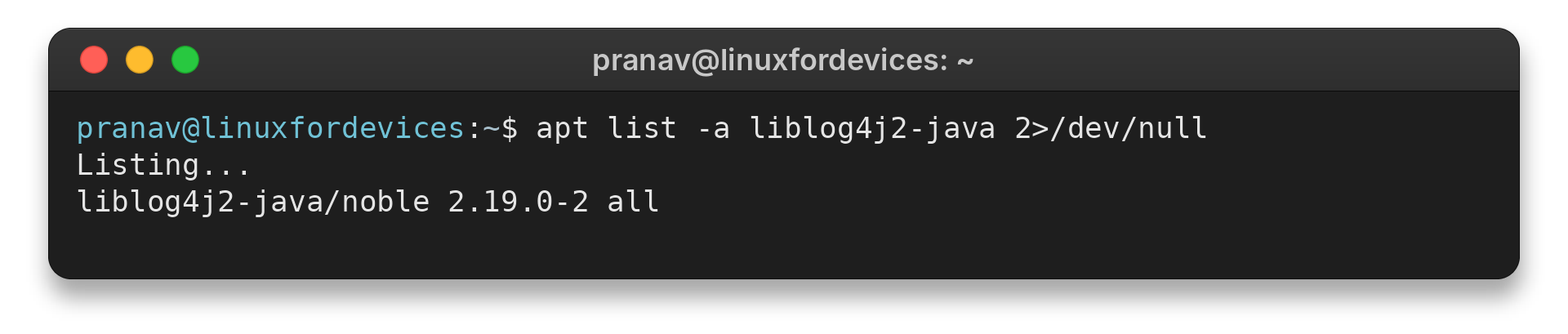
The terminal output lists liblog4j2-java version 2.19.0-2 from the noble repository. This is the repository version available to APT, while dpkg-query reports the installed package state.
Step 2: Locate candidate JAR files
A filename search narrows candidate archives, but filenames do not prove which version an application loads.
find /opt /usr/share/java -type f -iname '*log4j*.jar' 2>/dev/null
Read access depends on the directory permissions. Add sudo only when needed and permitted. A scan of these directories does not cover every application-specific location, containers, mounted volumes, or nested archives.
Change the search roots to match the software you run. A service installed under /srv or a user-owned deployment directory falls outside a search limited to /opt and /usr/share/java.
A broader scan takes longer and can cross mounted filesystems. Check the Linux archive commands guide when you need to inspect archive contents.
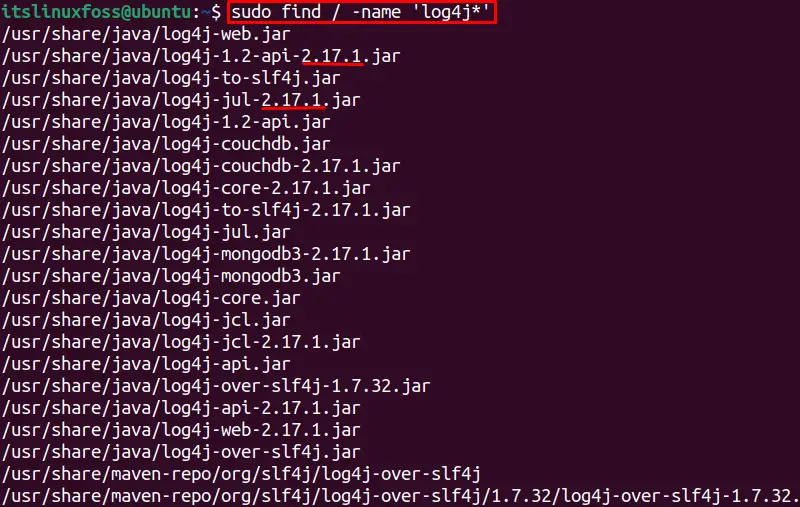
The retained find screenshot shows the file-discovery step. A matching name is a lead for inspection, not a security verdict or confirmation that a process loads that file. The command in the image searches a wider filesystem root than the scoped example above.
Step 3: Read the JAR manifest version
A JAR is a ZIP-format Java archive. Its manifest can identify the implementation version, which is stronger evidence than guessing from a filename such as log4j-core.jar.
unzip -p /path/to/log4j-core.jar META-INF/MANIFEST.MF | grep -E '^(Implementation|Bundle)-Version:'
Replace the example path with the candidate JAR found in the previous step. If unzip is unavailable, the JDK’s jar tool can list the archive and extract its manifest for inspection.
The manifest may omit a version field, especially in repackaged or shaded archives. Inspect the build metadata or use an archive-aware scanner instead of inferring a version from the file name. A missing field leaves the archive’s Log4j contents unknown.
| Evidence | What it establishes | What it does not establish |
|---|---|---|
| JAR filename | Candidate archive to inspect | Loaded version or vulnerability status |
| Manifest version | Version declared in that archive | Whether a running process loads it |
| Build report | Resolved dependency for a build | Whether that build is deployed |
A shaded JAR combines classes and resources from dependencies into a new archive. The original dependency JAR and its filename may no longer exist as a separate file. An outer application archive can also contain another archive, so a filesystem search for files ending in .jar will not reveal every nested library.
When a manifest check is inconclusive, inspect build output or use a scanner that supports nested archives. Record the artifact path and component it finds so you can distinguish an application bundle from an unrelated library.
Step 4: Update the copy’s actual owner
For a distribution package, review the installed and candidate versions, then apply the distribution’s supported update. On Debian or Ubuntu, refresh package metadata and upgrade the named package only after checking the proposed change.
sudo apt update
apt list --upgradable 2>/dev/null | grep -i log4j
sudo apt install --only-upgrade liblog4j2-java
Package names vary by release and repository, and a package may be absent or held back. Confirm the proposed package and version before accepting the transaction. Do not download a random JAR and overwrite a path under /usr/share/java.
Before accepting a package change, check the proposed actions. Confirm it updates the intended Log4j package without removing dependencies or changing unrelated services. A distribution may backport a fix while keeping an older-looking version string, so check its security notice before rejecting the package.
| Copy owner | Update path | Verification |
|---|---|---|
| Linux distribution | Supported repository package | Installed package record and vendor notice |
| Java application | Maven, Gradle or vendor release | Resolved runtime artifact and deployed build |
On another distribution, use its own repository and package tool rather than copying the apt command. The relevant package name can differ, and vendors may backport security fixes without adopting the same upstream version label. Keep the package source and the vendor advisory with your change record so a later audit can identify what was installed.
For an application-managed dependency, update the declared Log4j artifact in Maven or Gradle, preferably through the project’s dependency management or BOM. Build and deploy the application, then restart it according to its deployment procedure. Replacing a loose JAR without updating the dependency declaration can be undone by the next build or release.
Keep the application’s Java runtime and deployment method in view when changing its logging dependency. If Java itself is missing or installed from the wrong source, follow the Java installation guide for that environment. Use sudo only for system-level package actions that require administrator access.
Step 5: Verify the resolved version
After the upgrade, repeat the package query or inspect the rebuilt application artifact. For Maven projects, review the dependency tree for the resolved org.apache.logging.log4j artifacts. For Gradle, inspect the runtime dependency report.
Check the runtime classpath when deployment packaging can change what the build resolved. Verify the service is running the newly deployed artifact, not only that a repository or build file mentions a newer version. The package database, build report and running process answer related but different questions.
If the service is managed by systemd, restart it through the service’s documented deployment procedure after installing the rebuilt artifact. The Linux service management guide covers the general start, stop and restart commands. A successful restart confirms only that the service started, so check its logs and deployed dependency as well.

The output records the matching package and its un status. Here, the package is absent from the installed set, so dpkg has no installed Log4j version to report. Continue with the application archive checks when the service bundles its own library.
Why a Linux package search can miss Log4j
Linux package tools report packages they manage, while Java applications can bundle dependencies. Filename searches also miss renamed, shaded or nested copies.
| Check | What it establishes | Limit |
|---|---|---|
| Package listing | Records in the package database | Does not inspect application bundles |
| Filename search | Visible matching files | Does not show nested archive entries |
| Manifest | Version declared in that archive | Repackaging can omit or alter it |
| Build report | Dependency selected for a build | May not match the deployed artifact |
An executable archive may include dependencies inside the outer JAR or WAR. A plain find -name ‘*log4j*.jar’ sees filesystem filenames and skips entries stored inside archives.
The MergeBase Log4j detector documents scanning nested and shaded Java archives. Use a maintained scanner from its official source when a broad inventory is required, then review what each finding means. Confirm its current usage and output against the official README before running it on production artifacts.
Log4j API and Log4j Core are separate artifacts. Security advisories often identify the affected component, so do not treat the presence of log4j-api alone as proof that a vulnerable Core copy is present or absent. Check the current Apache Log4j security page and the affected component for the issue you are assessing.
Log4j 1.x is a different legacy line that Apache says reached end of life in 2015 and remains unsupported. Replacing a Log4j 1 JAR with a Log4j 2 JAR is not a drop-in update because the API namespace and configuration format differ. Follow Apache’s migration guide and test the application.
Apache’s download page currently lists Log4j 2.26.1, while its installation guide says the Log4j 2 runtime requires Java 8 or later. Choose a package from your distribution’s security notice or the dependency policy supported by your application. The upstream release alone does not determine the right package for every Linux system.
A version check is inventory, not a complete vulnerability assessment. The answer can depend on the exact component, release line, configuration and vendor backports. Use the Apache advisory and your distribution’s security notice before deciding whether a particular build is fixed.
Common errors when checking Log4j on Linux
A package query, filename search, or manifest check can each leave part of the picture unknown. Match the evidence to the copy your application uses before deciding what to update.
- A dpkg record marked un means the package is not installed, even if its name matches Log4j.
- A JAR filename does not prove its declared version or whether a running process loads it.
- A missing manifest version can result from repackaging. Check build metadata or scan nested archives instead of guessing.
- An older-looking distribution version may include a vendor backport. Read the distribution security notice before replacing it.
Conclusion: Update the dependency that ships with the application
Use dpkg or apt for distribution-managed Log4j, and inspect the manifest or dependency report for application-bundled copies. Update through the package or build system that owns the copy, then verify the deployed artifact.
For further details, see the Apache Log4j installation guide, its security advisories, and the Log4j 1 migration guide. Related LinuxForDevices guides cover installing Java, using sudo, Pacman, RPM packages, Linux services, and the Apache Ant build tool.
FAQ
These answers clarify what package and application checks can tell you.
How do I check Log4j version on Linux?
Use the distribution package database for installed packages, then inspect the JAR manifest or application dependency report for a bundled copy. A filename search alone cannot identify every nested dependency.
Does dpkg show Log4j inside a Java application?
No. dpkg reports packages recorded in the system package database. It does not inventory libraries bundled inside an application archive or installed outside dpkg.
Can I update Log4j by replacing its JAR file?
Do not replace a guessed system JAR. Update a distribution package through its package manager or change the application’s Maven or Gradle dependency, rebuild, deploy and verify the runtime artifact.
Is Log4j 1 the same as Log4j 2?
No. Log4j 1 is an unsupported legacy line, and Log4j 2 changes the API namespace and configuration format. Follow Apache’s migration guide rather than swapping the JAR alone.