

The download finished, but the terminal is full of unreadable characters and there’s no file in the folder. I like that curl can send the same response straight to a file, with the saved name either taken from the URL or chosen by you.
The key difference starts with where curl sends the response when you leave out an output option. Start there, then you can see what changes when you save it locally.
What curl writes when you omit an output option
When curl receives a response without an output option, it writes the response body to standard output. That works when another command reads the response through a pipe. For a binary file, those bytes can spill into the terminal instead of becoming a usable file.
Use -o to choose a local filename, or -O to take the filename from the URL path. I downloaded the same small robots.txt response both ways and compared the resulting files with SHA-256. Both contained the same 30 bytes.
curl -fL -o robots.txt https://httpbin.org/robots.txt
wc -c robots.txt
Check curl and choose a destination
Use a directory where you can write the file and where its name will not replace something you need.
- Confirm curl is installed and supports the protocol used by the download URL.
- Change to the destination directory or provide a path with -o.
- Use a trusted HTTPS URL and do not run commands copied from an untrusted source.
curl --version
Download a file with curl
Use -O when the URL path gives you a useful filename, or -o when you want to choose the local name.
1. Keep the filename from the URL
Uppercase -O, also written –remote-name, uses the last path component of the URL. The existing screenshot shows a release link with -L, which follows its redirect before saving the remote filename.
curl -fLO https://httpbin.org/robots.txt
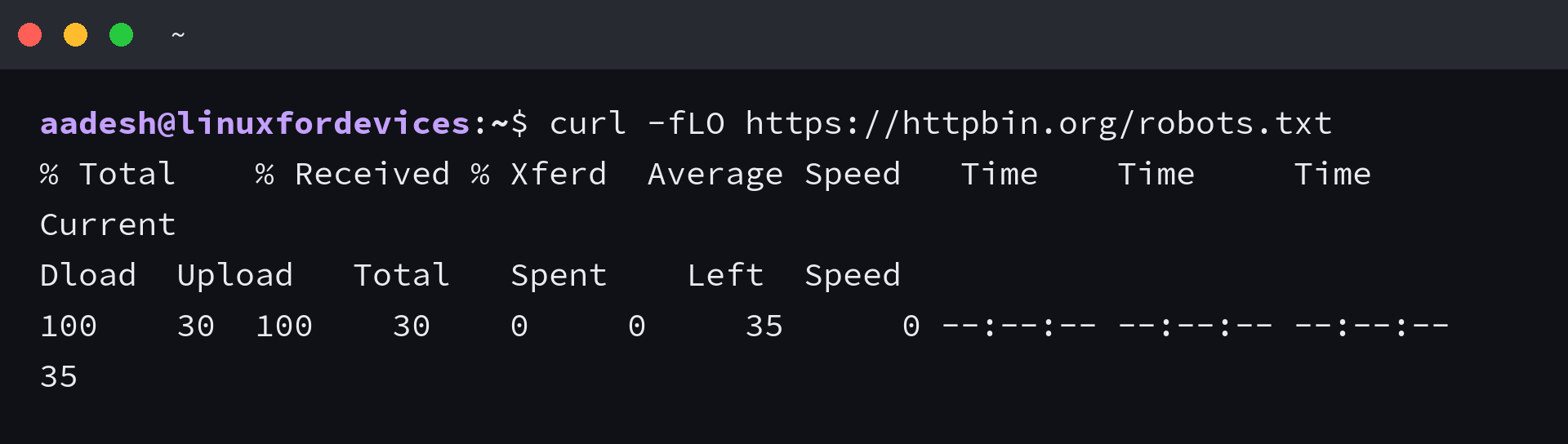

2. Choose the local filename
Lowercase -o, or –output, takes the path before the URL. The screenshot shows the chosen filename alongside a longer release filename in the URL.
curl -fL -o robots-copy.txt https://httpbin.org/robots.txt

3. Follow redirects and resume a partial file
Add -L when a URL redirects to the file, as release and CDN links can do.
Use -C – with the same output path to resume a partial file. curl derives the offset from the existing file size, and the server must support byte ranges.
curl -fL -o archive.tar.gz https://httpbin.org/range/500
curl -fL -C - -o archive.tar.gz https://httpbin.org/range/500
Check the response before trusting the file
A completed transfer does not prove the server returned the file you expected. A sign-in page, a not-found page, or an application error can arrive as HTML even when the request itself completed. Use -f to make HTTP responses with status 400 or higher return a curl error instead of a normal response body.
| What you see | What to check |
|---|---|
| curl reports an HTTP error | Keep -f so HTTP status codes 400 and above produce a failure instead of saving the response body as a normal result. |
| The file is empty | Check the URL and access requirements, then inspect the response headers. |
| The file contains HTML | Check for a redirect, login page, or error response. Add -L for redirects, but use the direct download URL when the response is a web page. |
| Resume is rejected | The server may not support byte-range requests. Restart without -C – or use a source that supports ranges. |
For a downloaded archive, choose the extraction command that matches its format.
For the next step, see the tar command guide if you have a tar archive. If the file is a ZIP or gzip archive, use the zip and unzip reference or gzip examples.
Verify the saved bytes before using them
When the server publishes a checksum, compare it with a locally calculated checksum before installing or opening the download.
wc -c robots.txt
sha256sum robots.txt
For a small text file, checking its size and first lines is enough to catch an HTML error page before you treat it as the requested file.
If you are deciding whether curl or wget fits the transfer, compare their jobs in the curl and wget comparison. For a file hosted on your own FTP service, start with the Ubuntu FTP server setup and confirm that the server permits the requested download.
Common questions about curl downloads
How do I save a file with curl?
Use curl -o filename URL to choose a local name, or curl -O URL to use the filename in the URL path. Add -L when the URL redirects to the file.
Why did curl save an HTML page?
The URL may return a login, redirect, or error page instead of the file. Inspect the URL and response status, and use -L when the server redirects to the download.
Can curl resume a broken download?
Use curl -C – -o filename URL to continue from the existing file size. The server must support byte-range requests, or curl cannot resume the transfer.