
Anonsurf is a Kali-focused script that changes system network routing through Tor with iptables. Install it only in a disposable Kali environment, inspect the installer before granting root access, and treat it as a routing tool rather than an anonymity guarantee.
What Anonsurf changes
The upstream project describes Anonsurf as a port of ParrotSec components for Kali Linux. Its documented start command applies system-wide Tor routing, while stop restores the previous iptables rules.
That scope is why a Kali virtual machine is a safer place to learn it than a workstation you depend on. If you need a command refresher before continuing, use these Kali Linux command basics.
Know the limits before turning it on
Tor routing can hide the source address that a destination sees, but it does not make an identified account anonymous or remove identifying browser behavior.
A site can still associate activity through sign-in state, copied identifiers, browser characteristics, uploaded files, or information you submit.
Use HTTPS for the service you visit because Tor exit traffic does not add end-to-end protection to plain HTTP content.
System-wide routing also changes more than a browser tab. Local services, software updates, remote shells, and tools with their own proxy settings can fail or behave differently after Anonsurf starts.
A disposable virtual machine gives you an exit path when a routing rule or dependency breaks. Take a snapshot before installation so you can restore a known configuration rather than debugging a mixed set of firewall changes.
Check the environment before installation
The repository documents Kali rolling on amd64 as its tested target, and the Kali download page listed Kali 2026.2 when this refresh was prepared, so update the installed system before adding a tool that modifies routing and DNS behavior.
sudo apt update
sudo apt full-upgrade
Restart if the upgrade installs a new kernel, then check the architecture and release information. Do not continue on an unsupported distribution just because the installer reaches a package manager.
uname -m
cat /etc/os-release
Clone the upstream project and inspect the installer
Clone the upstream repository rather than copying commands from an unknown mirror, then read installer.sh before you run it with sudo because it builds a Debian package and installs Tor, I2P-related dependencies, and supporting packages.
git clone https://github.com/Und3rf10w/kali-anonsurf.git
cd kali-anonsurf
sed -n '1,220p' installer.sh
The retained clone captures show the repository checkout and its project directory, which must contain installer.sh.


Install Anonsurf
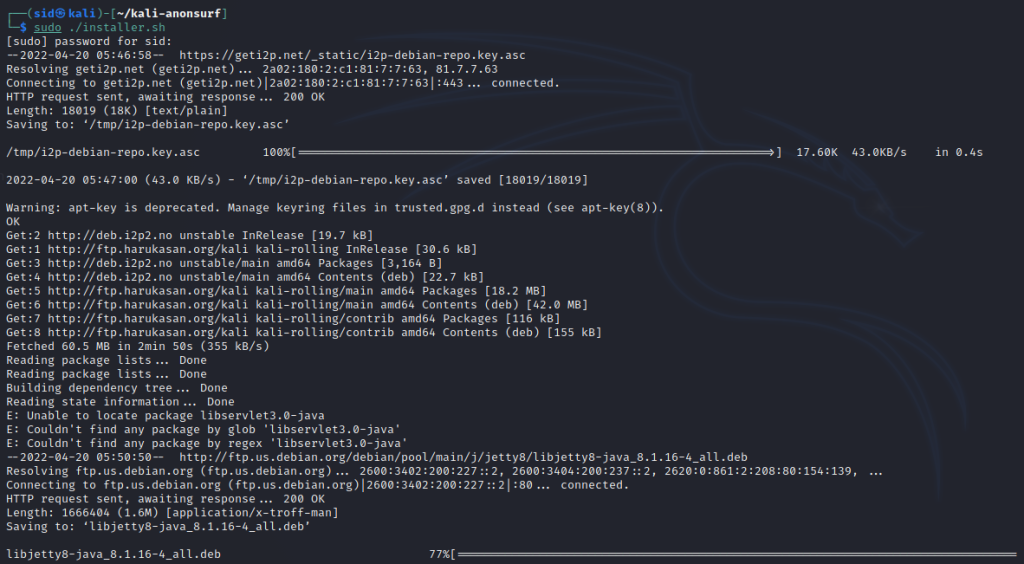
Run the installer from the cloned directory only after reviewing it, because it creates and installs the package with sudo.
sudo ./installer.sh
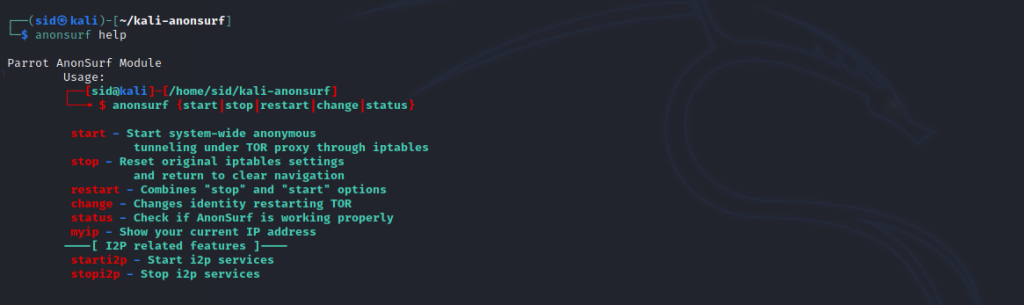
The retained installer output is a completion reference, and anonsurf shows the subcommands supported by the installed package.
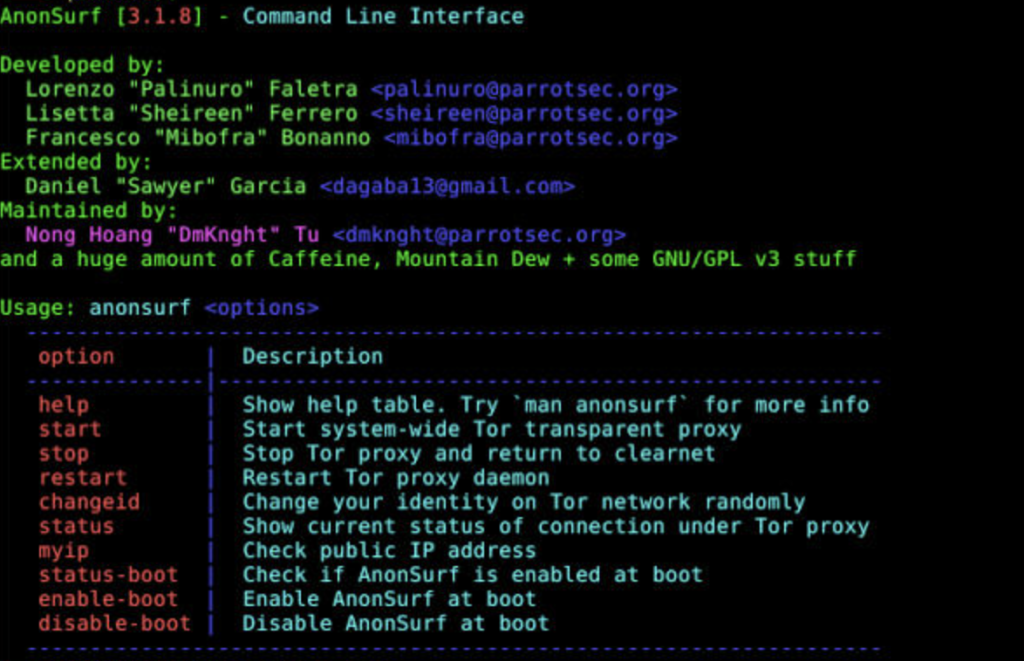
anonsurf
Start, inspect, and stop the routing mode
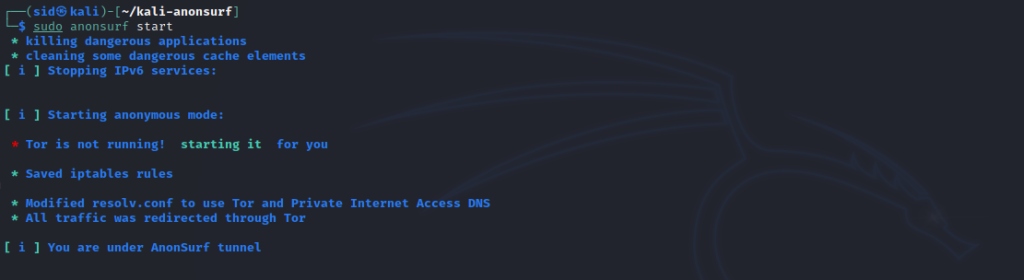
Start Anonsurf only when you are ready for machine-wide routing changes that can affect remote sessions and services.
sudo anonsurf start
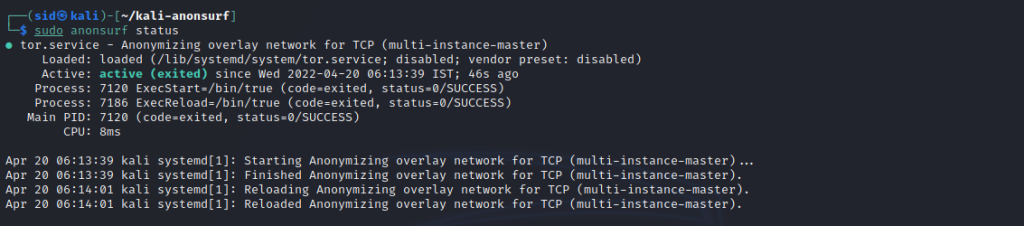
sudo anonsurf status
The retained start and status captures show the established command flow, and you can inspect listening sockets with ss on Linux when a service cannot connect.

Change a Tor circuit and inspect the reported address
The documented change command restarts Tor to request a new circuit, but it does not prove that every application, browser fingerprint, account session, or DNS request is anonymous.
sudo anonsurf change
sudo anonsurf myip
The retained circuit-change and address-check captures help you confirm command behavior and then test whether the service you need still works through the new route.

Return to the prior network rules
Stop Anonsurf after the task because the project documents stop as the command that resets original iptables settings and returns the system to its usual network path.
sudo anonsurf stop
The retained stop capture belongs here because it shows the exit step that prevents an accidental long-lived routing change. If the command reports an error, review your package state with this Linux package-management guide before reinstalling.

Troubleshooting checks that change the next move
An installer permission error means you should inspect the repository checkout and file ownership, not make every file executable. Learn the difference between executable and writable permissions in this chmod and chown reference.
- Confirm that you are in the cloned kali-anonsurf directory.
- Review installer.sh before retrying a privileged command.
- Use anonsurf status after start, then verify the service that needs network access.
- Run sudo anonsurf stop before changing unrelated firewall or network settings.
Routing failures can come from the local network configuration or from Anonsurf. Check the active address and DNS configuration with this Linux networking guide.
Then review how host firewall controls interact with application traffic in this firewall overview.
What the existing captures show
The final retained capture shows the command help view from the earlier walkthrough. Keep it as a visual reminder to inspect the installed tool locally, because the upstream usage list is the command contract for your installation.
Anonsurf on Kali Linux FAQ
These answers cover the support boundary that matters before you change system routing.
Does Anonsurf make every activity anonymous?
No. Anonsurf changes system routing through Tor and iptables, but it does not remove browser fingerprinting, account identity, unsafe application behavior, or the need for HTTPS.
Which Kali environment does the upstream project document?
The upstream repository documents Kali rolling on amd64 as its tested target. Use a disposable Kali environment and inspect the installer before running it with sudo.
How do I restore normal routing after using Anonsurf?
Run sudo anonsurf stop. The upstream usage text says that stop resets the original iptables settings and returns the system to its usual network path.
Why should I review installer.sh first?
The installer adds dependencies, builds a Debian package, and runs installation commands with elevated privileges. Reading it tells you which repositories, packages, and routing components the command will change.
Use it with a defined boundary
Use Anonsurf when you understand the machine-wide routing change and can restore it. For an authorized security lab, start with the disposable Kali setup, verify status after each change, and stop the tool before leaving the environment.