

`uniq -i weather.txt` keeps the first weather spelling even when the next line changes capitalization. I’m curious about how much the comparison rule can change what counts as a match.
Read `weather.txt` in order, keeping each line beside the one before it. Notice which adjacent lines `uniq` treats as a match.
What uniq compares
uniq compares each input line with the one before it, then keeps the first line in each matching run. When identical text appears again after a different value, the earlier copy is outside that run, so uniq prints it again.
The sample uses adjacent weather duplicates plus a capitalization variant, so both exact matching and case handling are visible.
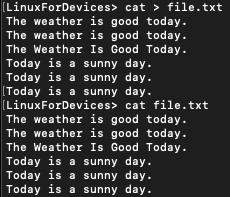
The exact weather copies and the sunny lines form separate adjacent groups. The capitalization variant is its own group.
The cat command can enter the sample interactively. The printf command below writes the same file at once.
printf '%s\n' \
  'The weather is good today.' \
  'The weather is good today.' \
  'The weather Is Good Today.' \
  'Today is a sunny day.' \
  'Today is a sunny day.' \
  'Today is a sunny day.' > weather.txt
What you need before using uniq
uniq reads a named input file or standard input when you leave the filename out. It writes to standard output by default, or to a second file path when you supply one.
| Input or destination | What uniq does |
|---|---|
| Input file | Reads lines from the file you name. |
| Standard input | Reads lines piped from an earlier command. |
| Standard output | Prints the filtered lines in the terminal or passes them to the next command. |
| Output file | Writes the filtered result to a separate path. |
If another command should select the records first, the grep command can pass matching lines to uniq through standard input.
Use uniq for common line tasks
The weather.txt file keeps its repeated lines in adjacent groups, so each option changes what uniq selects from the same input.
Collapse adjacent repeats
Run uniq without an option to keep the first line in each adjacent group. The capitalization variant remains because its text is not an exact match for the preceding line.
uniq weather.txt
The weather is good today.
The weather Is Good Today.
Today is a sunny day.

The command prints filtered output and leaves weather.txt unchanged. For the total number of input lines, use the Linux line-count command instead of treating each adjacent group as a separate count.
Count each group
Add -c to prefix each output line with the number of lines in its adjacent group. The number describes that group, not every matching line elsewhere in the file.
uniq -c weather.txt

The output assigns separate counts to the adjacent groups. A later copy separated by another line starts a separate count.
Each count measures one uninterrupted run, not every matching line in the full file. Sorting first changes the input so separated copies become part of the same run.
Select repeated or singleton groups
Use -d to print one line from each repeated group. I found it a better fit for compact reports because -D prints every repeated record for inspection.
uniq -d weather.txt
Use -D to print every line in a repeated group, or -u to print groups that contain a single line. These options still judge each line against its neighbors, so they do not find separated matches.
uniq -D weather.txt
uniq -u weather.txt
Ignore capitalization
Add -i when capitalization should not split otherwise matching adjacent lines. The first spelling in each group is still the one uniq prints.
uniq -i weather.txt

The first weather spelling stands for its whole adjacent group. The printed line keeps that original capitalization.
Write the result to a file
Give uniq a second path when the filtered result belongs in another file. Keeping the source and destination separate preserves the original input.
uniq weather.txt unique.txt
The second command displays the filtered file while leaving weather.txt available as the original input.
cat unique.txt
| Option | What it prints from weather.txt |
|---|---|
| -c | Counts of 2, 1, and 3 for the three adjacent groups. |
| -d | One copy of the repeated weather line and one of the sunny line. |
| -D | Both repeated weather lines and all three sunny lines. |
| -u | The single capitalization variant. |
| -i | One weather line and one sunny line after case-insensitive comparison. |
When repeated lines are not adjacent
uniq compares each line with the one before it. Build a file with values repeated apart from each other to see why a raw uniq pass leaves both copies.
printf '%s\n' 'pear' 'apple' 'pear' 'banana' 'apple' > mixed.txt
Run uniq on this file before sorting and every original line stays, because no duplicate neighbors exist.
uniq mixed.txt

I ran uniq on this input and found both copies still in place because neither was adjacent to its match. Sorting with the sort command groups equal lines, so uniq can count each set afterward.
sort mixed.txt | uniq -c

I found the sort pipeline useful when group counts matter more than original order. The tradeoff is that sorting changes the sequence.
Counts belong to the pipeline. Sort -u returns one sorted copy of each line, so choose it when group frequencies do not matter.
sort -u mixed.txt
apple
banana
pear
Keep original order when it matters
uniq preserves the position of the first line in each adjacent group, while sorting trades that order for global grouping. When you need field or character comparison rules, open the installed manual through the man command.
man uniq
Uniq command questions
The less common field and character flags change which parts of adjacent records are compared.
Can uniq compare only part of each line?
GNU uniq can skip a chosen number of leading fields with -f or leading characters with -s. The -w option limits how many characters take part in each comparison.