

Getting the Notepad++ editor onto a Linux system means picking an installation route. The original Windows app runs through Wine in its Snap package, and a separate fork is built for Linux.
I’ll cover the Snap installation and the native fork, including the limits to check before choosing either one.
TL;DR
To run the original Notepad++ on Linux, use its Snap package, which bundles the Windows app with Wine. For a native Linux program, use the separate Notepad++ Linux fork.
- Check that Snap is installed before using the Snap route.
- Use the Linux fork’s release package for a supported distribution when native Linux behavior matters.
- Do not treat the fork as an official upstream Notepad++ Linux release.
What Is Notepad++ on Linux?
Notepad++ is a Windows text editor, and its Snap package runs it through Wine, a compatibility layer for Windows software. I choose the native fork when distro-specific Linux packages matter because its repository publishes those releases.
How to Install Notepad++ on Linux Step by Step
Follow the package instructions that match the route you select.
Step 1: Check Snap support
Run this read-only check in a terminal before using the Snap route.
snap --version
I ran the version check on Ubuntu 24.04 and got Snap 2.78 and snapd 2.78, with series 16 and arm64 architecture.
snap          2.78
snapd         2.78
series        16
ubuntu        24.04
kernel        7.0.0-1013-oracle
architecture  arm64
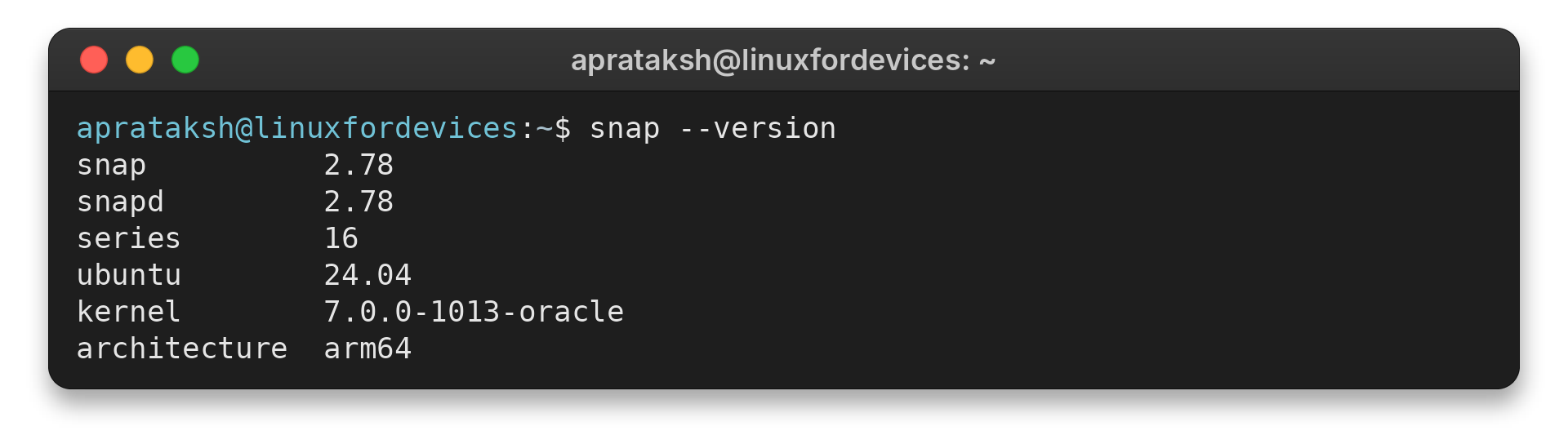
An unavailable snap command means Snap is not configured, while version output alone does not confirm app installation or store access.
Step 2: Install the Snap package
When Snap is configured, install the package using the command shown by Snap Store’s package page. This installs the Windows application and its Wine-based runtime, so its download size and startup behavior differ from a small native editor.
sudo snap install notepad-plus-plus
This install command requires administrator privileges and changes installed software, so I did not run it here. Snap Store documents installation with sudo snap install followed by the package name. The package page lists notepad-plus-plus, but check that page before installing because a local metadata lookup may differ from store availability.
The Snap Store package page lists the package name as notepad-plus-plus. After installation, start it from the desktop app menu or enter notepad-plus-plus in a terminal.
If you want to manage Wine outside the Snap package, LinuxForDevices’ Wine setup guide covers that separate workflow on Ubuntu.
Step 3: Choose the native Linux fork instead
Open the project’s release page and match the package to your distribution. The project’s guide lists these targets and options:
| Distribution or need | Package or route | What to check |
|---|---|---|
| Debian or Ubuntu | .deb | Release target and dependencies |
| Fedora or RHEL family | .rpm | Release target and dependencies |
| Arch family | .pkg.tar.zst or AUR package | Use the documented package name |
| Portable use | .tar.xz | Read the archive instructions |
| User-local setup | Project’s consumer install flow | Desktop and MIME integration steps |
The project marks Arch and derivatives, Ubuntu LTS 24.04 and later, and Fedora stable as validated targets. The user-local flow avoids a system-wide setup, but its commands differ from installing a release package.
That local flow adds desktop and MIME integration, so the editor can appear in the app menu and be associated with file types. The project documents a matching uninstall flow as well. Read those instructions if you want a per-user setup rather than a distro package.
Installation Choices and Common Limits
A successful installation may still leave the editor unable to open a particular file.
| Route | What you get | Check before installing |
|---|---|---|
| Notepad++ Snap | Windows Notepad++ running through bundled Wine | Snap support and app access to the files you edit |
| Notepad++ Linux fork | A distinct Linux-native project with its own releases | Supported distro, matching package type and feature status |
| Linux-native alternative | A different editor inspired by Notepad++ | Whether its features fit your existing workflow |
I checked Snap’s package metadata and received “error: no snap found for \”notepad-plus-plus\”.” That lookup failure does not establish whether the package is globally available. Check the live Snap Store page before relying on this route, and use the Linux fork’s official release page if the package is absent for you.
Snap’s home interface covers non-hidden files under the user’s home directory. It does not grant arbitrary access to every path on the system. After installing a snap, inspect its interfaces with the command below.
Snap documents snap connections as a way to inspect a package’s interfaces. I ran it before this package was installed, and it returned this message:
snap connections notepad-plus-plus
error: snap "notepad-plus-plus" not found

Run this check after installation, replacing the snap name when you inspect a different app. The message means the snap is not installed under that name, not that a store package is unavailable.
Do not start a desktop editor with sudo to edit protected files. LinuxForDevices’ config-file editing guide shows a safer sudoedit workflow for protected files.
When Wine compatibility or Snap confinement gets in the way, a native editor may be a better fit. LinuxForDevices’ Notepad Next overview describes another independent project.
The site’s Notepadqq setup guide covers another editor inspired by Notepad++. For terminal editing, the Vim tutorial shows how to open and save files.
Conclusion
Consult the Snap installation documentation, the Linux fork installation guide, and its release page for package-specific instructions and current assets.
FAQ
These answers separate the original application from Linux-native projects.
Does Notepad++ work on Linux?
The original Windows application can run through Wine in its Snap package. The Linux fork is a separate native project.
Can Notepad++ open Linux files?
Snap confinement can affect file access. Check the app’s interfaces and your file permissions.
Is the Linux fork an official Notepad++ release?
No. It is a separate project with its own repository and releases.
Can you install Notepad++ on Arch Linux?
The fork documents Arch packages and an AUR binary package named notepad-plus-plus-linux-bin. Check its current install notes.