

The `QUERY TIME` line reports how long the DNS exchange took, not how long a page takes to load. I’m curious that an empty answer can still arrive with `NOERROR`.
You can match the response to the name and record type you asked about. Read the reply’s status before interpreting its answer.
What a dig response contains
Domain Name System (DNS) records store typed data for names. dig is BIND’s command-line DNS query utility, and its output shows the response from the name server it asked.
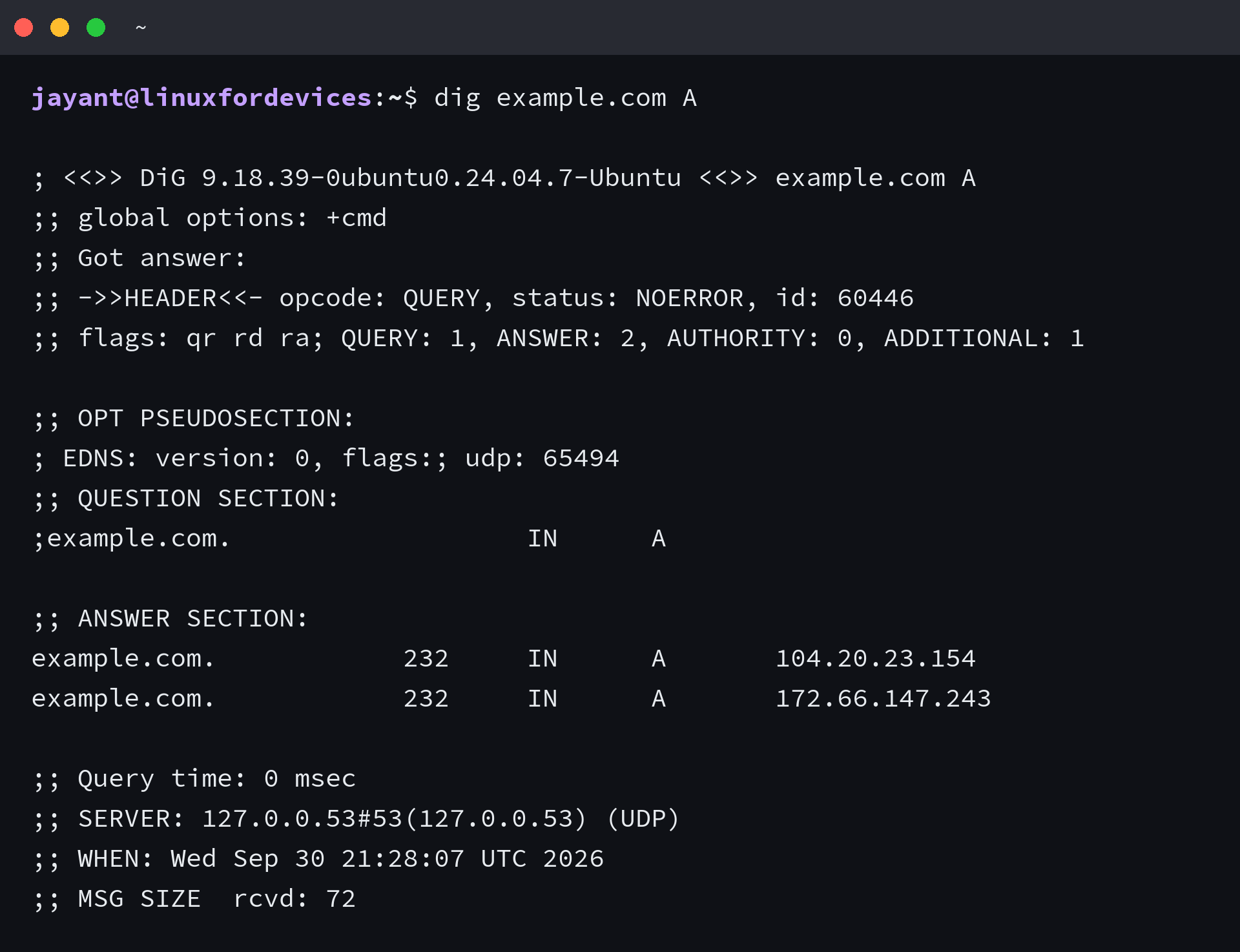
Start with an address lookup. This asks the configured resolver for example.com’s A records, which carry Internet Protocol (IP) version 4 (IPv4) addresses.
dig example.com A
| Output field | What it tells you |
|---|---|
| status | The DNS response code. NOERROR means the server completed the request, not that every record type has an answer. |
| QUESTION SECTION | The requested name, record type and class. IN is the Internet class. |
| ANSWER SECTION | The resource records returned for the question. Each row names its owner and shows the time to live (TTL). The class and type identify the record before its data. |
| SERVER | The server address dig contacted. It can be a local stub rather than an authoritative server. |
| QUERY TIME | How long this DNS exchange took, not the time a website takes to load. |
A time to live (TTL) value is the remaining cache lifetime in seconds. It does not predict when a DNS change will finish reaching every resolver.
The BIND dig manual documents its options. The LinuxForDevices man command guide explains how to search local manuals.
Install dig if it is missing
On Ubuntu and Debian-family systems, the package is named dnsutils. Fedora provides dig in bind-utils, so choose the package for your distribution.
Ubuntu’s dnsutils package index and Fedora’s bind-utils listing show the package names.
sudo apt install dnsutils
sudo dnf install bind-utils
Choose the record type
The record type defines what data you are asking for. A bare dig query defaults to an A record.
| Query | Record returned |
|---|---|
| A | Internet Protocol version 4 (IPv4) address |
| AAAA | Internet Protocol version 6 (IPv6) address |
| MX | Mail exchange (MX) host and its preference value. Senders try lower values first. |
| NS | Name server records for the zone |
| TXT | Text data published for the name |
| SOA | Start of Authority data for the zone, including its serial number |
| -x | Reverse lookup that asks for a pointer (PTR) record |
A PTR record maps an address to a name, not to your interface. The Linux IP address guide shows how to find local addresses.
dig example.com A
dig example.com AAAA
dig example.com MX +noall +answer
dig example.com TXT +noall +answer
dig -x 8.8.8.8 +noall +answer
The +short option returns terse data without the owner name or TTL. It also hides the class and type, so use the full answer when you need to compare records.
dig example.com A +short
dig example.com A +noall +answer

Choose +noall +answer when the record type or TTL determines which response you trust.
Ask a specific DNS resolver
By default, dig reads name server addresses from /etc/resolv.conf. On systems that use a local DNS stub, the SERVER line can show 127.0.0.53 even when another resolver sits behind it.
To ask a specific DNS server for a record, put @ before its name or address. This changes only that query, not the resolver used by other programs.
dig @1.1.1.1 example.com A
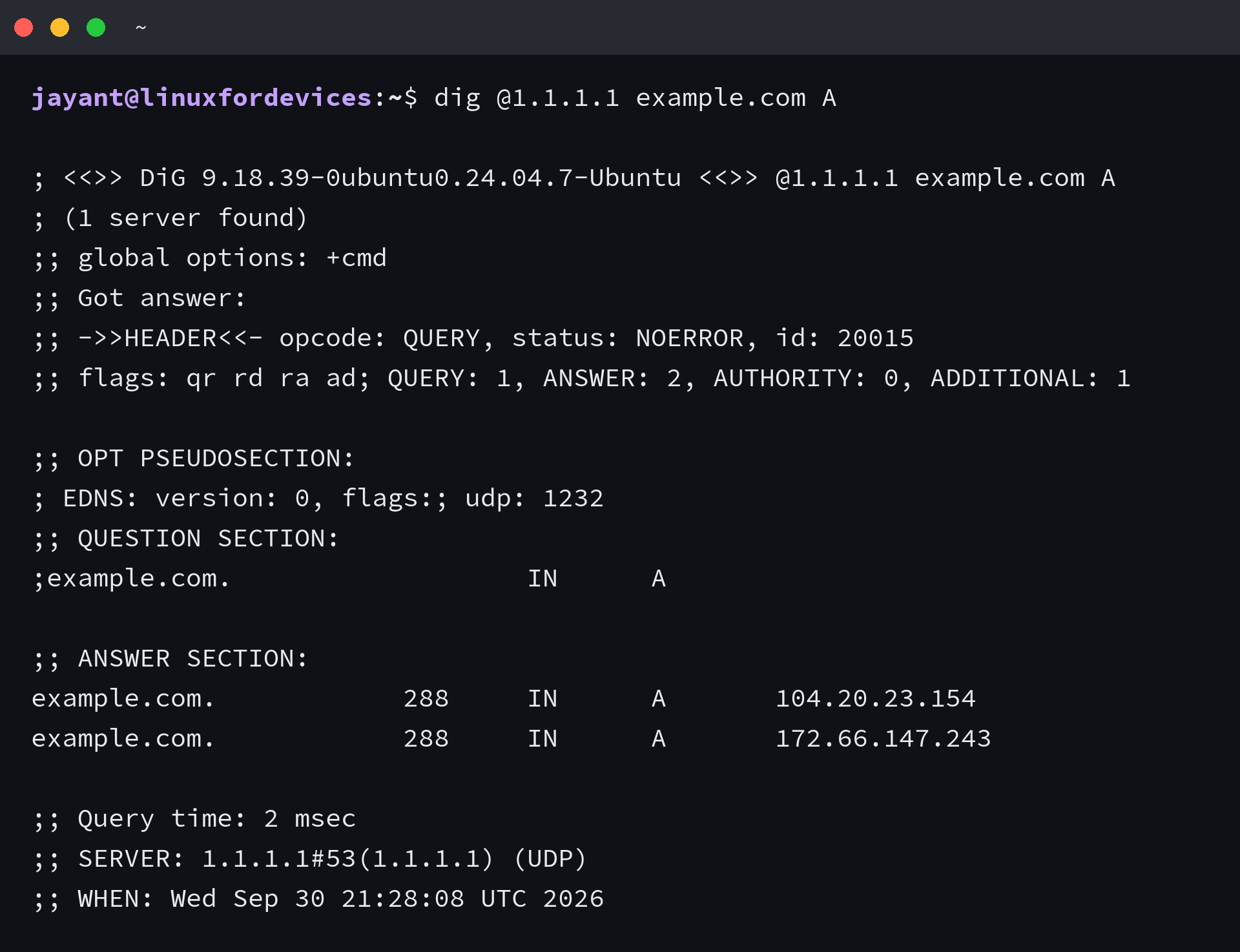
I saw the same two A values from the system stub and 1.1.1.1, with different TTLs in the replies.
If you need to change the resolver for a whole machine, follow the guide to change the DNS server on Linux. Ubuntu’s network configuration guide explains how persistent DNS settings fit into Netplan.
Trace the DNS delegation
A recursive lookup asks a resolver for the final answer. A trace instead follows the DNS delegation from the root toward the zone’s authoritative name servers.
- The root servers point to the name servers for the top-level domain (TLD).
- The TLD servers return the delegation for the requested zone.
- The zone’s authoritative server returns the requested record.
Use +trace to follow referrals from root to zone, and add -4 +nodnssec for an IPv4 trace without DNS Security Extensions (DNSSEC) records.
dig +trace example.com NS
dig -4 +trace example.com NS +nodnssec
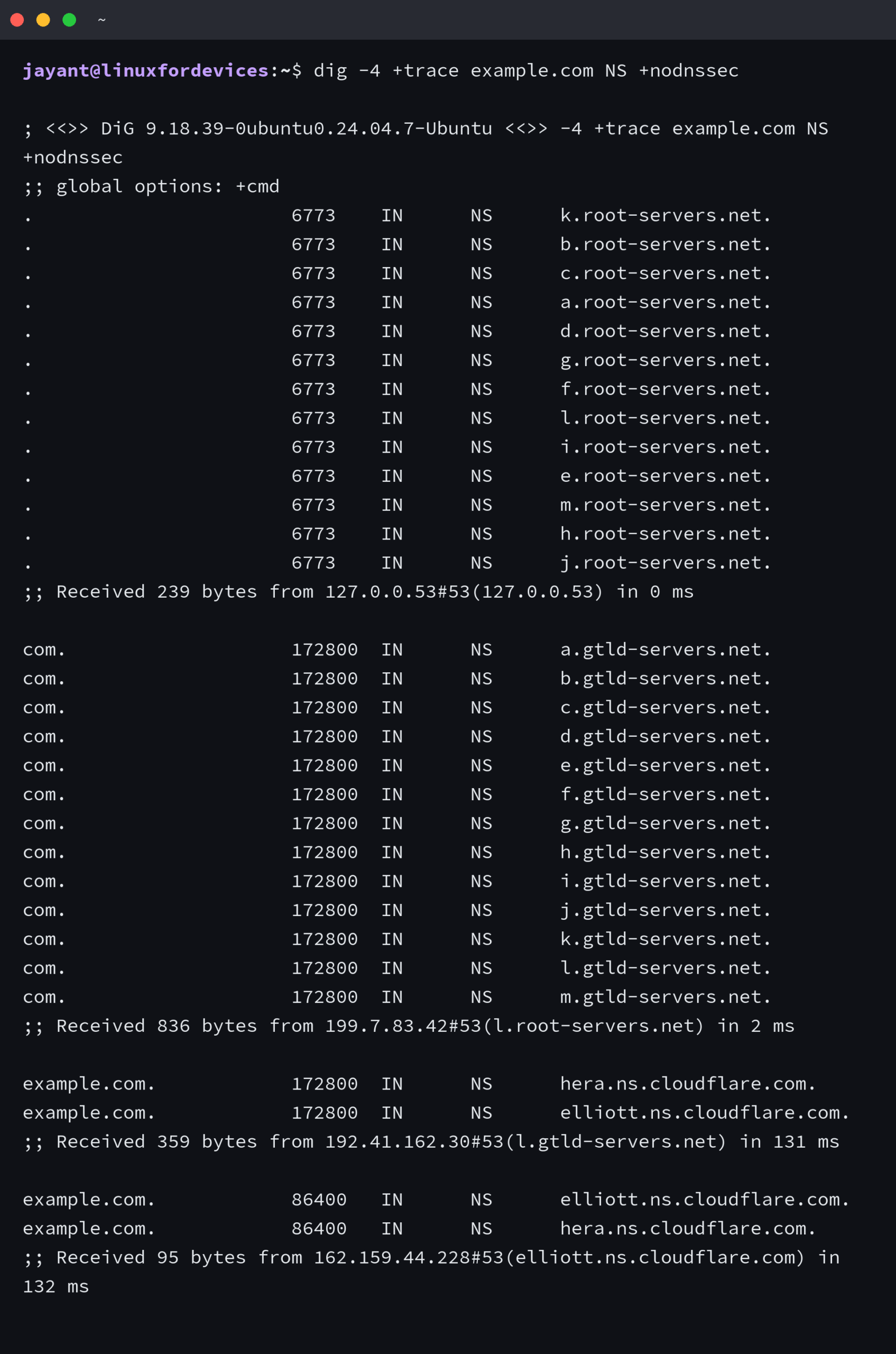
I used +trace to inspect DNS referrals, not to test the packet route. For network route failures, use the Linux traceroute command.
Read DNS response status
The response code separates a missing name from a resolver that cannot answer. If dig and nslookup print different results, compare the question and server before changing a record.
| Result | Meaning | Next check |
|---|---|---|
| NOERROR with answers | The server returned records for this question. | Read the record type and value. |
| NOERROR with ANSWER: 0 | The response has no record for the requested type. This is different from NXDOMAIN. | Check for a canonical name (CNAME) or query another type. |
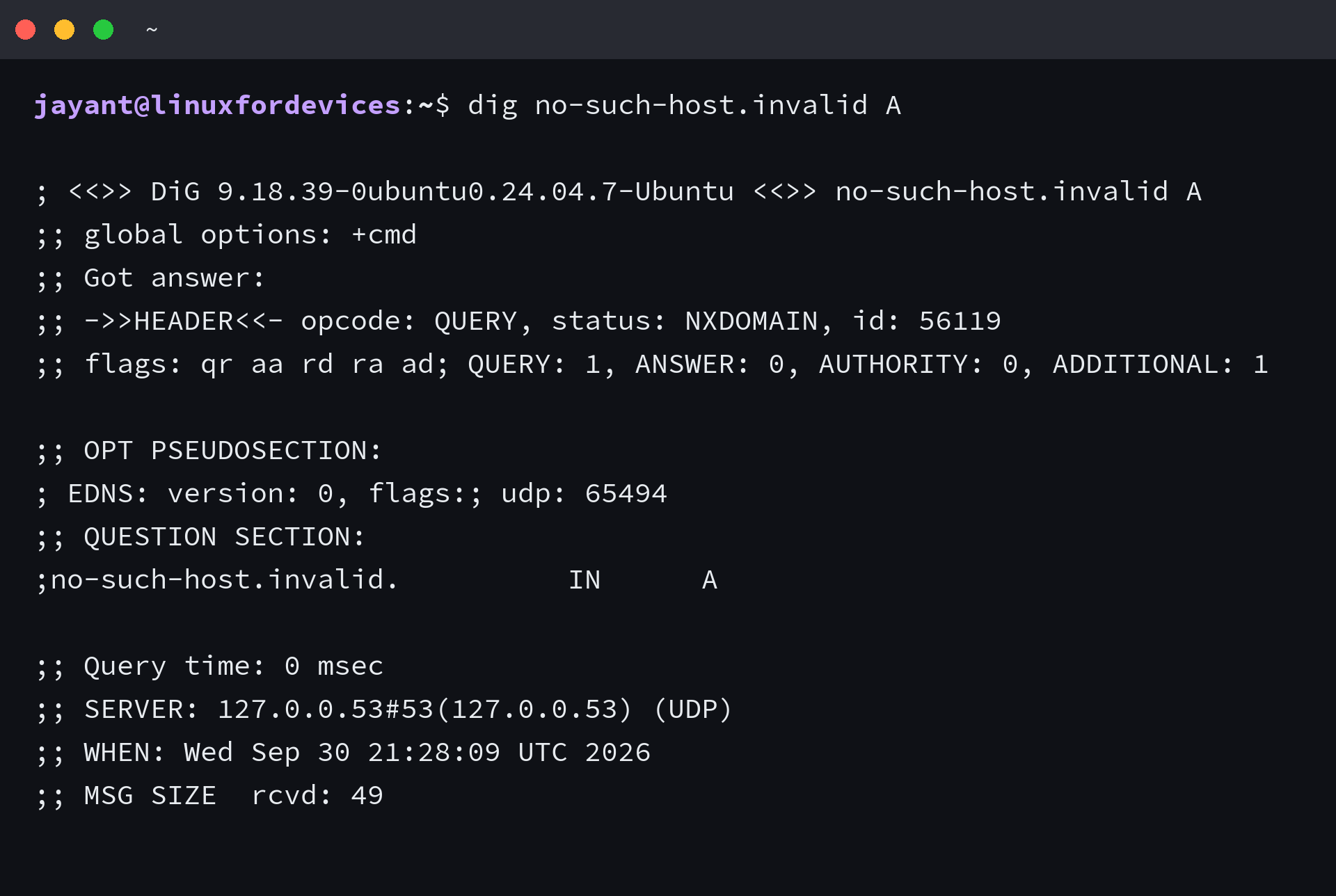
| NXDOMAIN | The queried name does not exist in DNS. | Check the spelling and domain suffix. |
| SERVFAIL | The resolver could not complete the lookup. | Compare another resolver and inspect the delegation or DNSSEC state. |
| REFUSED | The server rejected the query under its policy. | Use a resolver that permits the request. |
| Timeout | No response arrived from the server. | Check the server address and access to DNS port 53. |
This query uses the reserved .invalid suffix defined by RFC 6761 and returns NXDOMAIN with no answer records.
dig no-such-host.invalid A
An ANY query is not a complete record inventory. RFC 8482 allows a DNS server to return a minimal response to ANY, so ask for the record types you need instead.
Run a list of queries from a file
dig reads each line as a separate query, so a file can batch one domain name per line.
printf '%s\n' linuxfordevices.com google.com yahoo.com > example.txt
cat example.txt
dig -f example.txt +noall +answer
The retained terminal image shows cat example.txt printing the file contents. The root prompt is incidental, and file creation or DNS lookup does not require root access.

To run a bulk reverse DNS query to a specific nameserver, put each -x query on its own line. The @server option applies that resolver to the whole file.
printf '%s\n' '-x 8.8.8.8' '-x 1.1.1.1' > reverse.txt
dig @1.1.1.1 -f reverse.txt +noall +answer

Each file line follows dig’s command-line query syntax, so you can batch record lookups as well as reverse lookups.
Compare answers before changing DNS
A DNS answer comes from a specific question sent to one server. When two tools disagree, compare the question and the server before changing the machine’s DNS settings.
dig example.com A +noall +answer
dig @1.1.1.1 example.com A +noall +answer
Frequently asked questions
What does the dig command do in Linux?
dig sends DNS queries to a name server and displays its response. The default query asks for an A record unless you specify another type.
How do I install dig on Linux?
On Ubuntu or Debian-family systems, install dnsutils with apt. On Fedora, install bind-utils with DNF.
Why do the commands “dig” and “nslookup” sometimes print different results?
The tools can query different resolvers or ask different questions. Compare the name and record type first. Then check the resolver and ask it explicitly with dig.
Does dig ANY return every DNS record?
No. A DNS server may return a minimal response to ANY, so query the specific record types you need.