
imgcat prints an image or GIF inside a compatible terminal, so you can check a file without opening a separate viewer. The current project documents a Go installation path, while the Snap Store publishes imgcat for Linux.
I checked the current imgcat repository, Snap Store listing, and iTerm2 inline-image documentation for the commands and terminal boundary below. The terminal, not imgcat alone, decides whether an inline image can appear.
Check whether your terminal can display images
The Go project renders images with true color and a monospaced font that includes the lower half block character, while iTerm2 uses its own inline-image escape sequences so an image can travel through SSH and the terminal on your computer performs the display.
Start in the terminal where you want to view images, because imgcat can run successfully while an unsupported terminal leaves you with escape text, blocks, or no visible image.
Your shell also affects how you run the command and where it finds the executable. Choose the shell you use before changing its startup file, then use the Linux command-line basics if you need a refresher on paths and file names.
Install imgcat with Go
The maintained Go project documents this source installation command for a system where Go is available.
go install github.com/danielgatis/imgcat@latest
If your shell cannot find imgcat after the installation completes, add Go’s bin directory to PATH, where Go writes installed commands.
Check the Go runtime before installing, because a command-not-found response means the source command cannot build imgcat yet.
go version

Follow the official Go installation instructions, reopen your shell if the installer changes PATH, and run go version again after resolving the diagnostic shown above.
Install imgcat from the Snap Store
If your distribution uses Snap, install the current store package with this command after checking that snap is available.
sudo snap install imgcat
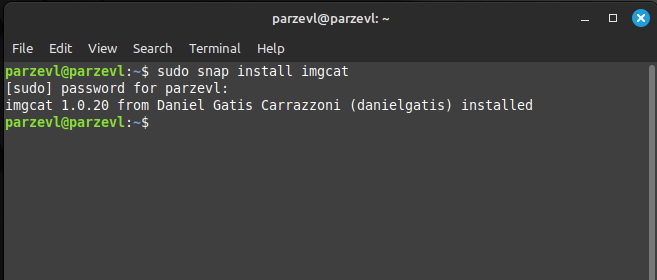
The retained terminal capture shows the successful Snap command and its completion message. The Snap Store listing remains a published Linux distribution channel for imgcat, while package management on Linux explains when a store-managed package is the better fit for your system.
Display an image with imgcat
Pass a local file path to imgcat, starting with a small PNG or JPEG to confirm terminal support before trying a large image or animation.
imgcat path/to/image.png
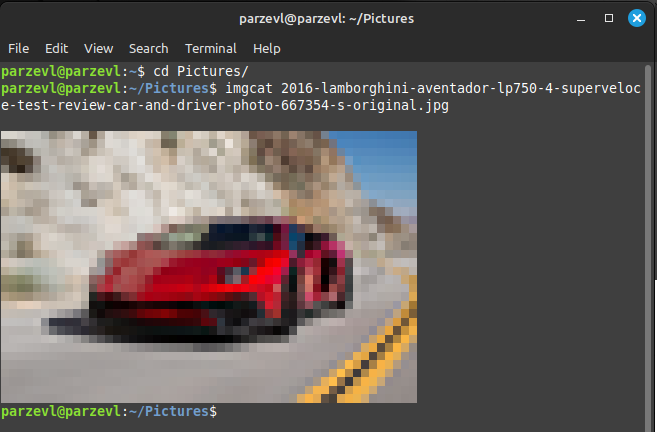
The retained usage capture shows imgcat rendering a JPEG directly below the command with terminal characters, which explains its deliberately blocky appearance instead of a desktop image window.
Download an image first if it exists only at a URL, then pass the saved file to imgcat. Use curl to download the local file, or use Ranger image previews when browsing a directory is more useful than opening one known path.
Fix the common imgcat failure modes
| What you see | What to check |
|---|---|
| go: command not found | Install Go, reopen the shell if needed, then run go version. |
| imgcat: command not found | Confirm the installation completed and that the Go bin directory is in PATH. |
| No image or unreadable output | Use a terminal with the required color or inline-image support. |
| An unexpected imgcat program | Run which imgcat. iTerm2 shell integration can place its own imgcat ahead of another installation. |
The iTerm2 documentation and the eddieantonio project both describe terminal-specific imgcat behavior. Check which imgcat before changing aliases or startup files, because the executable name alone does not identify the rendering method.
FAQ
These answers separate installation problems from terminal-rendering limits.
Does imgcat work in every Linux terminal?
No. imgcat needs a terminal that supports its rendering method. The Go project requires true color and a compatible monospaced font, while the iTerm2 utility uses iTerm2 inline-image support.
Why does imgcat say command not found after installation?
Your shell cannot find the executable. Confirm the installation completed, then add the directory that contains imgcat to PATH and open a new shell session.
Can imgcat display a file from a URL?
Download the image to a local path first, then pass that path to imgcat. This keeps the display command focused on one local file.
Run imgcat with one local PNG in the terminal you use for daily work. If that test fails, change the terminal support or choose a preview tool that matches your terminal instead of troubleshooting the image file first.