
Installing an RPM package on Ubuntu can still leave a program that will not start, because the conversion never touches the binary inside it.
I compared three Fedora 44 packages against an Ubuntu 24.04 host to find where a conversion stops paying off, and the answer turned out to be a version number the program asks the loader for every time it runs.
Why an RPM package does not install on Ubuntu by itself
RPM is the package format of the Red Hat family, which covers Fedora, RHEL, CentOS Stream, AlmaLinux, Rocky Linux and openSUSE. Ubuntu sits on the Debian side of that line, where dpkg handles the files and apt fetches them and works out what they need.
An RPM file is a cpio archive wrapped in a header, and that header carries the package name, its version, its architecture, the files it installs, and the shared library symbols its payload calls.
| RPM package | Debian package | |
|---|---|---|
| File extension | .rpm | .deb |
| Installs the files | rpm | dpkg |
| Resolves dependencies | dnf, yum, zypper | apt |
| Records what is installed | /var/lib/rpm | /var/lib/dpkg |
dpkg cannot read any part of that header. Ubuntu therefore ships two readers for the format, the rpm package that inspects and extracts an RPM file and alien that rewrites one into a Debian package.
Ubuntu 24.04 ships glibc 2.39, and a Fedora 44 build can call a function that arrived in glibc 2.43. Neither reader rebuilds the program inside the package, so no repackaging step touches that mismatch.
The packaging tools are covered in more detail in the apt and dpkg comparison and the Ubuntu package manager overview, which is the layer everything below builds on.
Check whether a native build exists first
There are four places a Linux build of a program can come from, and three of them produce something Ubuntu installs without a conversion.
- The distribution repository, which you reach with apt install and its search command.
- A Flatpak or Snap package, which is where a growing share of desktop software lands now.
- A .deb, AppImage or source tarball from the vendor’s own download page.
- A distribution container, when the packaged build itself is what you need rather than the program.
If one of the first three answers, stop there. I check the repository build first, because one command settles whether a conversion is necessary at all.
What you need before converting anything
The workflow needs two packages, and both come from Ubuntu’s own repositories.
sudo apt install alien rpm
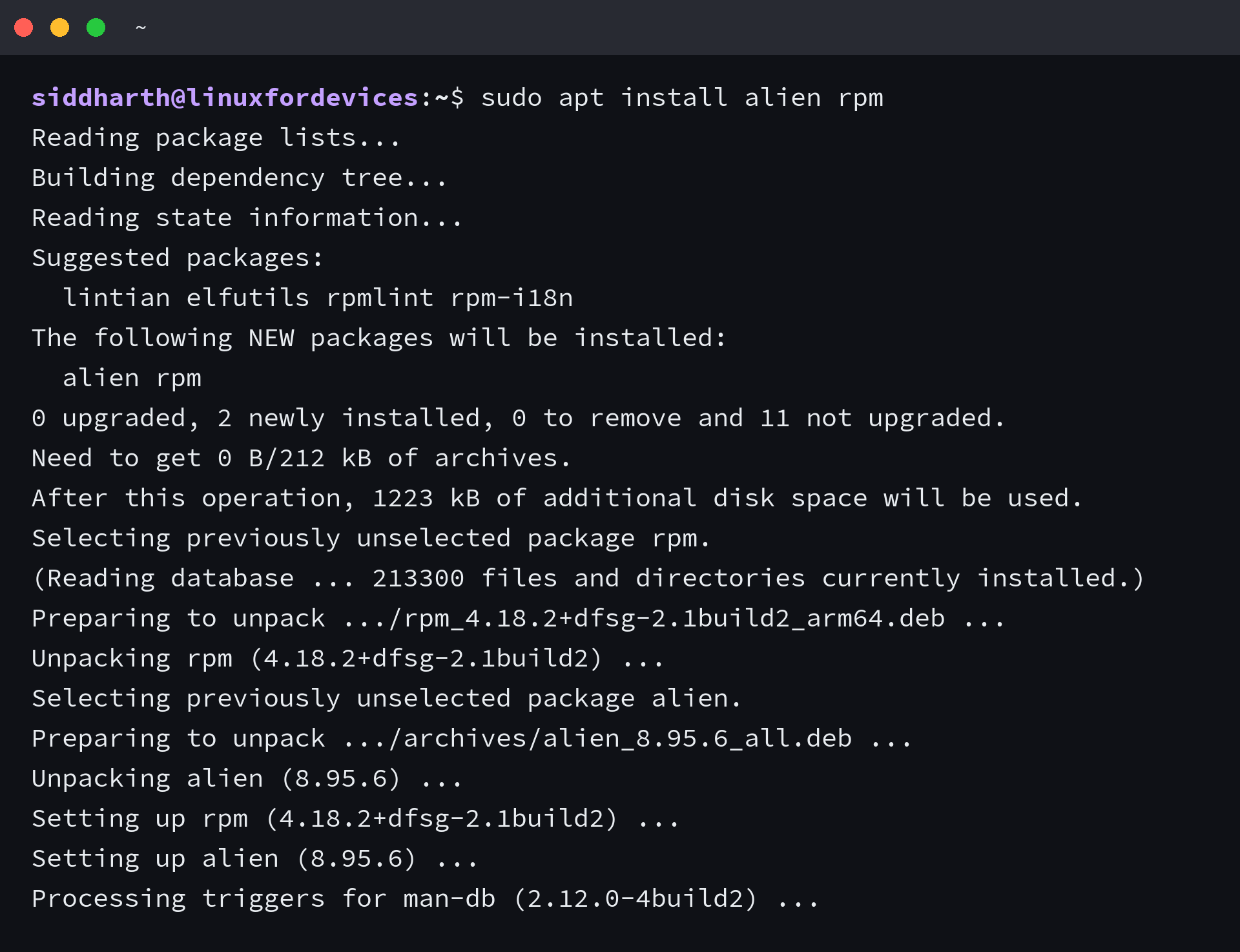
The universe repository has been enabled by default since Ubuntu 18.10, so the add-apt-repository universe step that older pages open with does nothing on a current install.
I installed the pair on a clean Ubuntu 24.04 host. alien brought cpio in with it, because alien shells out to rpm for every file it reads and to cpio when it has to unpack a payload.
| Package | Version on 24.04 | What it does |
|---|---|---|
| alien | 8.95.6 | Converts an RPM into a .deb and can install it in one step |
| rpm | 4.18.2 | Reads the header, lists the payload and can install the file |
| cpio | 2.15 | Unpacks the payload when you want the files without an install |
Your architecture decides which file you download, because uname -m prints x86_64 on an Intel or AMD machine and aarch64 on an ARM one.
Read the package before you install it
An RPM answers several questions about itself before you run anything. I ran the queries below against tree-2.2.1-4.fc44.aarch64.rpm, a Fedora build of the tree directory viewer taken from the Fedora 44 aarch64 package tree.
What the package claims to be
rpm -qpi tree-2.2.1-4.fc44.aarch64.rpm
Read the architecture line first. The output names the package, the version, the architecture, the build date, the license and the summary, and a package built for x86_64 will not install on an ARM machine.
The line above the header is a signature warning, and it reads Header V4 RSA/SHA256 Signature, key ID 6d9f90a6: NOKEY. That means the package carries a signature and the public key which would check it is missing from your keyring.
Which files it ships
rpm -qpl tree-2.2.1-4.fc44.aarch64.rpm
tree installs a binary, a manual page and a few documentation files, which is a short and readable list.
Packages that write into /etc/sysconfig, /usr/lib/systemd/system or /usr/lib64 deserve a second look instead. Those are the paths where Fedora and Ubuntu disagree about layout, and they are where a converted package starts fighting the system.
Which library symbols it needs
rpm -qpR tree-2.2.1-4.fc44.aarch64.rpm
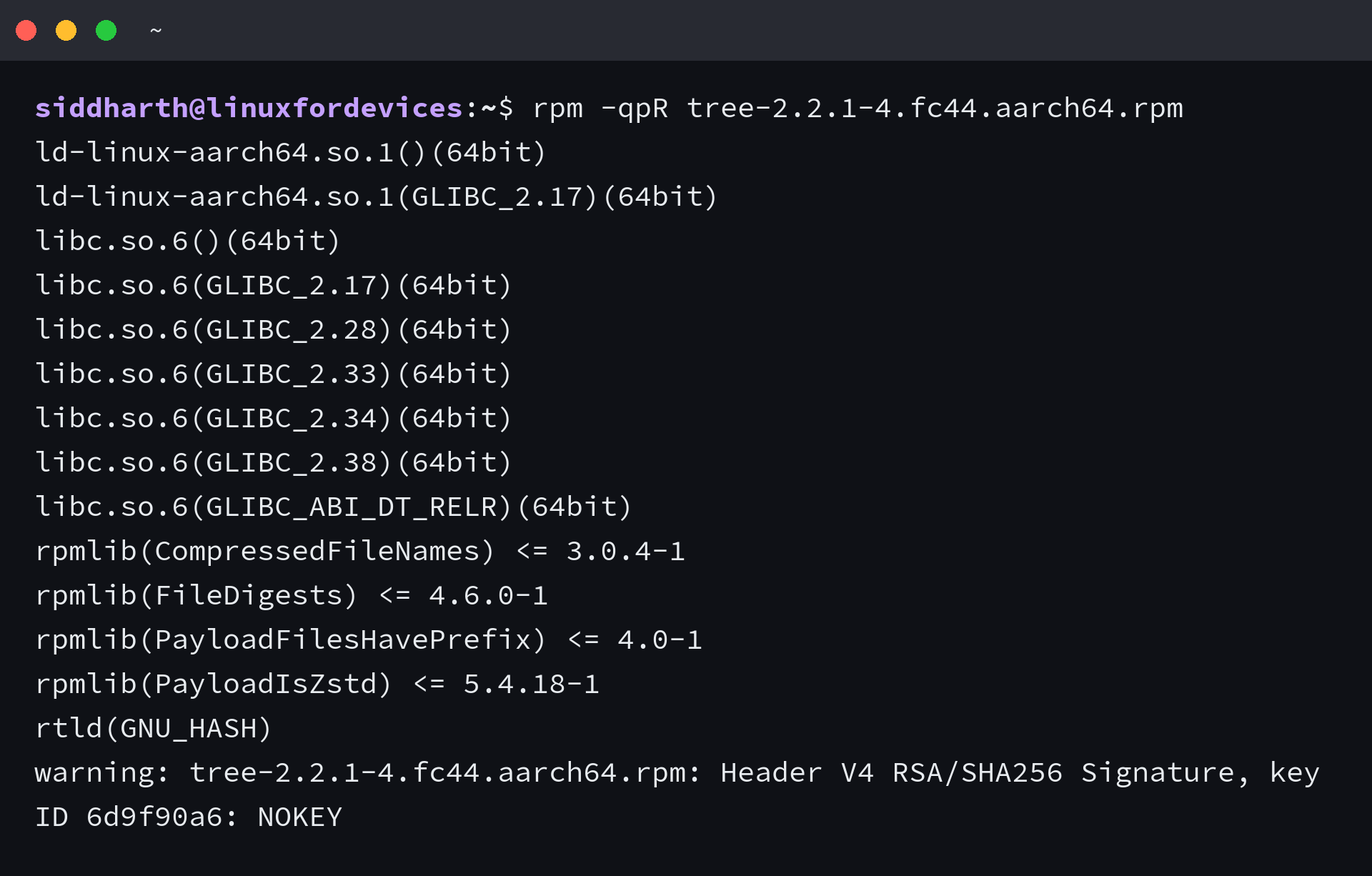
Every libc.so.6 line names the oldest glibc that provides a symbol the binary calls, and this package asks for symbols up to GLIBC_2.38 against the glibc 2.39 that Ubuntu 24.04 provides.
The highest number in that list is the one to compare. Run ldd –version to print the glibc your release provides, and treat any package asking for something above it as a package that cannot run here.
Unpack the payload without installing it
rpm2cpio tree*.rpm | cpio -idm

The payload unpacks into the current directory and nothing is registered with either package manager, which makes it the safest way to look inside a package.
From here I can inspect the binary with file and ldd, read the configuration files, or copy out the single file I wanted. The directory goes away when I am finished with it.
Install an RPM on Ubuntu with alien
alien converts between package formats. It builds a Debian package from the RPM without touching the payload, and it needs root because it re-runs the packaging tools underneath.
| Flag | Effect |
|---|---|
| -d, –to-deb | Build a Debian package, which is the default output |
| -i, –install | Build the package and install it, then delete the generated file |
| -k, –keep-version | Keep the original version instead of raising the release number |
| -c, –scripts | Also convert the maintainer scripts, which the manual warns about |
Build the Debian package
sudo alien -d tree*.rpm
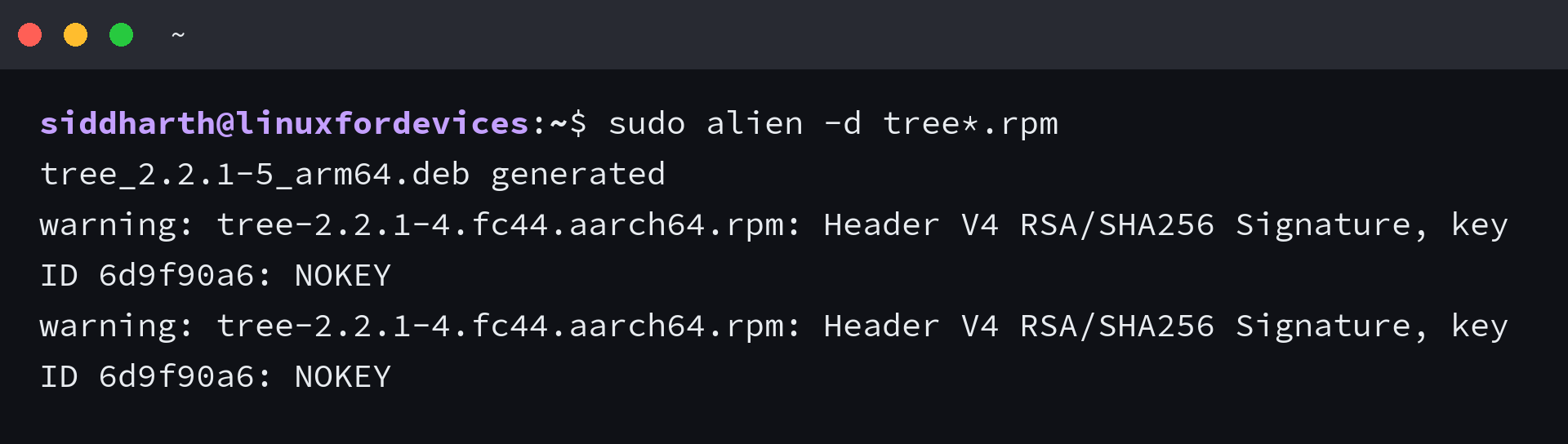
The command prints the file it generated, tree_2.2.1-5_arm64.deb, and the release number moved from 4 to 5 the way the manual page documents it as doing.
NOKEY repeats once for every file inside the package. alien is asking rpm about each one, and each answer carries the same signature warning.
Install the converted package
sudo dpkg -i tree_2.2.1-5_arm64.deb
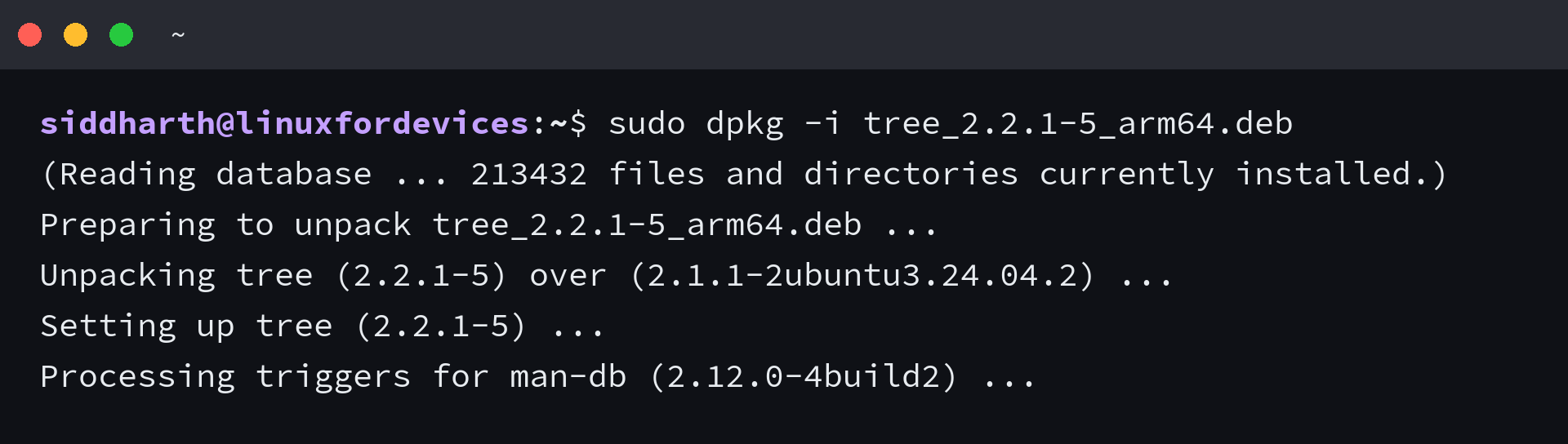
dpkg unpacks the alien build over the distribution build of tree, and the manual page triggers run as they would for any Debian package. I ran the binary afterwards and it printed tree v2.2.1, because this package only asked for symbols the release has.
If dpkg reports dependency problems instead, run the apt fix-up command and let apt try to satisfy what the converted package says it needs. Installing with sudo apt install ./tree_2.2.1-5_arm64.deb does the same job in one step, because apt accepts a local file path as a source. Both routes are covered in the guide to installing .deb files, and dpkg failures of this shape are collected in the dpkg error walkthrough.
Keep one consequence in view. The version is now newer than anything in the Ubuntu archive, so a later apt upgrade can replace it and leave you comparing two different builds of the same program.
Install the RPM file directly with rpm
The rpm package can install the file itself, without a conversion step.
sudo rpm -ivh tree-2.2.1-4.fc44.aarch64.rpm
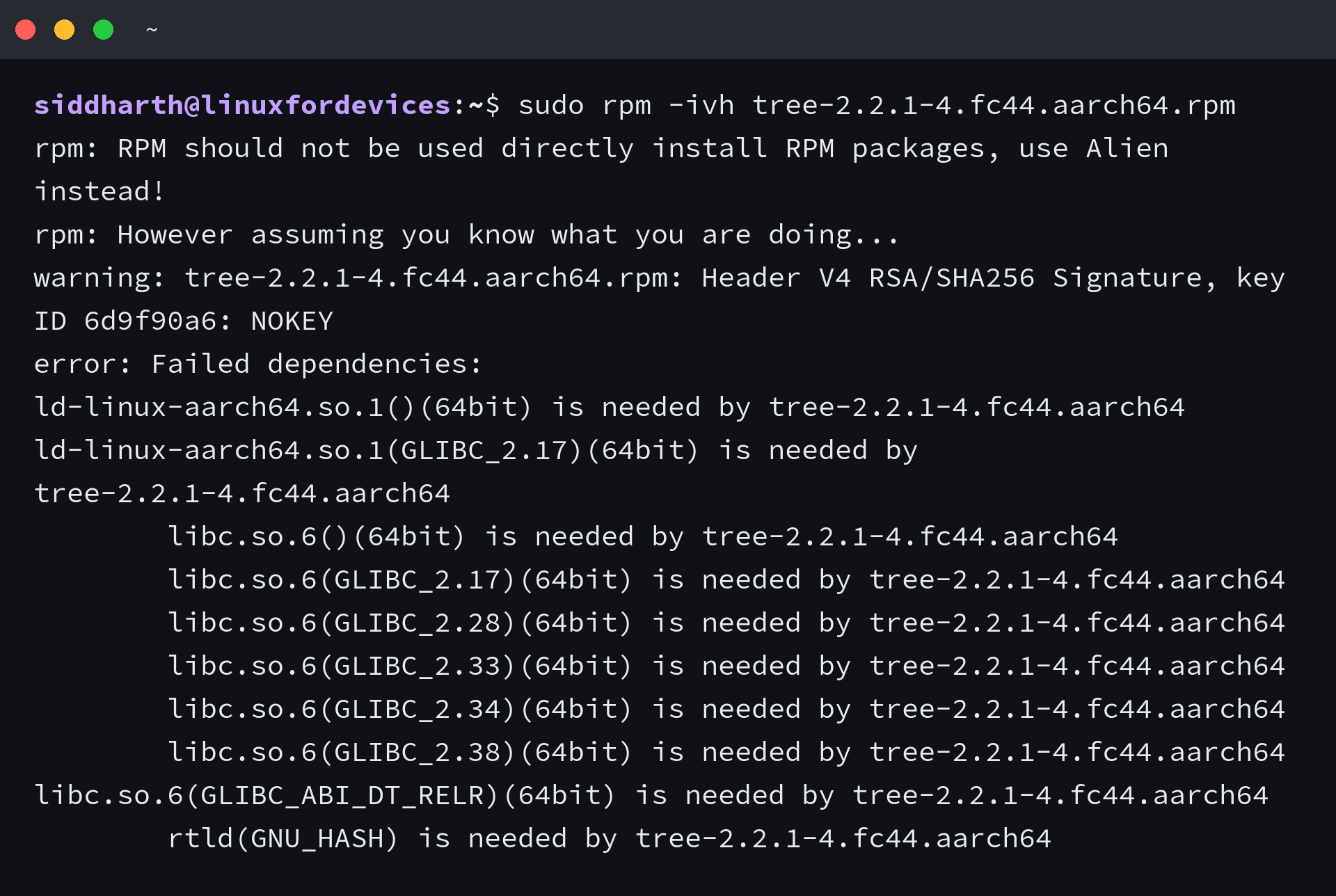
rpm reads its own database at /var/lib/rpm to decide whether requirements are met, and the libraries apt installed are not in it. Every libc.so.6 line from the earlier query therefore looks missing, even though the libraries are sitting on the disk.
That is the whole reason the direct route needs sudo rpm -ivh –nodeps, since the flag skips the check and installs anyway.
I installed the hello package this way and then looked for it from both sides. sudo rpm -q hello answered hello-2.12.3-1.fc44.aarch64, while dpkg -S /usr/bin/hello answered that no installed package owns that path.
That leaves two package managers sharing one filesystem, and only one of them knows the file exists. apt cannot upgrade or remove what rpm installed, and rpm cannot remove what dpkg installed.
When the converted program refuses to start
A conversion can finish cleanly and still leave you holding a binary the loader rejects. The tmux build from Fedora 44 shows it in a single line.
./usr/bin/tmux -V

That binary came out of the RPM without being installed, and the loader named the exact glibc version it wanted.
To check whether the conversion changed anything inside it, I converted the same RPM with alien, unpacked the generated Debian package, and compared the two payloads. Both hashed to 438d4dea123096d6e78c8c21931482fafc6efec7c76c4a7cee7d6e51e1d0a686, so the file the Debian package would install is byte for byte the file the RPM carried.
On the same host, objdump against libc.so.6 lists no symbol above GLIBC_2.39. The package asked for 2.42, and the loader stopped it at the name.
The other ways a converted package fails
A library version mismatch is the usual failure, and it is not the only one.
- A binary linked against a vendor library Ubuntu does not carry at all, which fails on a missing file rather than a version.
- A maintainer script that assumes Fedora paths, which usually stops the install instead of the program.
- Files that land outside the layout dpkg expects, which leaves them invisible to apt.
- An architecture mismatch, which is why the first query prints the architecture line.
None of these appear in the alien output. It reports that it built a file and says nothing about whether the file can run.
What to do when the RPM is your only option
Treat the RPM as a container of files rather than a way to install software. That reframing decides the approach, and it is the difference between a working machine and a broken one.
If you need the program, rebuild it from source or run it inside a container built from the distribution it was packaged for, where the libraries match by construction. If you need a file or a configuration that lives inside the package, extract it with rpm2cpio and leave the package managers alone.
When a conversion is the route you have left, install it with alien and then hold the version so the next apt upgrade does not replace it.
sudo apt-mark hold tree
The query to run on whatever you have already downloaded is rpm -qpR. Compare the highest GLIBC number it prints against ldd –version, then you will know before installing anything whether the binary can start.
I would rebuild from source before I ran a converted package on a machine I depend on, and the glibc check above is what decides that for me.
Frequently asked questions
Can I install an RPM package on Ubuntu?
Yes. Two routes work. alien converts the file into a Debian package that dpkg or apt installs, and the rpm package installs the file directly with the –nodeps flag. Both put the program on the disk, and neither guarantees that the program can start.
Can I install a Fedora RPM on Ubuntu?
You can install the package, but the binary it carries was built against Fedora libraries. A Fedora 44 build can require glibc symbols that Ubuntu 24.04 does not ship, and that fails at startup with a version-not-found error from the loader.
Does alien convert dependencies?
No. alien rewrites the package format and the file list, and it does not translate an RPM requirement into a Debian package name. The converted package carries no useful dependency information, so apt cannot resolve what the program needs.
Why does a converted program report a missing GLIBC version?
Versioned symbols are recorded in the binary at build time. If a program asks for GLIBC_2.42 and your libc stops at 2.39, the loader refuses it. Compare rpm -qpR against ldd –version before installing, because the failure is predictable.
How do I remove a package that rpm installed?
Use sudo rpm -e with the package name, because dpkg does not know the files exist. If the rpm database is gone or the removal fails, delete the listed files by hand and confirm with rpm -q.
Which route should I use, alien or rpm?
Prefer alien, because it produces a package dpkg and apt can see and eventually manage. Use rpm -ivh –nodeps only when you want the same unmanaged filesystem change with less bookkeeping.