
When a service on a Linux machine cannot be reached, checking its firewall is one place to start. A firewall status check tells you whether a particular management tool is active and, depending on the tool, which rules or zones it has configured.
I’ll show you how to check whether a firewall tool is active and inspect the rules or zones it has configured.
TL;DR: check Linux firewall status
The right command depends on the firewall tool managing your rules: use sudo ufw status verbose for UFW, firewall-cmd –state and firewall-cmd –get-active-zones for firewalld, or sudo nft list ruleset to inspect nftables rules.
- UFW shows whether its firewall is active and its configured rules.
- firewalld reports whether its daemon is running, then shows zones and rules.
- nft lists kernel rules, but that output alone does not test a connection from another machine.
What does firewall status show in Linux?
A firewall status check tells you whether a particular management tool is active and, depending on the tool, which rules or zones it has configured. Linux systems can manage packet filtering through different frontends, so there is no single status command that covers every setup.
UFW is a command-line frontend commonly used on Ubuntu. firewalld is a daemon that organizes rules into zones.
nftables is the packet-filtering framework whose current rules can be listed directly. A missing UFW or firewalld command means that tool is unavailable, not that the host has no packet-filtering rules.
I ran sudo nft list chain ip filter INPUT on this host. It printed an input chain with a policy and several rules, which is the kind of evidence a ruleset listing provides.
# Warning: table ip filter is managed by iptables-nft, do not touch!
table ip filter {
	chain INPUT {
		type filter hook input priority filter; policy accept;
		ct state related,established counter packets 57071691 bytes 76417555582 accept
		ip protocol icmp counter packets 12 bytes 1096 accept
		iifname "lo" counter packets 751859 bytes 65981567 accept
		ip protocol tcp ct state new tcp dport 22 counter packets 34882 bytes 2007444 accept
		counter packets 1376948 bytes 69776865 reject with icmp type host-prohibited
	}
}
The table warning identifies iptables-nft as the ruleset manager for that table. The policy and rule lines show local filtering behavior. They do not establish whether a service is reachable from a client on another network.
How to check firewall status step by step
Check the firewall interface your distribution uses, then inspect the active rules that affect the relevant network interface or zone. These read-only commands report different layers, so read the output in context.
Step 1: Check UFW status and rules
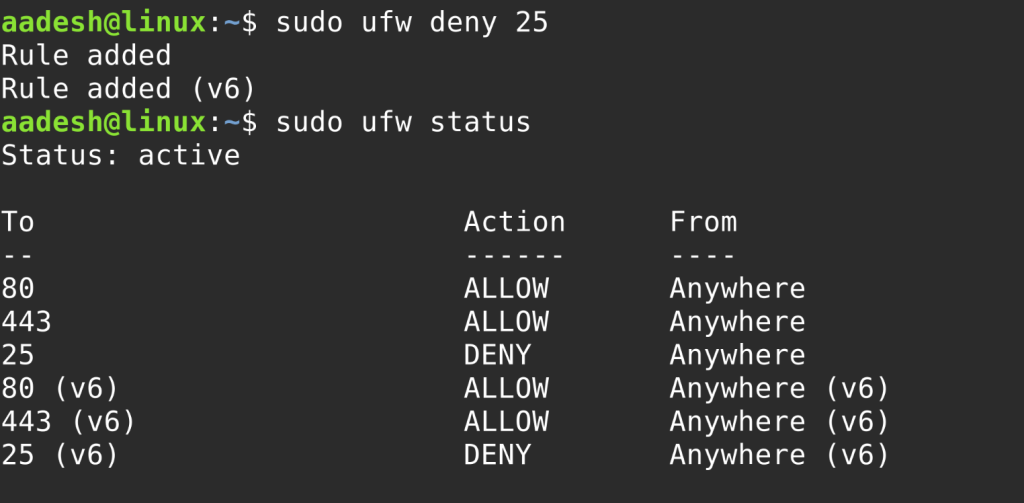
On a system using UFW, request its verbose status to see whether it is active and what its default policies and rules are.
sudo ufw status verbose
Look for Status: active or Status: inactive, followed by logging, default policy and rule entries. I ran this exact command here. It returned “ufw: command not found” with exit code 127, so this host does not provide UFW and that result says nothing about other firewall tools.
Step 2: Check whether firewalld is running
Use firewalld’s own client to check the daemon first. The command prints its state when the client can reach a running service.
firewall-cmd --state
The documented running response is running. I ran the same command here. The shell returned “firewall-cmd: command not found” with exit code 127, which only means the client is not installed or available in this environment.
Step 3: Inspect firewalld zones and their rules
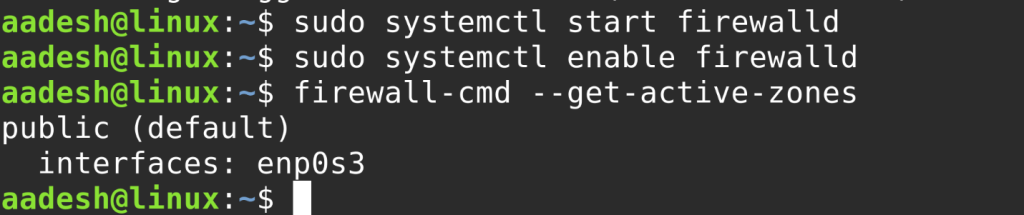
When firewalld is running, list active zones to find the zone bound to an interface, then inspect that zone’s services and ports.
firewall-cmd --get-active-zones
firewall-cmd --list-all
The active-zone output includes the zone name and its interface bindings. The listing shows the selected zone’s services, ports and related settings. firewalld separates runtime settings from permanent settings, so a change present in one may not be present in the other.
Step 4: List the nftables ruleset
If nftables is the relevant interface on your system, list the ruleset to inspect its tables and chains.
sudo nft list ruleset
Read the chain attached to the traffic path you care about, including its hook, policy and matching rules. On this host, the nft command family exposed an input chain with an accept policy followed by a reject rule. Read the policy and explicit rules together.
Common errors when checking firewall status
A local status output describes the tool or ruleset you queried, not every possible filter along a network path. The machine may also have another frontend, container rules or an upstream network firewall.
| Question | What to check |
|---|---|
| Is the firewall manager running? | Its service-specific status command. |
| Does a local rule allow the port? | The active zone, chain and matching rule. |
| Can a client connect? | A listening service and a test from the client network. |
A permitted rule does not prove that the application is listening or that routing and upstream policy allow the connection.
For firewalld, remember that runtime and permanent configuration can differ. For nftables output marked as managed by iptables-nft, do not edit the table directly with a second management tool because two tools can disagree about the rules they own.
If a command is missing, identify the firewall tool configured for the distribution before installing or enabling anything. A second firewall manager can conflict with the tool that already owns the rules.
Check a listener with open-port tools or service commands, and see the SSH port configuration steps for SSH access.
Conclusion
Use the status command for the firewall manager in use, then inspect the rules that govern the interface or chain handling the traffic. For a port-level answer, verify the listening service and test from the client side.
sudo nft list chain ip filter INPUT
This command prints one input chain. Choose the corresponding chain or zone for the traffic you need to understand.
For more detail, see the Ubuntu Server firewall documentation, the firewalld command reference, and our guides to firewalld and iptables traffic rules.
Frequently asked questions
These quick answers distinguish a firewall’s reported state from the result of a network test.
How do I check my firewall status in Linux?
Use the command for the firewall manager on your system: sudo ufw status verbose for UFW, firewall-cmd –state for firewalld, or sudo nft list ruleset to inspect nftables rules.
How can I check if port 443 is open in Linux?
Inspect the firewall rules that apply to TCP port 443, confirm that the service is listening, and test a connection from a client on the relevant network path. A local status command alone does not prove reachability.
Does an inactive UFW status mean Linux has no firewall?
No. It only reports UFW’s state. Check which firewall manager is configured and inspect the active ruleset, including firewalld or nftables where applicable.