
A value you set in one terminal may be missing when you open another. Environment variables are name-value pairs that processes receive when they start.
In this piece, I’ll show how Bash passes a value to child commands and how to choose a startup file for a later session.
TL;DR
Use export in Bash to pass a variable to child commands, or choose a startup file when later sessions need it.
- For one command, put NAME=value before the command.
- For this shell and its children, use export NAME=value.
- For a new login or service, set the value in the configuration that starts that process.
What Are Environment Variables in Linux?
An environment variable is a name-value pair a process receives when it starts.
| Command | What it shows | Scope |
|---|---|---|
| printenv NAME | One exported value | Environment passed to the command |
| env | Environment available to a process | Environment passed to the command |
| set | Bash parameters and functions | Current shell, including unexported parameters |
Use printenv to check one exported value because it shows exactly what the command’s environment contains. The Bash set builtin includes unexported parameters, so it can show shell state that printenv omits.
How to Set Environment Variables in Linux
The next command shows how Bash passes an exported value to child commands.
Step 1: Set a value for this shell or one command
Save this short script as session-variable-demo.sh, then run bash session-variable-demo.sh. It sets APP_MODE for child commands and then overrides it for one command.
#!/usr/bin/env bash
set -eu
export APP_MODE=development
printf 'Shell value: %s\n' "$APP_MODE"
printf 'Child process value: '
sh -c 'printf "%s\\n" "$APP_MODE"'
printf 'One-command value: '
APP_MODE=preview sh -c 'printf "%s\\n" "$APP_MODE"'
printf 'Parent after one-command value: %s\n' "$APP_MODE"
The captured output is:
Shell value: development
Child process value: development
One-command value: preview
Parent after one-command value: development
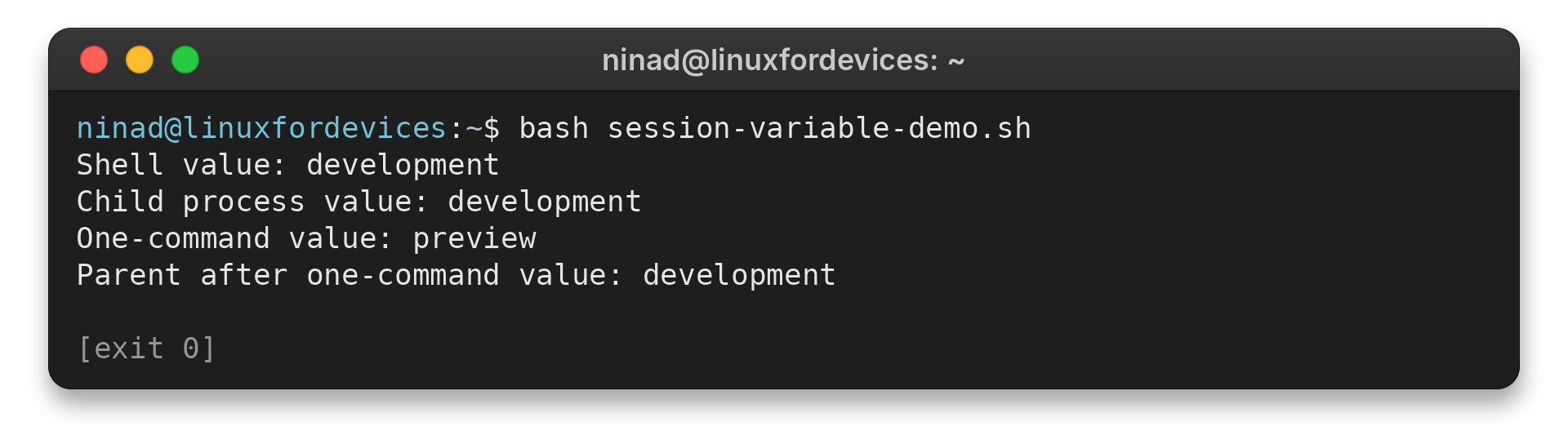
I ran the script and saw the child receive development, while the one-command override returned preview.
Step 2: Load a value in a new Bash login
Add export APP_MODE=development to ~/.profile for a Bash login that reads that file. Run bash profile-variable-demo.sh from the directory holding the script to test it with a temporary home.
#!/usr/bin/env bash
set -eu
demo_home="$PWD/.env-demo/home"
mkdir -p "$demo_home"
printf '%s\n' 'export APP_MODE=development' > "$demo_home/.profile"
printf 'Login-shell value: '
env -i HOME="$demo_home" PATH=/usr/bin:/bin bash --login -c 'printenv APP_MODE'
The captured output is:
Login-shell value: development
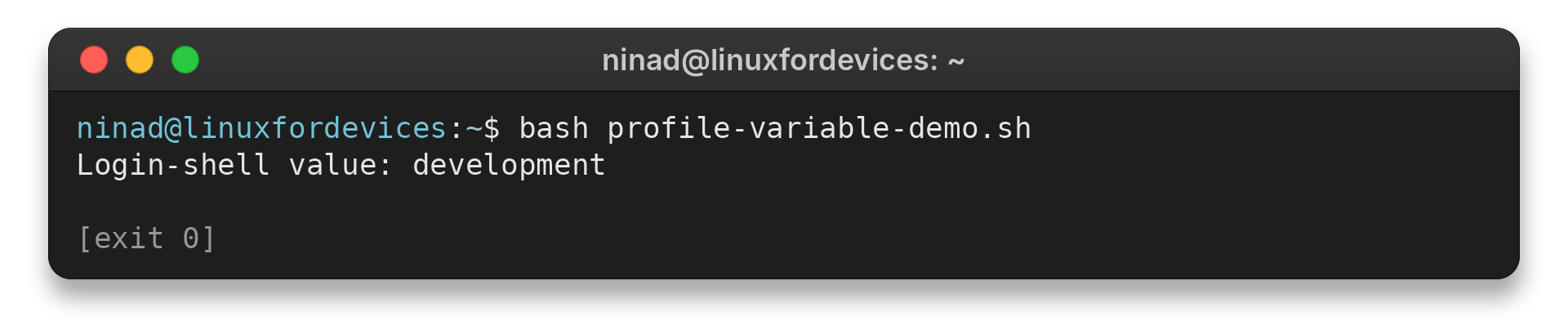
I saved the profile in a test home, and a fresh login printed development from it.
Which File Should You Use, and How Do You Fix a Missing Variable?
Choose a configuration read by the process that launches the target, because shell and service startup contexts differ.
| Target | Configuration to consider | Boundary |
|---|---|---|
| Interactive non-login Bash | ~/.bashrc | Read when that kind of Bash starts |
| Bash login session | /etc/profile if present, then ~/.bash_profile, ~/.bash_login, or ~/.profile | Reads the first available personal file |
| Login environment through PAM | /etc/environment | Assignment lines only |
| systemd user service | ~/.config/environment.d/*.conf | Applies to services started by the user manager |
| System service | The unit’s Environment= or EnvironmentFile= setting | Set this on the service unit |
Bash checks its login files in order, so use the first file present in the user’s home directory.
Write NAME=value in /etc/environment because PAM treats this file as assignments rather than a Bash script.
Use the service’s documented credential mechanism for passwords or key material. The systemd.exec(5) manual explains why environment variables are unsuitable for service secrets.
Match the symptom to the closest cause in the table before changing configuration.
| Symptom | Cause to check | Fix |
|---|---|---|
| printenv omits a value | The parameter stayed local to the shell | Use export NAME=value |
| A new terminal lacks the value | The assignment was only in the old shell | Add it to the startup file that new shell reads |
| A GUI app or service lacks it | It starts outside that shell’s child process tree | Configure its desktop or service manager |
| A command disappears after changing PATH | The assignment replaced existing search directories | Preserve the old value when adding a directory |
| A setting returns after unset | A startup or service file defines it again | Remove the source assignment, then start the target again |
When adding a personal executable directory, prepend it without discarding the existing PATH:
export PATH="$HOME/bin${PATH:+:$PATH}"
This puts the new directory ahead of existing entries, so a matching executable there takes priority. Check that the directory exists and is trusted before adding it to PATH. For a command that still cannot be found, see the Linux command-not-found troubleshooting guide.
To remove a value from the current Bash session, use unset NAME. If it comes back in a new session, remove its assignment from the startup or service configuration that supplies it. A Java program may need its own JAVA_HOME value, covered in the Linux JAVA_HOME guide.
Common Errors with nohup
nohup keeps a command running after a hangup signal. Put the variable in the launch command when that process needs it.
| Problem | What to check | Action |
|---|---|---|
| The background command lacks a value | The variable was assigned but not exported | Use NAME=value nohup command or export NAME=value first |
| The value is missing in another terminal | That terminal is a separate process tree | Set it in the startup configuration for that login |
| The command runs but cannot find an executable | PATH was replaced instead of extended | Preserve the existing PATH when adding a directory |
Use NAME=value nohup command because the assignment applies to that invocation. Configure a service or later login through its own launch settings.
Conclusion: Match a Variable to Its Scope
Before restarting a background job, check its command and the output file it writes.
- Bash Reference Manual: Environment
- Bash Reference Manual: Startup Files
- systemd environment.d manual
FAQ
These answers cover scope questions that come up after setting a value.
Why does export not survive a new terminal?
export changes the current shell and the environment it passes to child processes. A new terminal is started separately, so add the assignment to the startup file that shell reads.
Can env change the calling shell?
No. env NAME=value command runs the command with a modified environment. It does not change the environment of the shell that launched it.
Does Bash always read ~/.profile?
No. A login Bash reads the first available file among ~/.bash_profile, ~/.bash_login and ~/.profile. An interactive non-login Bash reads ~/.bashrc.
How do I set a variable for a systemd user service?
Place a KEY=value assignment in a .conf file under ~/.config/environment.d when the program is started by the systemd user manager. It does not apply to every shell or system service.