

Installing IntelliJ IDEA on Linux comes down to four supported methods: JetBrains Toolbox, the official tarball, Snap, and Flatpak. Each one now installs the same unified IDE, since JetBrains merged Community and Ultimate into a single product with IDEA 2025.3. This guide walks through every method, how to launch the IDE afterward, and how Community compares to Ultimate today.
Installing IDEA Community edition
There are a few different ways to install IDEA. Let’s go through them one by one.
Install via JetBrains Toolbox
The JetBrains Toolbox App is the method JetBrains itself recommends now, since it manages installs, updates and rollbacks for every JetBrains IDE from one place instead of a bare tarball. Download the Linux tarball from jetbrains.com/toolbox-app, extract it, and run the bundled binary once to install Toolbox itself.
tar -xzf jetbrains-toolbox-*.tar.gz
cd jetbrains-toolbox-*/
./jetbrains-toolbox
Toolbox adds itself to your application menu and puts a system tray icon in most desktop environments (GNOME users on Wayland may need the AppIndicator extension for the tray icon to show). From there, search for “IntelliJ IDEA Community Edition” and click install. Toolbox also drops a matching idea shell command in your PATH, so version switching or uninstalling later never means hunting through /opt.
From Source
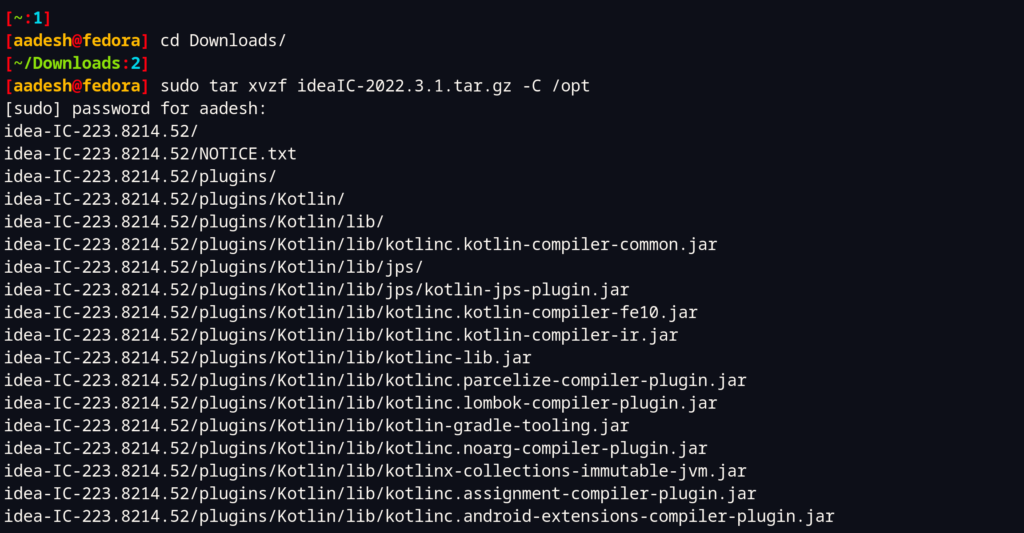
Visit the official website and download the latest tarball for Linux from the website. Once the download is finished, open a terminal window, and we will extract the downloaded files to the /opt directory using the tar command. Just type the following command:
# Enter your Downloads folder
cd ~/Downloads

# Extracting the tarball
sudo tar xvzf ideaIC-2026.X.Y.tar.gz -C /opt
Note that you have to change X and Y in the above code with the correct version numbers.
IntelliJ IDEA ships its own JetBrains Runtime (JBR), a tuned OpenJDK build, so the IDE itself launches without any system-wide Java install. You only need a JDK installed separately if you plan to build and run your own Java projects inside the IDE. To check whether one is already on your system, you can type:
java --version

If you need a project JDK and don’t have one yet, install it with the following commands, depending on your Linux distribution:
# On Debian and Ubuntu based distributions:
sudo apt update && sudo apt install default-jre default-jdk

# On Fedora Workstation
sudo dnf install java-17-openjdk.x86_64

# On Arch Linux
sudo pacman -S jre-openjdk
sudo pacman -S jdk-openjdk
Finally, let’s change the ownership of our extracted directory inside the /opt directory, to do that, type the following commands in the Terminal:
sudo chown -Rfv USER:GROUP /opt/idea-IC-VERSION
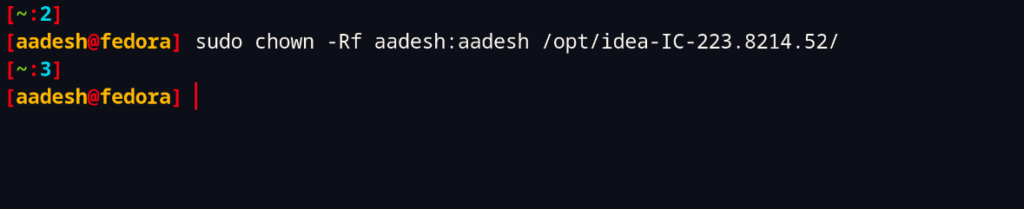
Note that the version of my IDEA IC can be different from yours, and therefore you should use Tab completion after idea-IC- to find the correct directory name. Finally, you can run the installer script:
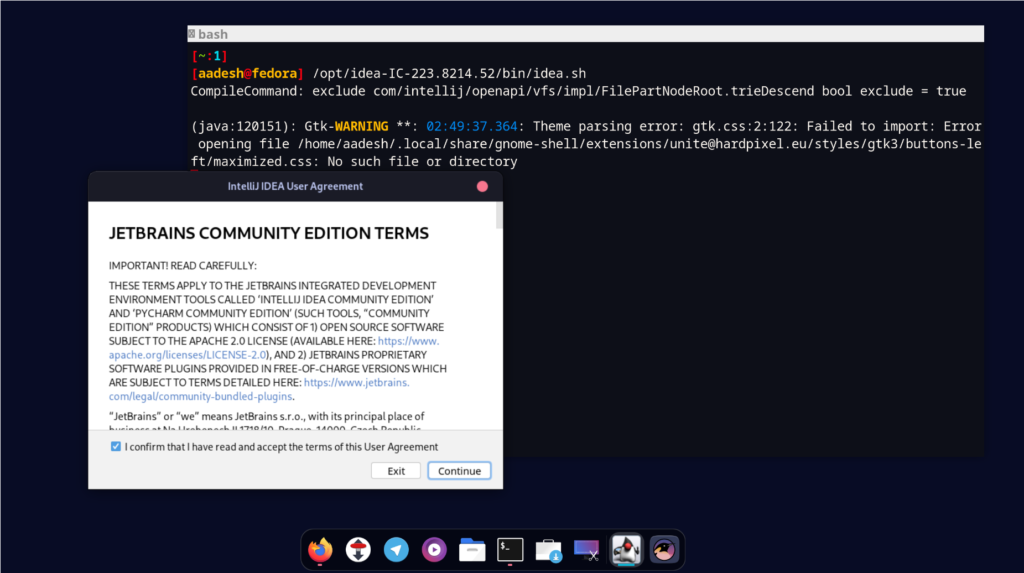
/opt/idea-IC-VERSION/bin/idea.sh
Finally, you will be able to see a dialog box asking you to accept the License agreements for the IDEA community edition, hit check the radio button, and click on continue.
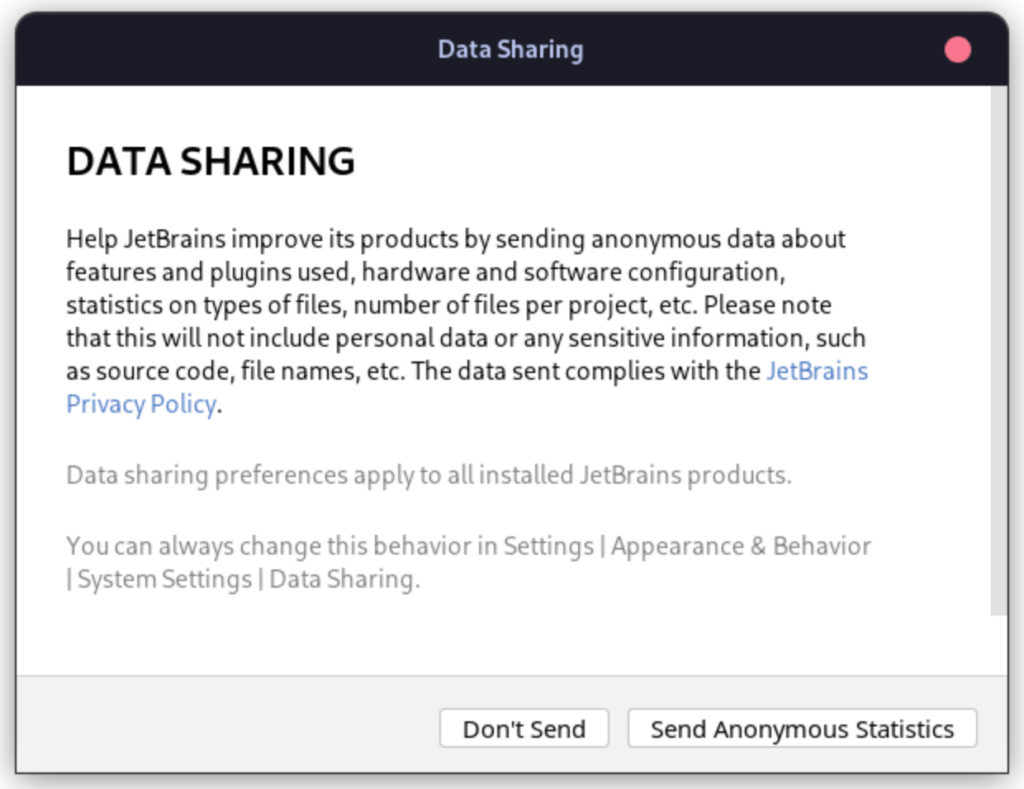
Now, the next screen will ask you to share anonymous statistical data about the application to JetBrains, and select whether to accept or deny as per your preference.
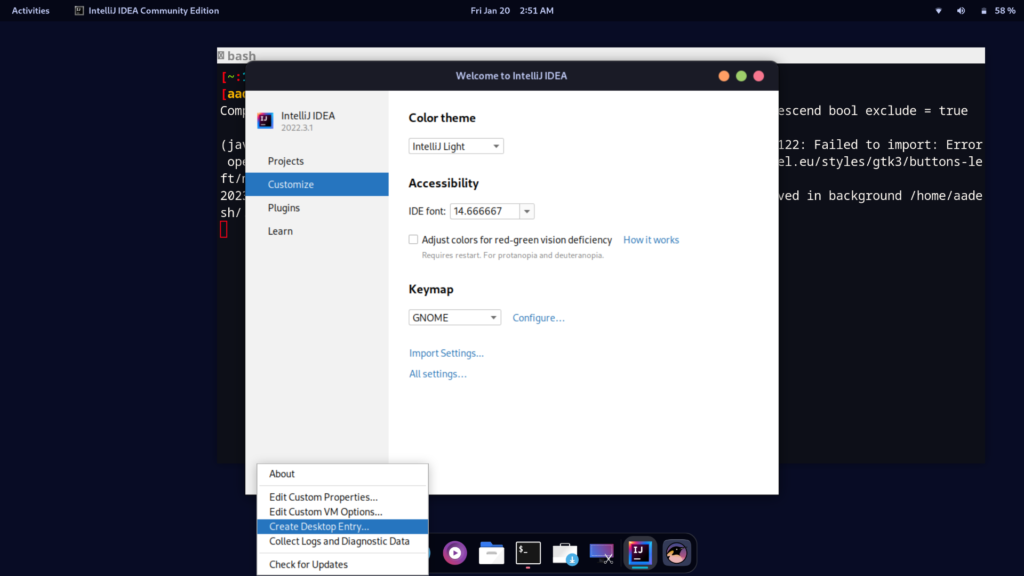
Finally, the application will be launched. However, you can create a desktop entry from the settings so that you do not have to launch the application from the terminal.
From the snap store
You can also install IDEA from the snap store if you are using Ubuntu or any distribution which has snaps enabled. JetBrains merged the separate Community and Ultimate snaps into one unified intellij-idea package starting with the 2025.3 release, so the old edition-only snap name no longer receives JetBrains’ updates. Install the current snap by typing:
sudo snap install intellij-idea --classic
All Community-tier functionality stays free under the unified snap, and it also starts a free 30-day Ultimate trial on top, after which it falls back to the free feature set automatically if you don’t subscribe.
From Flatpak
Although you can install the IDEA Community edition from Flatpak, it is not recommended because Flatpaks are sandboxed, and you will have to spend some time giving this application appropriate file permissions. The Flathub listing itself now carries the “IntelliJ IDEA Open” name, though the underlying app ID is unchanged. Still, you can install it by typing:
flatpak install flathub com.jetbrains.IntelliJ-IDEA-Community
Make sure you have Flathub enabled on your distribution, otherwise this command will not work. If you’re weighing Flatpak against a Snap for other apps too, our Bottles install guide walks through the same Flathub-first approach.
Getting IntelliJ IDEA on a distro’s own package manager
Most mainstream distributions, Ubuntu and Fedora included, don’t carry IntelliJ IDEA Community in their default repositories, so the tarball, Snap, Flatpak and Toolbox routes above remain the practical options everywhere. Arch-based distributions are the exception: the AUR carries intellij-idea-community-edition-jre, buildable with any AUR helper. Debian and Ubuntu also ship a intellij-community-idea source package in the universe repository, though it tends to trail several releases behind JetBrains’ own tarball and is easy to miss unless you already know to look for it.
Starting IntelliJ IDEA after installation
Once installed, you can launch IntelliJ IDEA any of three ways depending on which method you used. Toolbox and Snap installs add a menu entry automatically. A tarball install needs the desktop entry step above, or you can run it straight from its bin directory each time:
cd /opt/idea-IC-VERSION/bin
./idea.sh
The first launch shows a splash screen, then asks whether to import settings from a previous installation, useful if you’re migrating from another machine, and otherwise safe to skip on a first install. If the IDE doesn’t respond to a menu click after a Snap install, run intellij-idea from a terminal once to confirm the binary launches and check for a stale desktop database with update-desktop-database ~/.local/share/applications.
IntelliJ IDEA Community vs Ultimate
Since IDEA 2025.3, JetBrains sells IntelliJ IDEA as one unified download rather than two separate products, so the choice today is about which features a license turns on, not which installer you run.
| Aspect | Community (free) | Ultimate (paid tier) |
|---|---|---|
| Cost | Free, Apache 2.0 core | Free 30-day trial, then subscription |
| Languages | Java, Kotlin, Scala, Groovy | Adds JavaScript, TypeScript, PHP, Python, SQL, Go |
| Frameworks | Basic Spring/Maven/Gradle support | Full Spring, Jakarta EE, Docker, Kubernetes tooling |
| Database tools | None built in | Built-in DataGrip-level database client |
| Install method | Same tarball, Snap, Flatpak, Toolbox | Same installers, license key turns on extra features |
If you only write Java, Kotlin, or Scala, Community covers the daily workflow this guide walks through. Reach for the Ultimate trial only once a missing tool, usually the database client or a framework inspection tied to one language, actually blocks your work.
Troubleshooting common IntelliJ IDEA install issues on Linux
A few problems account for most install failures reported around this setup.
“idea.sh: not found” after extracting the tarball. The extracted folder name includes the version number and doesn’t match older guides. Use Tab completion after typing cd /opt/idea-IC- to find your actual directory before running the script.
IDE launches but can’t find a project JDK. This is unrelated to the JetBrains Runtime that runs the IDE itself. Open File > Project Structure > SDKs and point IntelliJ at a JDK you installed separately, or let IntelliJ download one for you from that same dialog.
Snap version looks frozen on an old release. Snap channels update automatically but can lag on stable. Run sudo snap refresh intellij-idea to force a check, or switch to the edge channel for the newest builds at the cost of stability.
Flatpak app can’t see files outside your home folder. This is the sandboxing tradeoff mentioned above. Grant broader filesystem access with flatpak override --user --filesystem=host com.jetbrains.IntelliJ-IDEA-Community. Keep in mind this trades away most of the isolation Flatpak is meant to provide.
Keeping IntelliJ IDEA updated on Linux
Update behavior depends entirely on which install method you picked, so it’s worth knowing before you hit a stale version mid-project. JetBrains Toolbox checks for new builds automatically and prompts you inside the app. A Snap install updates itself in the background on whatever channel you’re subscribed to, though as noted above stable can lag behind JetBrains’ own release notes by a few weeks.
Tarball and Flatpak installs behave differently. IntelliJ IDEA’s own Help menu offers in-app updates for a tarball install and handles the download and restart for you, so you rarely need to repeat the manual extraction steps once the IDE is running. Flatpak updates go through the normal flatpak update command, which refreshes every Flatpak app on the system in one pass rather than just IntelliJ IDEA on its own.
Key takeaways
- IntelliJ IDEA Community installs on Linux via JetBrains Toolbox, the official tarball, Snap or Flatpak.
- The IDE bundles its own JetBrains Runtime, so a system JDK is only needed for your own projects.
- JetBrains merged Community and Ultimate into one unified product starting with IDEA 2025.3.
- The Snap package name changed from separate per-edition snaps to a single
intellij-ideasnap. - Community and Ultimate share the same installer, and a license key turns on the extra Ultimate tooling.
- Most distros don’t package IntelliJ Community by default. Arch’s AUR is the main exception.
Frequently asked questions
Does IntelliJ IDEA Community need Java installed to run on Linux?
No. IntelliJ IDEA bundles the JetBrains Runtime to run itself. You only need a separate JDK installed if you’re building or running your own Java project inside the IDE.
What’s the difference between IntelliJ IDEA Community and Ultimate on Linux?
Community is free and covers Java, Kotlin, Scala and Groovy. Ultimate is a paid subscription that adds JavaScript, Python, database tools and full framework support on the same installer.
Is Snap or Flatpak better for installing IntelliJ IDEA on Linux?
Snap generally works with fewer permission headaches out of the box, while Flatpak sandboxes the app more tightly and needs manual filesystem overrides for some workflows. The official tarball or Toolbox avoids both tradeoffs.
Why does my IntelliJ IDEA Snap install feel out of date?
Snap’s stable channel can lag behind JetBrains’ own release cadence. Run sudo snap refresh intellij-idea or switch to the edge channel for newer builds.
Can I install IntelliJ IDEA Community from my distro’s default repositories?
Only on Arch-based distros through the AUR in practice. Debian and Ubuntu carry a universe package that trails releases, so the tarball, Snap, Flatpak or Toolbox remain the reliable routes elsewhere.
Do I need JetBrains Toolbox to use IntelliJ IDEA on Linux?
No, Toolbox is optional. It’s useful if you run multiple JetBrains IDEs or want automatic updates, but the tarball, Snap and Flatpak all install and run IntelliJ IDEA on their own.