
To see which programs on your Linux machine are using the network, or which ports are open for connections, you list its sockets. The ss and netstat commands do that, showing each socket with the addresses and ports it uses.
Here I’ll show you how to list listening ports and find which process is behind each one.
What do netstat and ss show?
A socket is a local endpoint that a program uses to communicate over a network. The Transmission Control Protocol (TCP) and User Datagram Protocol (UDP) appear as separate socket types, with fields for state, queues, and local or peer addresses.
netstat reports network connections and also has separate modes for routes and interfaces. ss inspects sockets and offers filters for their protocol, state, address, and port.
Local Address:Port names the endpoint on this machine, and Peer Address:Port identifies the other endpoint only when a connection has one.
| Task | ss | netstat |
|---|---|---|
| List listening TCP and UDP sockets | ss -tuln | netstat -tuln |
| Show process details for listeners | sudo ss -tulnp | sudo netstat -tulnp |
| Summarize network sockets or protocols | ss -s | netstat -s |
| Filter a socket by state or endpoint port | ss state and address/port predicates | Use the available netstat selectors, then inspect the matching rows |
The first three rows show common task mappings, not a promise that every netstat mode has an ss equivalent. Use ss for socket filters, and keep netstat when you need its separate route or interface reports.
What you need before checking sockets
The commands come from different package families. ss is part of iproute2, while netstat is supplied by net-tools on distributions that package it.
Check which command is installed before relying on it. This check prints a path for each available program.
command -v ss netstat
If netstat has no path, use the package manager documentation for your distribution to find net-tools. The socket examples below use commands from both packages without assuming that netstat is installed.
How to inspect sockets with ss and netstat
Start with the question you need to answer. The same machine can have listening services, connected TCP sessions, and UDP sockets, so the flags decide which rows appear.
Step 1: Show TCP and UDP sockets
Use the protocol flags with numeric output when you want endpoint addresses and ports without service-name lookup. These commands show TCP and UDP socket rows.
netstat -tun
ss -tun
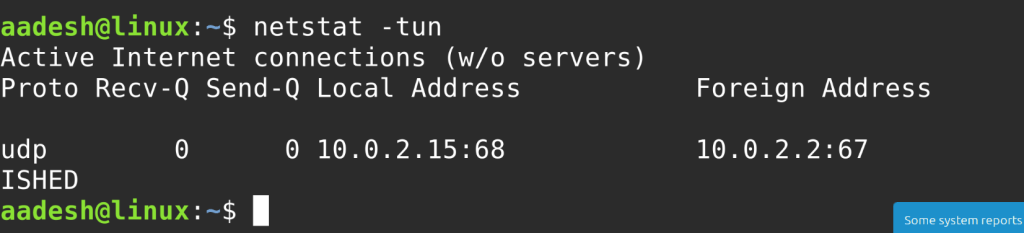
In these commands, -t selects TCP, -u selects UDP, and -n keeps addresses and ports numeric. The netstat screenshot shows a UDP row, and its address values depend on the machine producing the output.
To narrow the result to listeners, add -l as the next step does, and see the open-port guide for that related task.
Step 2: List listening TCP and UDP ports
The -l flag keeps listening sockets and the protocol flags separate TCP from UDP. Add -n when you want numeric values instead of service names.
ss -tuln
netstat -tuln
A LISTEN state marks a TCP socket waiting for connections. UDP does not use TCP’s listening handshake, so its rows can show UNCONN while the socket is available to receive datagrams.
A wildcard address such as 0.0.0.0 binds on all local addresses for its socket family, while 127.0.0.1 limits IPv4 traffic to the local machine.
Step 3: Find the process using a listening port
Add -p to request process information alongside the socket row. Use sudo when the process belongs to another account.
sudo ss -tulnp
sudo netstat -tulnp
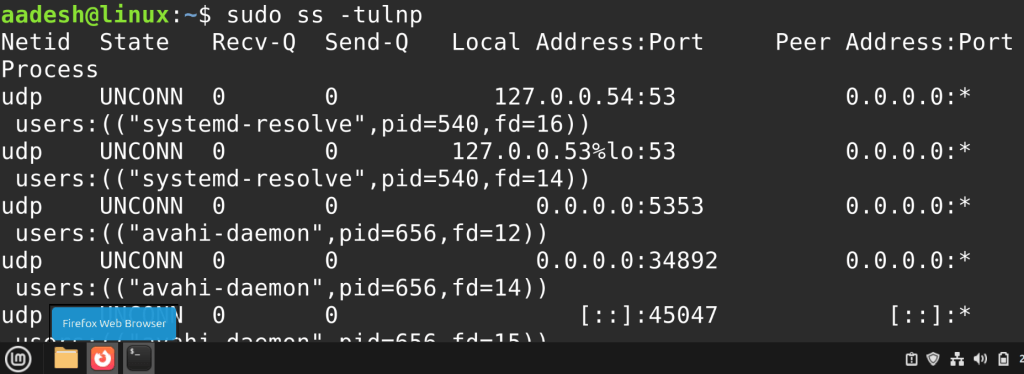
The Process column associates a socket with a process name and process ID (PID) when the caller can see that process. Without enough permission, a missing name is not proof that the socket has no owner.
If the question is simply which ports listen, use the earlier commands without -p. Add process details only when you need to decide which service to inspect or stop.
Step 4: Filter by connection state or port
A state filter narrows TCP output to connections marked established. A port predicate can match the local source port or the remote destination port.
ss -tan state established
ss -tn 'sport = :443'
ss -tn 'dport = :443'
An ss filter uses sport for a socket’s source port and dport for its destination port. For a listening server, sport refers to the local port.
For a client connection, dport can match the remote service port.
Use the predicate instead of searching formatted output for a port number. A text search can match that number in another address or column.
Step 5: Read summary counts
Use summary mode when you need counts rather than one line per socket.
ss -s
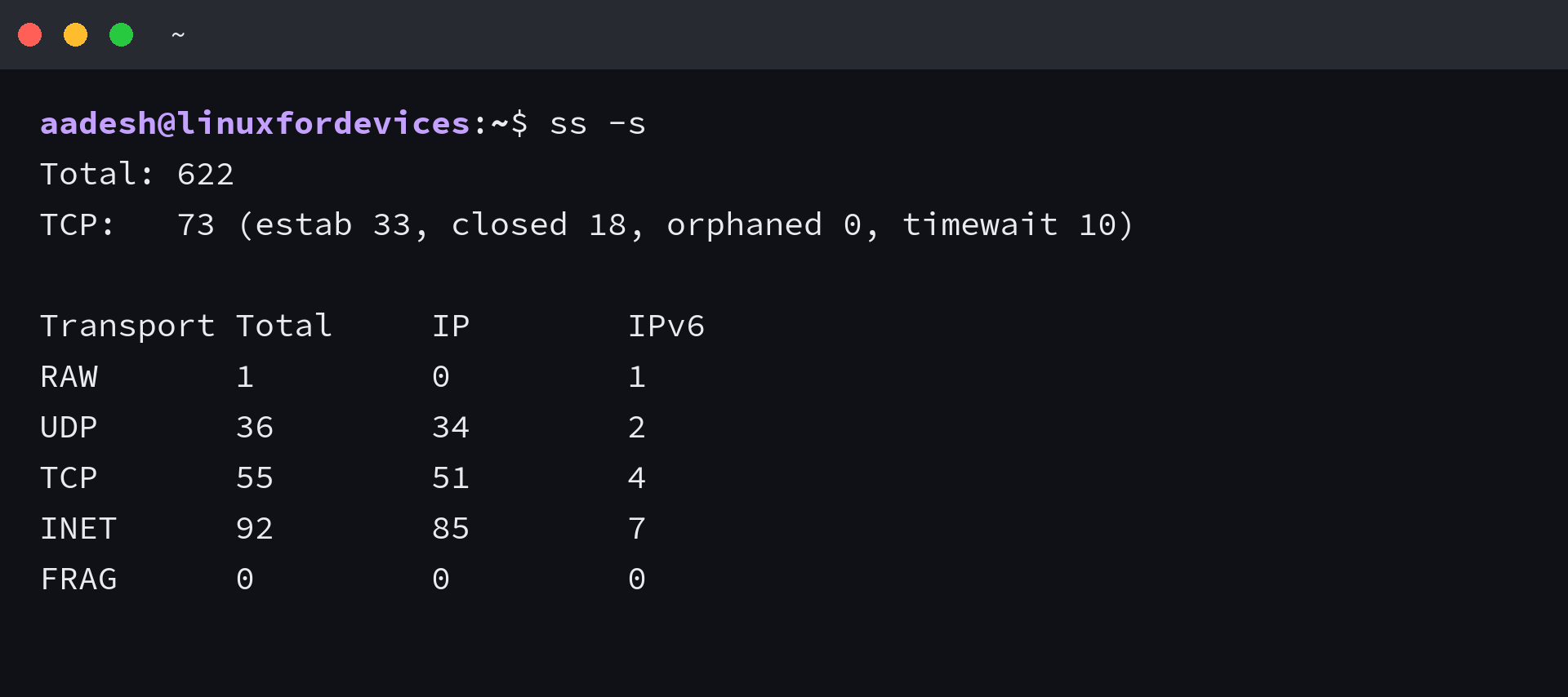
The summary lists an overall total beside TCP state counts and a transport table. The ss manual says these counters come from multiple sources, and I treat each displayed field as a separate counter rather than adding every value into one total.
What a socket listing cannot tell you
A socket list describes local kernel endpoints and current states, but it does not show firewall rules or prove that another machine can reach a listener.
| Field or state | What it tells you | What it does not prove |
|---|---|---|
| Local Address:Port | The address and port bound on this machine | That a remote client can reach it |
| Peer Address:Port | The remote endpoint for a connected socket | That every socket has a remote peer |
| LISTEN | A TCP socket is waiting for a connection | That a firewall or route permits the connection |
| Recv-Q and Send-Q | For established TCP, bytes not copied by the application and bytes not acknowledged by the peer. For a listener, the current accept queue and maximum SYN backlog. | A complete diagnosis of application latency on its own |
| Loopback or wildcard bind | Which local addresses the service binds to | That the service is exposed on a public interface |
A loopback-bound service accepts local traffic, while a wildcard bind requests any local address in its socket family. The firewall and route still affect access.
Check Ubuntu network configuration when interface setup is the question.
The Linux IP address reference helps identify the local address shown in a socket row.
When a listener is open but a client still cannot connect, test from that client with netcat. Use traceroute to inspect the route to a remote host.
A listening socket is only the local view
Start with the listener and its owning process, then test the connection from the network location that matters. That separates a missing service from a route or firewall problem.
sudo ss -tulnp
A process name tells you what owns the local socket. A separate client-side probe tells you whether the path to that socket works.
Netstat and ss command questions
What does the ss command stand for?
Technical guides commonly expand ss as socket statistics. The upstream ss manual describes it as a utility to investigate sockets, but does not define the letters as an acronym.
How do I list listening TCP and UDP ports?
Run ss -tuln to list numeric TCP and UDP sockets that are listening. Use sudo ss -tulnp when you also need process details and have permission to view them.
Why is the process name missing from ss output?
The -p option requests process information, but permissions can hide processes owned by another account. Try sudo ss -tulnp when you are authorized to inspect system-wide socket owners.
Is ss a complete replacement for netstat?
ss shows socket information similar to netstat and supports socket filters. netstat also has separate route and interface modes, so the commands do not replace every other’s feature.