
For Citra Linux, install Azahar, the maintained open-source 3DS emulator built from the PabloMK7 Citra fork and Lime3DS.
Use only games, system data, and keys you are entitled to use because an emulator does not grant a license to download or share copyrighted game files.
Choose the supported Citra-based emulator
Azahar is the maintained Citra-based 3DS emulator for Linux, with a Flathub package recommended by its maintainers and an AppImage available from its GitHub releases page.
Pick Flatpak when you want updates and desktop integration managed by your distribution’s Flatpak setup. Pick the AppImage when you prefer a single downloaded file and your machine matches the build architecture.
Install Azahar from Flathub
First check whether Flatpak is available. If your shell cannot find it, install Flatpak from your distribution’s package manager, add the Flathub remote if your distribution has not added it, then return to this command.
flatpak --version
Package management on Linux explains why your distribution needs a configured package source before it can install software. Use the Flatpak application ID below, not a Citra package name, because it selects the maintained Azahar build.
flatpak install flathub org.azahar_emu.Azahar
Flatpak shows the source, runtime, download size, and permission prompt before it installs the application. Confirm the application ID is org.azahar_emu.Azahar, then accept the prompt only when those details match.
flatpak run org.azahar_emu.Azahar
The first launch opens Azahar’s setup interface, where you can keep the emulator separate from your game files and follow the project’s guidance for content you own.
Use the AppImage when Flatpak is not your route
Download the default azahar.AppImage from the Azahar releases page, rather than azahar-wayland.AppImage, unless you specifically need native Wayland without Xwayland.
Make the downloaded file executable and start it from the directory where you saved it, using the Linux command line reference before changing permissions if you need help working with downloaded files.
chmod +x azahar.AppImage
./azahar.AppImage
The Linux release currently provides an x86-64 AppImage. Check your machine architecture before you run it, especially on ARM devices such as some single-board computers.
uname -m && file azahar.AppImage
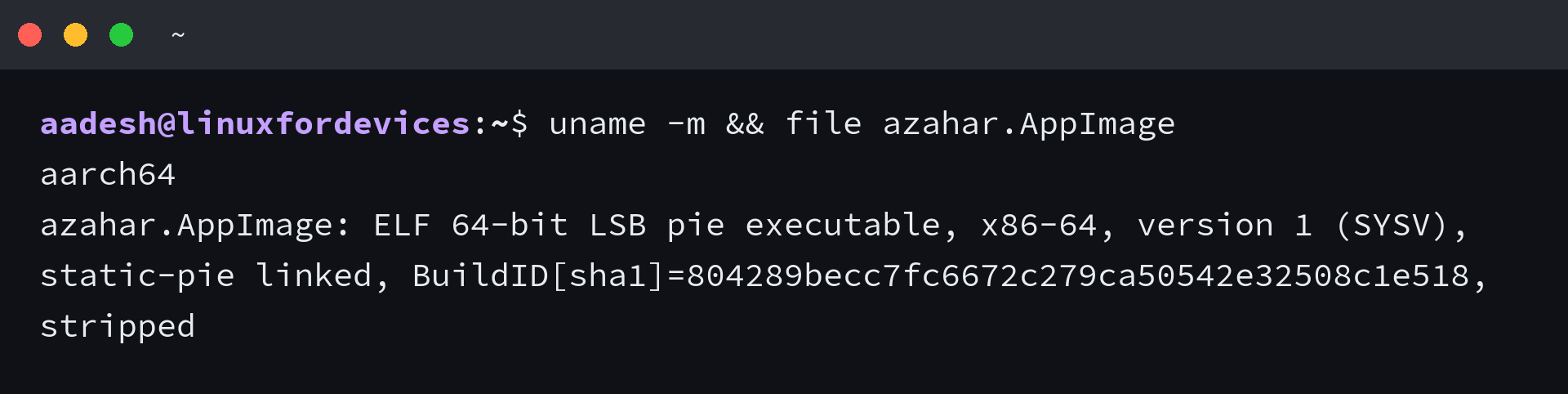
I verified the architecture check against the current Azahar AppImage. An aarch64 machine and an x86-64 AppImage do not match, so use a supported build instead of trying to run that file natively.
The Linux wget command and downloading files with curl cover the download commands when you want to fetch a release from the terminal.
Solve the setup problems that change the next step
If Flatpak reports that it cannot find org.azahar_emu.Azahar, inspect the configured remotes before repeating the install command. Add Flathub through your distribution’s documented Flatpak setup rather than copying a repository command for a different distribution.
If an AppImage reports an Exec format error, compare the two values from the architecture check. A mismatch means the downloaded executable targets another processor family.
If you plan to use a handheld Linux device, using YouTube on Steam Deck in Gaming Mode shows how a Flatpak application fits into the Steam Deck desktop and gaming workflow. It solves a different task, but the same application-delivery choice applies.
FAQ
Can I still install Citra on Linux?
Citra no longer has an active official release path. Install Azahar when you need a maintained Citra-based 3DS emulator on Linux.
What is the easiest way to install Azahar on Linux?
The Azahar project recommends its Flathub package. Install it with flatpak install flathub org.azahar_emu.Azahar after Flatpak and the Flathub remote are configured on your distribution.
Why does the Azahar AppImage show an Exec format error?
The AppImage can target a different processor architecture from your Linux machine. Run uname -m and file azahar.AppImage, then compare the reported architectures before you try another launch.
Install Azahar through Flathub when possible, then check the architecture before using an AppImage.